Cron Expressions Explained: Syntax, Examples and Common Mistakes
Read and write cron schedules with confidence: the five fields, steps and ranges, 20 ready-to-use examples, the day-of-week OR trap, time zones and DST.
 By Avinash KoriPublished 6 min read
On this page
Cron has scheduled jobs on Unix systems since the 1970s, and its five-field syntax has outlived the original program. The same expressions configure Linux crontabs, Kubernetes CronJobs, GitHub Actions, cloud schedulers and job libraries in every language. The syntax is compact enough to fit in a comment, and cryptic enough that 0 0 13 * 5 doesn't mean what most people think.
This guide explains each field, gives you a set of tested expressions to copy, and covers the mistakes that make jobs run at the wrong time, or not at all.
The five fields
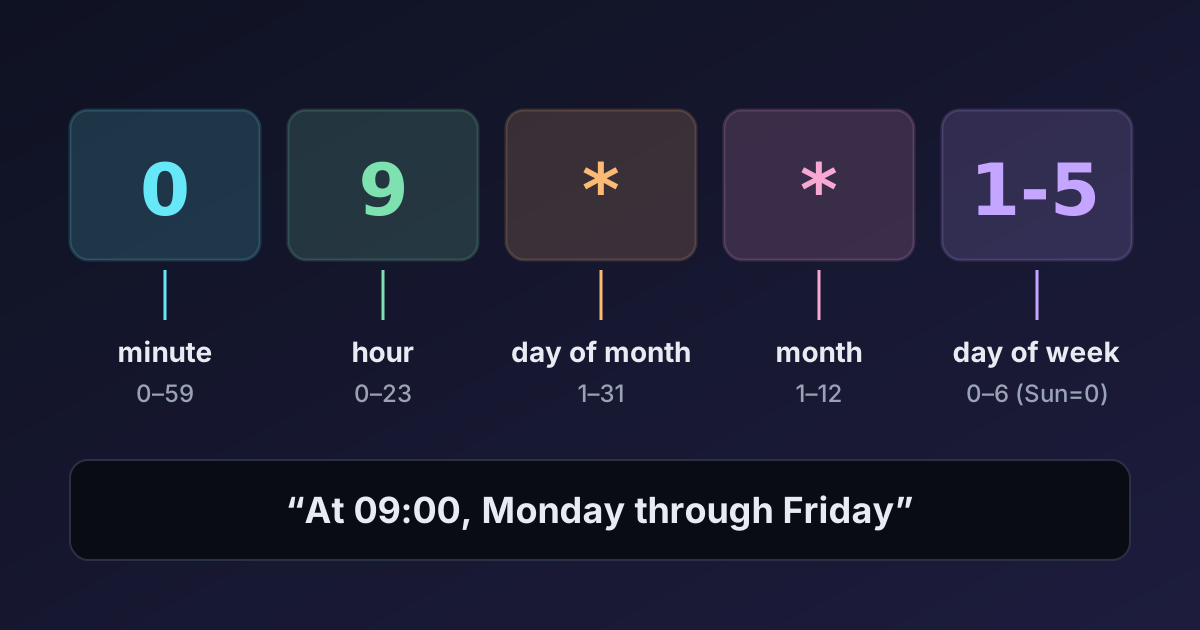
A standard cron expression has five fields separated by spaces:
┌───────────── minute        (0–59)
│ ┌─────────── hour          (0–23)
│ │ ┌───────── day of month  (1–31)
│ │ │ ┌─────── month         (1–12 or JAN–DEC)
│ │ │ │ ┌───── day of week   (0–6, Sunday = 0, or SUN–SAT; 7 also means Sunday)
│ │ │ │ │
0 9 * * 1-5
0 9 * * 1-5 reads as: at minute 0 of hour 9, on any day of the month, in any month, on Monday through Friday. In other words, 09:00 on weekdays.
Paste any expression into the Cron Expression Parser to get a plain-English description and the next run times in your time zone. It's the fastest way to check a schedule before you deploy it.
Special characters
| Syntax | Meaning | Example | Reads as |
|---|---|---|---|
* | Every value | * * * * * | every minute |
, | A list | 0 9,17 * * * | at 09:00 and 17:00 |
- | A range | 0 9 * * 1-5 | 09:00, Monday to Friday |
/ | A step | */15 * * * * | every 15 minutes |
| range + step | Steps within a range | 0 8-18/2 * * * | every 2 hours from 08:00 to 18:00 |
Steps count from the start of the range, not from when the job was created. */15 in the minute field means minutes 0, 15, 30 and 45. */7 means 0, 7, 14 … 56, and then 0 again at the top of the hour, so the gap between 56 and 0 is only 4 minutes. If you need a truly regular interval that doesn't divide 60 (or 24), cron is the wrong tool.
Many cron implementations also accept macros:
| Macro | Equivalent |
|---|---|
@hourly | 0 * * * * |
@daily (or @midnight) | 0 0 * * * |
@weekly | 0 0 * * 0 |
@monthly | 0 0 1 * * |
@yearly (or @annually) | 0 0 1 1 * |
@reboot | once at startup (crontab only) |
Ready-to-use examples
| Schedule | Expression |
|---|---|
| Every 5 minutes | */5 * * * * |
| Every 15 minutes during office hours, weekdays | */15 9-17 * * 1-5 |
| Every hour, on the hour | 0 * * * * |
| Every 6 hours | 0 */6 * * * |
| Every day at 02:30 | 30 2 * * * |
| Every day at 09:00 and 18:00 | 0 9,18 * * * |
| Weekdays at 09:00 | 0 9 * * 1-5 |
| Weekends at 10:00 | 0 10 * * 6,0 |
| Every Sunday at 04:05 | 5 4 * * SUN |
| First day of every month at midnight | 0 0 1 * * |
| 15th of every month at noon | 0 12 15 * * |
| First day of each quarter | 0 0 1 1,4,7,10 * |
| Every year on 1 January | 0 0 1 1 * |
Mistake 1: the day-of-month / day-of-week OR rule
This is the trap that catches experienced engineers. When both day fields are restricted (neither is *), classic cron runs the job when either matches, not both.
0 0 13 * 5Most people read this as "midnight on Friday the 13th". Cron reads it as "midnight on the 13th of every month, and midnight every Friday". The parser describes it as At 00:00 on day-of-month 13, or on Friday, and the next runs from mid-October 2026 are Friday 16th, Friday 23rd and Friday 30th.
The same trap breaks the common attempt to run something on the first Monday of the month:
0 9 1-7 * 1 # runs on days 1–7 AND on every MondayStandard cron can't express "first Monday" directly. The usual workaround is to schedule days 1–7 and check the weekday in the command:
0 9 1-7 * * [ "$(date +\%u)" = 1 ] && /usr/local/bin/monthly-reportNote the backslash: in a crontab, % is a special character (it means a newline) and must be escaped. Some schedulers, such as Quartz in the Java world, support MON#1 for "first Monday", but that isn't standard cron syntax.
Mistake 2: forgetting the time zone
A cron expression has no time zone; the scheduler supplies one. A classic crontab uses the server's local time (often UTC on cloud machines). Some platforms always use UTC:
- GitHub Actions schedules are always in UTC.
- Kubernetes CronJobs use the controller's time zone unless you set
spec.timeZone(for exampleEurope/Berlin), which is supported since Kubernetes 1.27. - Cloud schedulers (AWS EventBridge, Google Cloud Scheduler) let you choose a zone per job.
So 0 9 * * 1-5 is 09:00 UTC on GitHub, which is 05:00 in New York in summer and 14:30 in India. Decide which zone a schedule is meant for, write it next to the expression, and check the next runs in that zone. The Time Zone Converter helps translate a business time into the scheduler's zone.
Mistake 3: daylight saving time
If the scheduler uses a zone with daylight saving time, two nights a year are special. In New York on 8 March 2026, clocks jump from 02:00 to 03:00, so a job at 30 2 * * * has no 02:30 to run at. On 1 November 2026, 01:00–02:00 happens twice, so a job at 30 1 * * * might run twice. Implementations handle this differently (Vixie cron runs skipped jobs right after the jump; others skip them).
The safest options are to schedule jobs in UTC, or to avoid the 01:00–03:00 window for daily jobs in DST zones. The Cron Expression Parser marks next runs that fall into a DST gap. Our article on time zone and DST bugs explains gaps and overlaps in more depth.
Mistake 4: impossible or rare dates
0 0 31 * *    # only in months with 31 days: skips Feb, Apr, Jun, Sep, Nov
0 0 30 2 *    # never runs
If you want "the last day of the month", standard cron can't say it. Schedule days 28–31 and check whether tomorrow is the 1st:
0 23 28-31 * * [ "$(date -d tomorrow +\%d)" = 01 ] && /usr/local/bin/close-month(date -d is GNU syntax; on macOS use date -v+1d.)
Mistake 5: six fields or five?
Some systems add a seconds field at the start (Quartz, Spring's @Scheduled, many Node.js libraries), and some add a year at the end. 0 */5 * * * * is "every 5 minutes" in a six-field scheduler, but invalid in a standard crontab. Always check which format your platform expects. The parser accepts both five and six fields and shows how each is interpreted.
Mistake 6: assuming the job's environment
A command that works in your terminal can fail under cron, because cron runs with a minimal environment:
PATHis short (often just/usr/bin:/bin). Use absolute paths to programs, or setPATH=at the top of the crontab.- No shell profile is loaded, so variables from
.bashrcdon't exist. - Output goes nowhere, or to local mail. Redirect it to a log:
>> /var/log/report.log 2>&1. - Overlapping runs. If a job sometimes takes longer than its interval, two copies run at once. Use a lock:
flock -n /tmp/report.lock /usr/local/bin/report.
Mistake 7: thundering herds
If every server, customer or container runs its job at 0 * * * *, they all hit the database or an external API at the same second. Spread work out with an offset (7 * * * *) or random jitter in the job itself. GitHub notes that scheduled workflows at the start of every hour are the most likely to be delayed, for exactly this reason.
Summary
A cron expression is five fields (minute, hour, day of month, month, day of week) built from *, lists, ranges and steps. Watch for the OR rule when both day fields are set, know which time zone your scheduler uses, keep daily jobs away from DST transitions or run them in UTC, and remember that cron runs with a minimal environment. Check every new schedule's next run times before you trust it.

Written by
Avinash Kori
Founder of Devtoolry
Avinash builds Devtoolry, a set of free developer tools that run entirely in the browser, and writes practical guides on the formats, encodings and techniques behind them.
Try it yourself
The free tools used in this article. They run in your browser, so nothing you paste is uploaded.
Cron Expression Parser
Explain any cron expression in plain English and see its next run times in your time zone. Validates crontab syntax, steps, ranges, names and @daily macros.
Time Zone Converter
Convert a date and time between time zones online with correct daylight saving handling, including gaps and overlaps. Compare EST, PST, GMT, CET, IST and more.