Unix Timestamps Explained: Seconds, Milliseconds and the Year 2038
What a Unix timestamp is, how to tell seconds from milliseconds, converting in JavaScript, Python and SQL, the date-only parsing trap, and the 2038 problem.
 By Avinash KoriPublished 5 min read
On this page
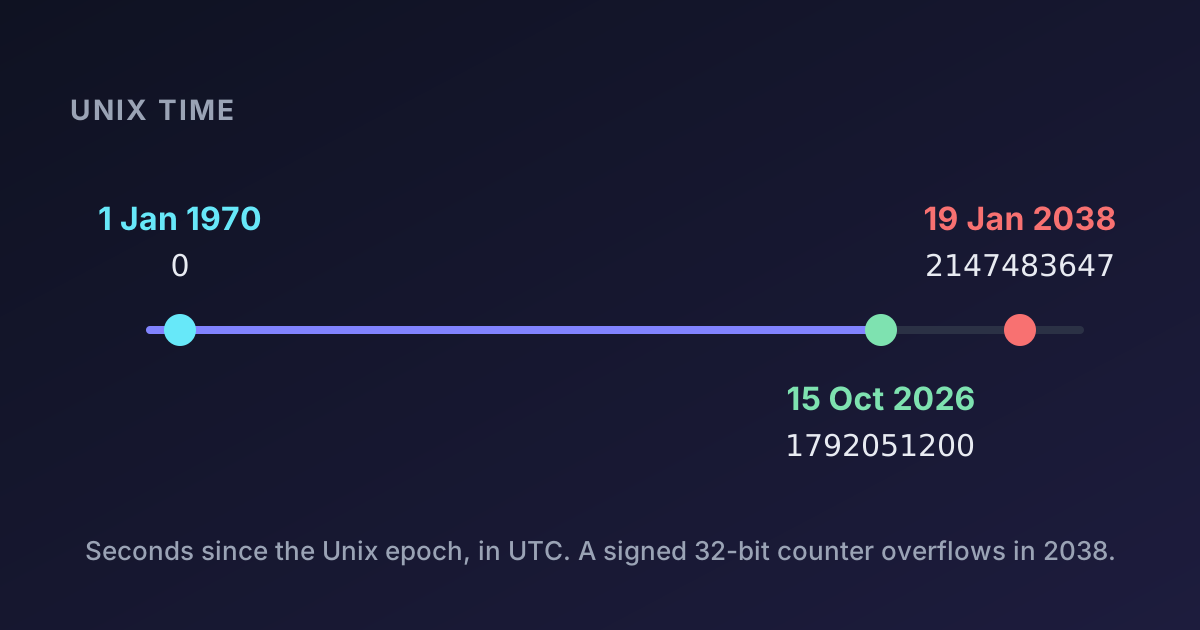
1792051200. To a computer that's a precise moment: 08:00 UTC on 15 October 2026. To a person reading a log file, an API response or a database row, it's just a big number. Unix timestamps are the most common way software stores time, and most date bugs start with a misunderstanding of what that number does and doesn't contain.
This guide explains Unix time, the seconds-versus-milliseconds trap, how to convert in the languages you use, and the overflow coming in 2038.
What a Unix timestamp is
A Unix timestamp counts the seconds elapsed since 00:00:00 UTC on 1 January 1970, a moment called the Unix epoch. Times before the epoch are negative.
That definition has two consequences worth memorising:
- A timestamp has no time zone. It identifies one instant, the same everywhere on Earth.
1792051200is 08:00 UTC, which is 09:00 in London (on British Summer Time in October), 13:30 in Mumbai and 04:00 in New York, all at the same instant. A time zone only matters when you display the timestamp. - It's just an integer. Comparing, sorting and subtracting timestamps is trivial, which is exactly why databases, logs and protocols use them. The number of seconds between two events is one subtraction.
Paste any timestamp into the Unix Timestamp Converter to see it as a date in any time zone, or watch the current Unix time tick.
Seconds or milliseconds?
This is the bug everyone hits once. Unix time is defined in seconds, but many platforms use milliseconds:
| Platform | Unit | Example for the same moment |
|---|---|---|
Unix, C, PHP time(), Python time.time() (float) | seconds | 1792051200 |
JavaScript Date.now(), Java System.currentTimeMillis() | milliseconds | 1792051200000 |
| Some databases and APIs | microseconds | 1792051200000000 |
The quickest way to tell them apart is length. Present-day timestamps in seconds have 10 digits; in milliseconds, 13; in microseconds, 16. (Seconds will gain an eleventh digit in the year 2286.)
Mixing them up gives absurd dates rather than errors:
new Date(1792051200 * 1000).toISOString(); // "2026-10-15T08:00:00.000Z" — correct
new Date(1792051200).toISOString();        // "1970-01-21T17:47:31.200Z" — seconds treated as ms
If a date shows up in January 1970, a value in seconds was treated as milliseconds. If it's tens of thousands of years in the future, it's the opposite. JWTs are a classic place for this bug: their exp and iat claims are in seconds, so Date.now() must be divided by 1000. Our JWT guide covers the details.
Converting in common languages
JavaScript
const nowSeconds = Math.floor(Date.now() / 1000);
const date = new Date(1792051200 * 1000);
date.toISOString();                                   // "2026-10-15T08:00:00.000Z"
date.toLocaleString('en-GB', { timeZone: 'Asia/Kolkata' }); // "15/10/2026, 13:30:00"
Math.floor(Date.parse('2026-10-15T08:00:00Z') / 1000); // 1792051200
Python
from datetime import datetime, timezone

datetime.fromtimestamp(1792051200, tz=timezone.utc)  # 2026-10-15 08:00:00+00:00
int(datetime(2026, 10, 15, 8, 0, tzinfo=timezone.utc).timestamp())  # 1792051200
Always pass tz=timezone.utc to fromtimestamp. Without it, Python converts to the server's local time zone, so the same code gives different results on your laptop and in production. (datetime.utcfromtimestamp is deprecated since Python 3.12 because it returns a time without zone information.)
SQL
-- PostgreSQL
SELECT to_timestamp(1792051200);              -- 2026-10-15 08:00:00+00
SELECT extract(epoch FROM now())::bigint;

-- MySQL
SELECT FROM_UNIXTIME(1792051200);             -- in the session time zone
SELECT UNIX_TIMESTAMP();
Shell
date -u -d @1792051200       # GNU/Linux: Thu 15 Oct 2026 08:00:00 AM UTC
date -u -r 1792051200        # macOS/BSD
date +%s                     # current Unix time
The date-only parsing trap
JavaScript has a surprise for anyone who parses a date without a time:
new Date('2026-10-15');        // midnight UTC
new Date('2026-10-15T00:00');  // midnight in the *local* time zone
Date-only ISO strings are parsed as UTC, while date-time strings without a zone are parsed as local time. A user in New York who picks 15 October in a date input and sees it formatted locally gets 14 October, 20:00. Birthdays shift by a day, and so do deadlines.
The fix depends on what you mean. If a date is a calendar date with no time (a birthday, a holiday), keep it as the string 2026-10-15 or as separate year, month and day values, and don't convert it to a timestamp at all. If it's a moment, always include the zone: 2026-10-15T00:00:00Z or 2026-10-15T00:00:00+05:30.
Leap seconds: Unix time pretends they don't exist
Since 1972, 27 leap seconds have been added to UTC to keep it aligned with the Earth's rotation. Unix time ignores them: every day is exactly 86,400 seconds. When a leap second happens, the Unix clock repeats a second or (on systems that "smear" leap seconds, as Google and AWS do) runs slightly slow for a few hours.
For almost all software this is a good trade: day arithmetic stays simple. It does mean that subtracting two Unix timestamps can be off by a second across a leap second, which matters only in scientific and financial timing. The good news: leap seconds are scheduled to be abolished by 2035.
The year 2038 problem
Many older systems store Unix time in a signed 32-bit integer. Its maximum value, 2,147,483,647, corresponds to:
2038-01-19T03:14:07ZOne second later the value overflows to −2,147,483,648, which is a date in December 1901. Software that still uses 32-bit time_t will think it has travelled back 136 years.
Most modern operating systems and languages already use 64-bit time, which lasts for about 292 billion years. The risks are in the places that are hard to update:
- Embedded devices (routers, industrial controllers, cars) with 32-bit firmware.
- File formats and protocols with 32-bit timestamp fields.
- Database columns: MySQL's
TIMESTAMPtype is limited to 2038-01-19. UseDATETIMEorBIGINTfor dates beyond that. PostgreSQL'stimestamptzis safe. - Code that already deals with the future today: 15-year certificates, 30-year mortgages and long-dated bonds cross 2038 now.
If you store timestamps yourself, use a 64-bit integer column, and test your code with dates after 2038.
Timestamps vs ISO 8601 strings
Unix timestamps are compact and easy to compute with, but unreadable. ISO 8601 strings (2026-10-15T08:00:00Z) are readable and still sort correctly as text, if they are all in UTC with the same precision. A common, sensible split:
- Store and compute with timestamps or native database time types.
- Exchange in APIs as ISO 8601 with an explicit offset or
Z, so humans can read payloads and nobody has to guess the unit. - Display in the user's time zone, converted at the last moment.
When the display involves several zones, let a tool do the work: the Time Zone Converter handles daylight saving correctly, and Time zone and DST bugs explains what goes wrong when code does it by hand. For "how many days until…" questions, the Date Difference Calculator counts calendar days rather than dividing seconds by 86,400.
Summary
A Unix timestamp is the number of seconds since 1970-01-01 UTC: one instant, with no time zone. Tell seconds (10 digits) from milliseconds (13 digits) by length, convert to local time only for display, include a zone whenever you parse a date-time, and store timestamps in 64-bit fields so 2038 is a non-event.

Written by
Avinash Kori
Founder of Devtoolry
Avinash builds Devtoolry, a set of free developer tools that run entirely in the browser, and writes practical guides on the formats, encodings and techniques behind them.
Try it yourself
The free tools used in this article. They run in your browser, so nothing you paste is uploaded.
Unix Timestamp Converter
Convert Unix epoch timestamps in seconds or milliseconds to readable dates and back, in any time zone. See the current Unix time live as it ticks.
Time Zone Converter
Convert a date and time between time zones online with correct daylight saving handling, including gaps and overlaps. Compare EST, PST, GMT, CET, IST and more.
Date Difference Calculator
Calculate the exact difference between two dates online in years, months, days, hours and business days. Count days until a deadline or since an event.