HTML Meta Tags That Matter for SEO and Social Sharing
The meta tags every page needs: title, description, canonical, robots, viewport, Open Graph and Twitter Cards, with lengths, examples and tags to skip.
 By Avinash KoriPublished 5 min read
On this page
The <head> of a web page is invisible to visitors, but it decides how the page looks in a Google result, in a Slack or LinkedIn link preview, and on a phone screen. Most of the tags people copy from old templates do nothing; a handful matter a lot.
This guide covers the tags worth adding to every page, what each one controls, recommended lengths, and the ones you can safely delete. To generate the markup for a page, use the Meta Tag Generator, which previews the search result as you type.
The essential head
Here's a complete, modern <head> for an article page. Everything below explains a part of it.
<head>
  <meta charset="utf-8">
  <meta name="viewport" content="width=device-width, initial-scale=1">
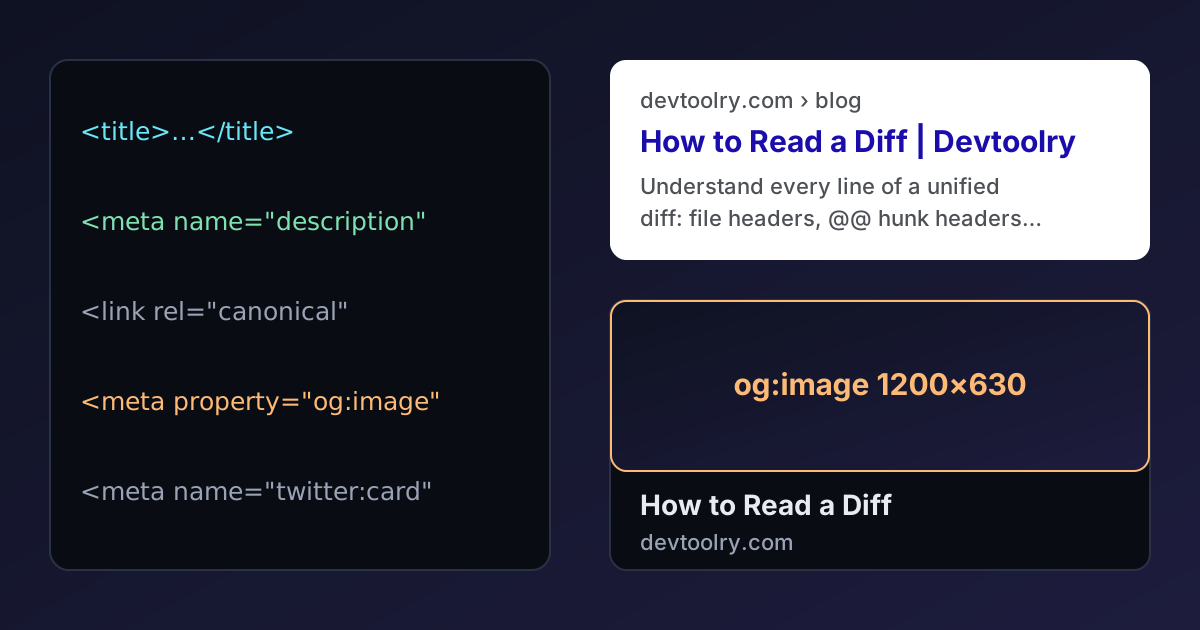
  <title>How to Read a Diff: Unified Diff Format Explained | Devtoolry</title>
  <meta name="description" content="Understand every line of a unified diff: file headers, @@ hunk headers, context lines and + and - changes, plus git diff extras and patches.">
  <link rel="canonical" href="https://devtoolry.com/blog/how-to-read-a-diff">

  <meta property="og:type" content="article">
  <meta property="og:title" content="How to Read a Diff: Unified Diff Format Explained">
  <meta property="og:description" content="Understand every line of a unified diff, from @@ hunk headers to patches.">
  <meta property="og:url" content="https://devtoolry.com/blog/how-to-read-a-diff">
  <meta property="og:image" content="https://devtoolry.com/blog/how-to-read-a-diff/opengraph-image">
  <meta property="og:image:width" content="1200">
  <meta property="og:image:height" content="630">
  <meta name="twitter:card" content="summary_large_image">
</head>
charset and viewport
<meta charset="utf-8"> tells the browser how to decode the page's bytes. Put it first, within the first 1024 bytes of the document, so the browser never guesses wrong. Without it you risk the garbled characters described in our guide to Unicode and UTF-8.
<meta name="viewport" content="width=device-width, initial-scale=1"> makes mobile browsers render the page at the device's width instead of a zoomed-out desktop layout. Google indexes the mobile version of pages, so a page without it is effectively broken for search. Don't add user-scalable=no or maximum-scale=1: blocking zoom is an accessibility failure.
The title tag
The <title> is the single most important on-page SEO element. It's the clickable headline in search results, the text in browser tabs and bookmarks, and the default title when someone shares the link.
- Length: aim for 50–60 characters. Google truncates by pixel width (around 600 px), so longer titles get an ellipsis.
- Put the main topic first. "JSON Formatter — Free Online Tool | Brand" works better than "Brand | Tools | JSON Formatter".
- Make every title unique. Duplicate titles across pages confuse search engines and users.
- Write for people. Stuffing keywords ("JSON Formatter, JSON Beautifier, Format JSON Online") reads as spam, and Google may rewrite titles that don't describe the page well.
The meta description
The description doesn't directly affect ranking, but it's often the snippet shown under your title, so it strongly affects whether people click.
- Length: 120–160 characters fits on most screens.
- Summarise the page's value and match the search intent: what will the reader get?
- Make it unique per page. Google often generates its own snippet from the page content when the description is missing, duplicated or doesn't match the query.
The Meta Tag Generator counts characters for both the title and the description against these limits.
The canonical link
<link rel="canonical" href="https://devtoolry.com/blog/how-to-read-a-diff">The same content is often reachable at several URLs: with and without www, with tracking parameters (?utm_source=…), with a trailing slash, or sorted differently. The canonical tag names the one URL you want indexed, so ranking signals aren't split. Use an absolute URL, point each page to itself unless it's a true duplicate, and make sure the canonical URL returns a 200 status, not a redirect.
Robots directives
<meta name="robots" content="noindex, follow">You only need a robots meta tag when you want to exclude a page: search results pages, thank-you pages, staging copies, account pages. noindex keeps it out of search results; follow lets crawlers still follow its links. Without the tag, pages are indexable by default.
Don't confuse this with robots.txt. Blocking a URL in robots.txt stops crawling, which means search engines can't see a noindex tag on it, and the URL may still appear in results. To remove a page from search, allow crawling and use noindex.
Open Graph: link previews
When someone shares a link on LinkedIn, Facebook, Slack, Discord, WhatsApp or iMessage, the app fetches the page and reads its Open Graph tags to build a preview card:
| Tag | Purpose |
|---|---|
og:title | Headline of the card (can be shorter than the <title>, without the brand) |
og:description | One or two sentences under the headline |
og:image | The preview image: 1200 × 630 px works everywhere |
og:url | The canonical URL |
og:type | website for most pages, article for blog posts |
og:site_name | Your brand name |
The image matters most: link previews with a large image get far more attention. Use an absolute URL, keep important text away from the edges (some apps crop to a square), keep the file under a few hundred kilobytes, and give each important page its own image. Note that most social apps don't render SVG images, so use PNG or JPEG for og:image.
Open Graph uses property= rather than name=, a leftover from its RDFa origins. Most parsers accept either, but property is correct.
Twitter (X) Cards
X reads Open Graph tags as a fallback, so you usually need only one extra tag:
<meta name="twitter:card" content="summary_large_image">summary_large_image shows a big image above the title; summary shows a small square thumbnail. Optionally add twitter:site with your account's handle.
Structured data
Meta tags describe a page; structured data (JSON-LD in a <script type="application/ld+json"> block) describes the things on it, such as an article, a product, an organisation, or a breadcrumb trail. It can earn rich results such as breadcrumbs in search, and helps search engines understand your content. Each article on this blog includes BlogPosting and BreadcrumbList data, for example.
Tags you can delete
<meta name="keywords">: ignored by Google for well over a decade, and by Bing as a ranking signal. It only tells competitors which keywords you target.<meta name="revisit-after">,<meta name="rating">,<meta name="distribution">: no search engine uses them.<meta http-equiv="X-UA-Compatible" content="IE=edge">: only mattered for Internet Explorer.<meta name="author">and<meta name="generator">: harmless but have no search effect. The generator tag can advertise your CMS version to attackers.
Checking your tags
- View the source of the rendered page, not your template, especially for JavaScript-heavy sites. Crawlers and link previewers see what the server sends. Paste the HTML into the HTML Viewer or the HTML Formatter to read it comfortably.
- Use the platforms' preview tools: LinkedIn's Post Inspector and Facebook's Sharing Debugger show exactly what they read, and can refresh a cached preview after you fix something.
- Check Search Console for duplicate titles, missing descriptions and canonical issues across the whole site.
Shared links often end up in print and on posters too; if you need one, a QR code makes the page reachable from paper.
Summary
Every page needs a UTF-8 charset, a viewport tag, a unique 50–60 character title, a 120–160 character description and a canonical URL. Add Open Graph tags with a 1200 × 630 image and twitter:card so shared links look good, use noindex only for pages that shouldn't appear in search, and delete legacy tags like keywords that no search engine reads.

Written by
Avinash Kori
Founder of Devtoolry
Avinash builds Devtoolry, a set of free developer tools that run entirely in the browser, and writes practical guides on the formats, encodings and techniques behind them.
Try it yourself
The free tools used in this article. They run in your browser, so nothing you paste is uploaded.
Meta Tag Generator
Generate SEO meta tags, Open Graph and Twitter Card markup online for any web page. Preview the search result as you type, then copy the HTML.
HTML Formatter
Format and beautify messy or minified HTML into clean, indented markup with Prettier, including embedded CSS and JavaScript. Runs locally in your browser.
HTML Viewer
Preview HTML online in a secure sandboxed frame while you edit the source. See your markup rendered live, with scripts kept safely switched off.