The JavaScript Event Loop: Promises, setTimeout and Microtasks in Practice
Why setTimeout(fn, 0) runs after promises, how await pauses, why busy loops delay timers, and how to run async work in sequence or parallel, with tested output.
 By Avinash KoriPublished 5 min read
On this page
Here's a five-line program. Before reading on, predict the order of the output:
console.log('script start');
setTimeout(() => console.log('timeout'), 0);
Promise.resolve().then(() => console.log('promise 1')).then(() => console.log('promise 2'));
queueMicrotask(() => console.log('microtask'));
console.log('script end');
Node.js and every modern browser print:
script start
script end
promise 1
microtask
promise 2
timeout
A timer with a delay of zero runs last, after two rounds of promise callbacks. If that surprises you, this article is for you. Understanding why it happens explains most "async" bugs in JavaScript: callbacks that run in the wrong order, UIs that freeze, and loops that don't wait. Run every example yourself in the JavaScript Compiler.
One thread, one call stack
JavaScript runs your code on a single thread. At any moment, exactly one piece of your code is executing, and it runs to completion before anything else of yours can start. Nothing interrupts a function halfway through to run a timer or a click handler.
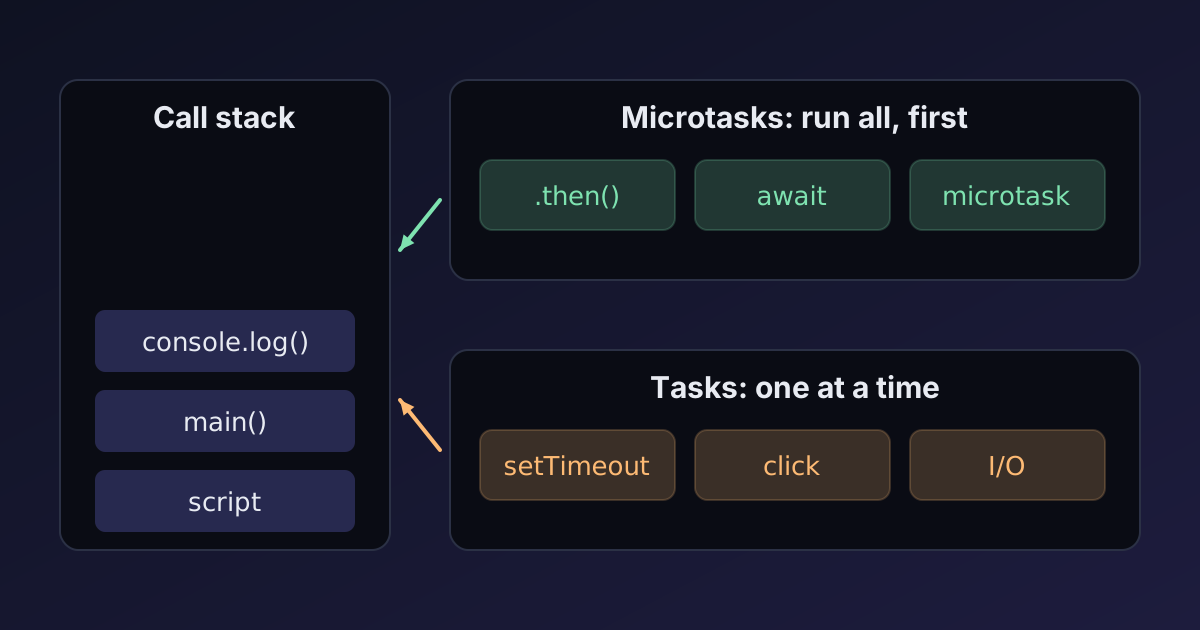
Work that has to wait (timers, network responses, file reads, user events) is handled by the environment: the browser or Node.js. When it's ready, the environment doesn't run your callback immediately. It puts it in a queue, and the event loop picks it up when the call stack is empty.
Two kinds of queue
There are two queues that matter, and they have different priorities:
- The task queue (sometimes called the macrotask queue) holds callbacks from
setTimeout,setInterval, I/O, and user events like clicks. - The microtask queue holds promise callbacks (
.then,.catch,.finally), the continuation ofasyncfunctions afterawait, andqueueMicrotaskcallbacks.
The event loop follows a simple rule:
- Take one task from the task queue and run it to completion.
- Then run all microtasks, including any microtasks those microtasks add, until the microtask queue is empty.
- In browsers, render if needed (update layout and paint).
- Repeat.
The initial script counts as the first task. Now the example makes sense:
script startandscript endprint during the first task.- When the script finishes, the microtask queue holds
promise 1andmicrotask. They run in the order they were queued. - Running
promise 1resolves the next promise in the chain, which queuespromise 2as a new microtask. The loop keeps draining, so it runs right away. - Only when the microtask queue is empty does the loop take the next task: the timer.
setTimeout(fn, 0) means "run fn as a new task as soon as possible", not "run it now". Browsers also enforce a minimum delay of about 4 ms for deeply nested timers.
What await actually does
await is syntax for "pause this function and continue it as a microtask when the promise settles":
async function main() {
  console.log('A');
  await null;
  console.log('C');
}
main();
console.log('B');
setTimeout(() => console.log('D'), 0);
This prints A, B, C, D. The code before the first await runs synchronously, as part of the call to main(). At the await, main returns a pending promise and the caller continues (B). The rest of main runs as a microtask (C), before the timer task (D).
Two consequences:
- An
asyncfunction always returns a promise, even if it never awaits anything. Forgetting toawaitit means errors become unhandled rejections and the caller continues before the work is done. awaitdoesn't block the thread. Other code runs while a function is waiting. That's whyasync/awaitkeeps a UI responsive, and also why shared state can change between two lines of anasyncfunction.
Blocking the loop
Because tasks run to completion, a long synchronous computation blocks everything else:
const start = Date.now();
setTimeout(() => console.log('timer fired after', Date.now() - start, 'ms'), 100);
while (Date.now() - start < 500) {}  // busy for half a second
console.log('loop done');
Output: loop done, then timer fired after 502 ms. The timer was due after 100 ms but couldn't run until the loop finished. In a browser, the same loop also freezes clicks, scrolling and rendering, because rendering happens between tasks too.
The same applies to microtasks. An infinite chain of promises that keeps queueing new microtasks starves the task queue: timers never fire and the page never repaints.
For heavy work, either split it into chunks that yield to the event loop:
async function processInChunks(items, handle, chunkSize = 500) {
  for (let i = 0; i < items.length; i += chunkSize) {
    items.slice(i, i + chunkSize).forEach(handle);
    await new Promise((resolve) => setTimeout(resolve, 0)); // let other tasks and rendering run
  }
}
or move it off the main thread entirely with a Web Worker (or worker_threads in Node.js). Workers have their own event loop and communicate with messages. That's how this site's compilers run your code without freezing the page, as explained in running Python in the browser.
Sequential vs parallel async work
A very common performance bug is awaiting independent operations one after another:
const wait = (ms, value) => new Promise((resolve) => setTimeout(() => resolve(value), ms));
const ids = [1, 2, 3];

// Sequential: about 300 ms
for (const id of ids) await wait(100, id);

// Parallel: about 100 ms
await Promise.all(ids.map((id) => wait(100, id)));
The loop waits for each operation before starting the next. Promise.all starts all of them, then waits once. Use sequential awaits only when each step depends on the previous one, or when you must limit load on a server. For "some may fail" cases, Promise.allSettled returns every result without rejecting on the first error.
The forEach trap
forEach doesn't know about promises:
ids.forEach(async (id) => {
  await wait(10);
  console.log('item', id);
});
console.log('after forEach');
This prints after forEach first, then the three items. forEach calls the async callback, gets a promise back, ignores it and moves on. Any code after the loop that expects the work to be done is wrong, and any rejection inside it is unhandled. Use for…of with await for sequential work, or Promise.all(ids.map(…)) for parallel work.
Node.js specifics
Node.js uses the same model with a few extra queues. Its event loop has phases (timers, I/O callbacks, setImmediate, close callbacks), and between them it drains process.nextTick callbacks before promise microtasks. Two practical rules:
process.nextTickruns before promise callbacks; overusing it can starve I/O just like an endless promise chain.setImmediateruns after I/O callbacks in the current loop iteration. Inside an I/O callback it always runs before asetTimeout(fn, 0); in the main script their order isn't guaranteed.
Debugging async order
When callbacks run in an order you don't expect:
- Label each callback with its queue: sync, microtask (promise/await) or task (timer/event).
- Remember the rule: current task → all microtasks → next task.
- Look for missing
awaits, especially on calls toasyncfunctions and insideforEach. - Check for blocking code if timers fire late or the UI freezes.
Types help too: with TypeScript's strict checks and a lint rule like @typescript-eslint/no-floating-promises, forgotten awaits become errors. Try it in the TypeScript Compiler, and see our guide to TypeScript strict mode for the flags involved.
Summary
JavaScript runs one task at a time to completion, then drains every queued microtask before taking the next task. Promise callbacks and code after await are microtasks; timers, I/O and events are tasks. That's why setTimeout(fn, 0) runs after promises, why a busy loop delays timers and freezes pages, and why forEach doesn't wait for async callbacks. Run independent work in parallel with Promise.all, yield or use workers for heavy computation, and always await the promises you create.

Written by
Avinash Kori
Founder of Devtoolry
Avinash builds Devtoolry, a set of free developer tools that run entirely in the browser, and writes practical guides on the formats, encodings and techniques behind them.
Try it yourself
The free tools used in this article. They run in your browser, so nothing you paste is uploaded.
JavaScript Compiler
Run JavaScript online in an isolated browser sandbox. See console output, errors and execution time instantly, with top-level await and stdin input.
TypeScript Compiler
Compile and run TypeScript online. Your code is type-checked with the official compiler in strict mode, then runs in a sandboxed worker in your browser.