Regular Expressions for Developers: 12 Patterns You'll Actually Use
Tested regular expressions for emails, dates, UUIDs, versions and logs, plus groups, lookaheads, greedy vs lazy matching and catastrophic backtracking.
 By Avinash KoriPublished 6 min read
On this page
Regular expressions have a reputation for being write-only: easy to type, impossible to read a week later. Much of that reputation comes from copying 200-character patterns from the internet without understanding them. The patterns you need day to day are short, and once you know a handful of building blocks, you can read and adapt them with confidence.
This guide covers the building blocks first, then 12 tested patterns for real tasks, and finally the mistakes that turn a regex into a bug or a denial-of-service. Examples use JavaScript syntax, which is very close to Python, Java, PHP (PCRE) and Go. Try each one in the Regex Tester, which highlights matches and capture groups as you type.
The building blocks in five minutes
| Syntax | Matches | Example |
|---|---|---|
. | Any character except a newline | a.c matches abc, a-c |
\d \w \s | Digit, word character ([A-Za-z0-9_]), whitespace | \d\d matches 42 |
[abc] [^abc] | One of the listed characters / none of them | [aeiou] matches a vowel |
[a-z] | A range | [0-9a-f] matches a hex digit |
* + ? | 0 or more, 1 or more, 0 or 1 | colou?r matches both spellings |
{n} {n,m} | Exactly n, between n and m | \d{4} matches a year |
^ $ | Start and end of the input (or line, with m) | ^\d+$ means "only digits" |
\b | Word boundary | \bcat\b doesn't match concatenate |
(…) (?:…) | Capturing group / non-capturing group | (\d+)px captures the number |
(?<name>…) | Named group | (?<year>\d{4}) |
a|b | Either | jpe?g|png |
To match a special character literally, escape it with a backslash: \., \(, \$, \[. A very common bug is an unescaped dot: /a.c/ matches abc, while /a\.c/ only matches a.c.
Flags change how the whole pattern behaves: g (find all matches), i (ignore case), m (^ and $ match at line breaks), s (. matches newlines too) and u (Unicode mode).
12 patterns for everyday tasks
Every pattern below was tested against the inputs shown.
1. A plausible email address
^[^\s@]+@[^\s@]+\.[^\s@]+$Matches [email protected] and [email protected]; rejects ada@example and a [email protected]. This deliberately simple pattern checks for the shape [email protected] with no spaces. Fully RFC-compliant email regexes are hundreds of characters long and still don't prove an address exists. Validate the shape loosely, then send a confirmation email.
2. An ISO date (YYYY-MM-DD)
^\d{4}-(0[1-9]|1[0-2])-(0[1-9]|[12]\d|3[01])$Accepts 2026-10-15, rejects 2026-13-01 and 2026-1-5. Note that it accepts 2026-02-30: a regex checks format, not calendar logic. Parse the date afterwards to check that it exists.
3. A hex colour
^#(?:[0-9a-fA-F]{3}){1,2}$Matches #fff and #5B5BF0, rejects #abcd. The group of three hex digits repeats once or twice, which allows exactly 3 or 6 digits.
4. A UUID
^[0-9a-f]{8}-[0-9a-f]{4}-[1-8][0-9a-f]{3}-[89ab][0-9a-f]{3}-[0-9a-f]{12}$Use it with the i flag. The [1-8] checks the version digit and [89ab] the variant, so it rejects random 32-hex strings that only look like UUIDs. Our article on UUID v4 and v7 explains those fields.
5. A semantic version
^(0|[1-9]\d*)\.(0|[1-9]\d*)\.(0|[1-9]\d*)(?:-([\w.-]+))?(?:\+([\w.-]+))?$Matches 1.2.3 and 2.0.0-rc.1+build.5, rejects 1.02.3 (leading zeros aren't allowed in SemVer). The groups capture major, minor, patch, pre-release and build metadata.
6. An IPv4 address
^(?:(?:25[0-5]|2[0-4]\d|1\d\d|[1-9]?\d)\.){3}(?:25[0-5]|2[0-4]\d|1\d\d|[1-9]?\d)$Matches 192.168.1.1, rejects 256.1.1.1 and 10.0.0.01. The alternation spells out 0–255 without leading zeros. In real code, your language's IP parsing functions are usually a better choice; this pattern is useful in config validation and log filters.
7. A URL slug
^[a-z0-9]+(?:-[a-z0-9]+)*$Matches json-formatter, rejects JSON, a--b and -a. Words of lower-case letters and digits, joined by single hyphens.
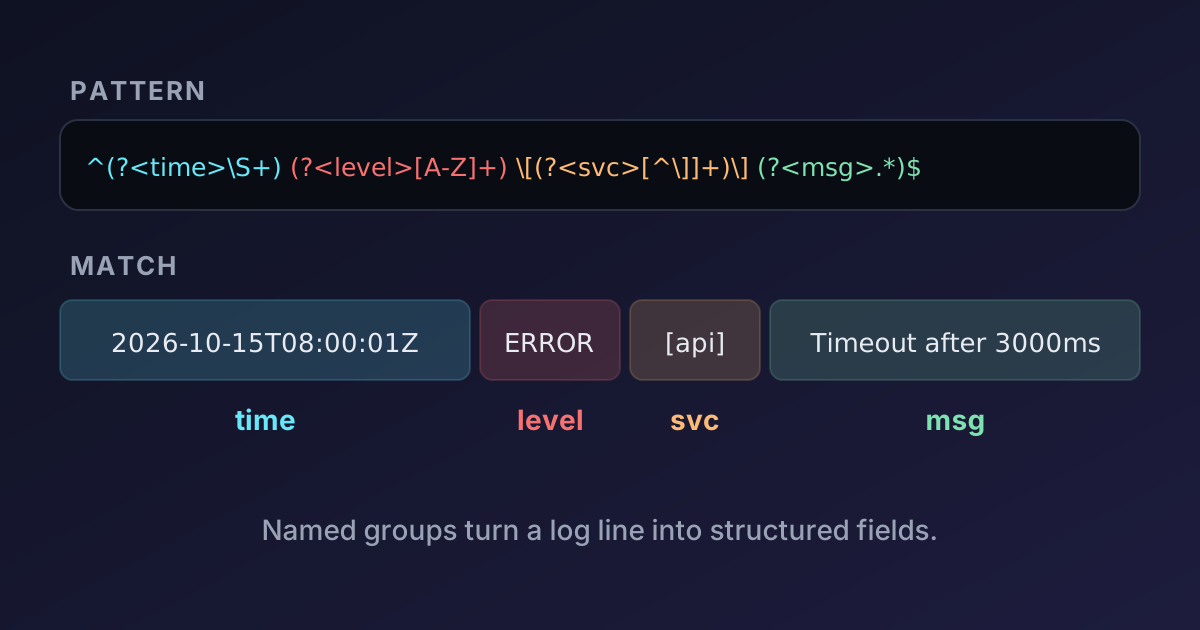
8. Parsing a log line with named groups
const line = '2026-10-15T08:00:01Z ERROR [api] Timeout after 3000ms (request_id=7f3a)';
const { groups } = line.match(/^(?<time>\S+) (?<level>[A-Z]+) \[(?<service>[^\]]+)\] (?<message>.*)$/);
// groups = { time: '2026-10-15T08:00:01Z', level: 'ERROR', service: 'api', message: 'Timeout after 3000ms (request_id=7f3a)' }
Named groups make the pattern self-documenting and the code that uses it readable. Note [^\]]+: "one or more characters that aren't a closing bracket", a much safer way to match "everything up to ]" than .*.
9. Reformatting with capture groups
'2026-10-15'.replace(/(\d{4})-(\d{2})-(\d{2})/, '$3/$2/$1'); // "15/10/2026"$1, $2 and $3 refer to the captured groups in the replacement. Editors like VS Code support the same syntax in search-and-replace, which makes regex a powerful refactoring tool.
10. Extracting all prices from text
const text = 'price: $5, $12.50 and $100';
[...text.matchAll(/\$(\d+(?:\.\d{2})?)/g)].map((m) => m[1]); // ["5", "12.50", "100"]
matchAll with the g flag returns every match with its groups. The non-capturing group (?:\.\d{2})? makes the cents optional without creating an extra capture.
11. Password rules with lookaheads
^(?=.*[a-z])(?=.*[A-Z])(?=.*\d).{12,}$Each (?=…) is a lookahead: it checks that something appears somewhere ahead without consuming characters. Together they require a lower-case letter, an upper-case letter and a digit, and .{12,} requires at least 12 characters. That said, length matters far more than character classes for real strength, as our guide to password entropy shows.
12. Thousands separators
'1234567'.replace(/\B(?=(\d{3})+(?!\d))/g, ','); // "1,234,567"This inserts a comma at every position that's not at a word boundary and is followed by a multiple of three digits. It's a neat demonstration of lookaheads, but for real formatting use Intl.NumberFormat, which also handles locales that group digits differently.
Greedy vs lazy
Quantifiers are greedy by default: they match as much as possible. Adding ? makes them lazy:
'<b>bold</b> and <i>it</i>'.match(/<.+>/)[0];  // "<b>bold</b> and <i>it</i>"
'<b>bold</b> and <i>it</i>'.match(/<.+?>/)[0]; // "<b>"
The greedy .+ runs to the end of the input and backtracks to the last >. Lazy .+? stops at the first. Often a negated character class is clearer and faster than either: <[^>]+> means "a <, then anything except >, then >".
And don't parse HTML with regex beyond quick searches. Nested tags, attributes containing > and comments defeat any pattern. Use a real parser.
Five mistakes to avoid
Forgetting anchors in validation. /\d{4}/.test('abc12345xyz') is true, because the pattern matches somewhere in the string. Validation patterns need ^ and $.
Reusing a global regex with test(). A regex with the g flag remembers where its last match ended (lastIndex):
const re = /\d/g;
re.test('1'); // true
re.test('1'); // false — the search started after the first match
Drop the g flag for yes/no checks, or create the regex inside the function.
Assuming \w covers all letters. In JavaScript, \w is ASCII only: 'ünïcödé'.match(/\w+/g) gives ['n', 'c', 'd']. With the u flag you can use Unicode properties: /\p{L}+/gu matches the whole word. Our article on Unicode and UTF-8 explains why text is trickier than it looks.
Using ^ and $ on multi-line text without m. Without the m flag they match only the start and end of the whole input, so /^line2$/ finds nothing in "line1\nline2". With m it matches.
Catastrophic backtracking. Nested quantifiers like (a+)+ can make the engine try an exponential number of ways to match before failing. On our test machine, this took 16 seconds for a 29-character input:
/^(a+)+$/.test('aaaaaaaaaaaaaaaaaaaaaaaaaaaa!'); // false, after 16 s of CPU timeEach extra a doubles the time. If a pattern like this validates user input on a server, one request can block a CPU core: a ReDoS (regular expression denial of service) attack. Avoid nested quantifiers over the same characters, prefer specific character classes over .*, limit input length before matching, and consider engines without backtracking (such as RE2) for untrusted patterns.
How to build a regex without guessing
- Collect real examples — strings that should match and strings that shouldn't.
- Start small. Match one part, check it, then extend.
- Use the Regex Tester to see matches and groups live, and to toggle flags.
- Anchor validation patterns with
^and$. - Write tests for the examples, including the tricky ones, and run them in the JavaScript Compiler or your test suite.
- Leave a comment explaining the intent. Your future self will thank you.
Summary
A small set of building blocks (character classes, quantifiers, anchors, groups and lookaheads) covers most real-world regex. Anchor validation patterns, escape special characters, prefer negated classes like [^>]+ over lazy dots, use named groups for readability, and avoid nested quantifiers that can backtrack catastrophically. And remember what regex can't do: it checks format, not meaning, so parse dates, emails and HTML with tools designed for them.

Written by
Avinash Kori
Founder of Devtoolry
Avinash builds Devtoolry, a set of free developer tools that run entirely in the browser, and writes practical guides on the formats, encodings and techniques behind them.
Try it yourself
The free tools used in this article. They run in your browser, so nothing you paste is uploaded.
Regex Tester
Test JavaScript regular expressions online with live match highlighting, capture groups and flags. Debug a pattern against your own text, right in your browser.
JavaScript Compiler
Run JavaScript online in an isolated browser sandbox. See console output, errors and execution time instantly, with top-level await and stdin input.