What Is Base64 Encoding? How It Works and When to Use It
How Base64 turns bytes into text, why it adds 33% to the size, Base64 vs Base64URL, handling UTF-8 in JavaScript, and why Base64 is never encryption.
 By Avinash KoriPublished 5 min read
On this page
Base64 shows up in more places than most developers notice: email attachments, data: URLs in CSS, HTTP Basic authentication, JSON Web Tokens, SSH keys, and API fields that carry images or files. It is one of the simplest encodings in computing, and also one of the most misused, usually by people who think it hides data.
This guide explains exactly how Base64 works, with a worked example you can check by hand, and covers the details that cause bugs: padding, the URL-safe variant, and Unicode text in JavaScript.
The problem Base64 solves
Many systems were built to carry text, not arbitrary bytes. Email was designed for 7-bit ASCII. JSON strings can't hold raw binary. URLs and HTTP headers have characters with special meanings. If you push the bytes of a PNG image through these channels, some bytes get altered, stripped or misinterpreted.
Base64 solves this by representing any sequence of bytes using only 64 safe characters: A–Z, a–z, 0–9, + and / (plus = for padding). Every system can carry those characters unchanged.
How it works: a worked example
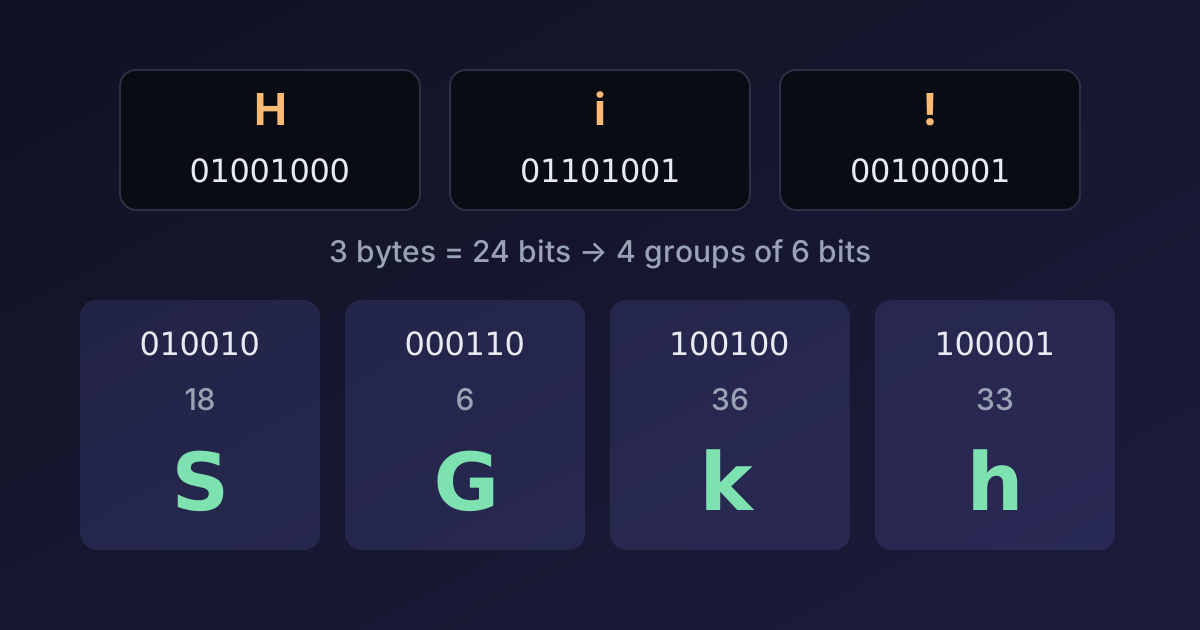
Base64 takes the input three bytes at a time (24 bits) and splits them into four groups of six bits. Each 6-bit group is a number from 0 to 63, which picks a character from the alphabet.
Let's encode the text Hi!:
| Step | H | i | ! |
|---|---|---|---|
| ASCII code | 72 | 105 | 33 |
| Binary (8 bits) | 01001000 | 01101001 | 00100001 |
Join the 24 bits and cut them into four 6-bit pieces:
010010 000110 100100 100001
  18      6     36     33
   S      G      k      h
Index 18 is S, 6 is G, 36 is k and 33 is h, so Hi! encodes to SGkh. You can check it in the Base64 encoder or in any browser console with btoa('Hi!').
Padding with =
When the input length isn't a multiple of three, the last group is short. Base64 fills it with zero bits and adds = signs so the output length stays a multiple of four:
"Hi!" → SGkh       (3 bytes, no padding)
"Hi"  → SGk=       (2 bytes, one =)
"H"   → SA==       (1 byte, two =)
Some formats (JWTs, many URL-based tokens) drop the padding, since the decoder can work out the length. Most decoders accept both, but strict ones don't, which is a common source of "invalid Base64" errors when moving data between systems.
Base64 makes data bigger
Every 3 bytes become 4 characters, so Base64 output is about 33% larger than the input (plus a little more if line breaks are added, as email does every 76 characters). A 300 KB image becomes about 400 KB in Base64.
That matters for performance. Inlining small icons as data: URLs can save an HTTP request, but inlining large images bloats your HTML or CSS, can't be cached separately, and delays rendering. As a rule of thumb, only inline assets of a few kilobytes. For APIs that upload files, prefer multipart/form-data or a direct binary upload over Base64 inside JSON.
Base64 vs Base64URL
Standard Base64 uses + and /, which have special meanings in URLs (+ can mean a space in query strings, / separates path segments). Base64URL replaces them:
| Standard Base64 | Base64URL | |
|---|---|---|
| Character 62 | + | - |
| Character 63 | / | _ |
| Padding | = required | usually omitted |
The bytes FB FF BF show the difference: standard Base64 gives +/+/, Base64URL gives -_-_. JWTs, many OAuth parameters and WebAuthn use Base64URL. If a token fails to decode, check which variant it is. The Base64 tool has a URL-safe switch for exactly this, and the JWT Decoder handles it automatically.
Don't confuse Base64URL with URL encoding: percent-encoding (%20) is a different mechanism, explained in our guide to URL encoding.
Base64 and Unicode in JavaScript
JavaScript's built-in btoa() and atob() date from the early web and work on "binary strings", where each character must be a single byte (code 0–255). Two problems follow:
btoa('€');   // InvalidCharacterError: Invalid character
btoa('é');   // "6Q==" — encodes the Latin-1 byte, not UTF-8
btoa('€') throws because € is outside the 0–255 range. btoa('é') succeeds, but encodes the single Latin-1 byte E9, while every other system expects the UTF-8 bytes C3 A9, which encode to w6k=. The result decodes to garbage elsewhere.
The fix is to convert the text to UTF-8 bytes first:
function encodeBase64(text) {
  const bytes = new TextEncoder().encode(text);
  let binary = '';
  for (const byte of bytes) binary += String.fromCharCode(byte);
  return btoa(binary);
}

function decodeBase64(base64) {
  const bytes = Uint8Array.from(atob(base64), (char) => char.charCodeAt(0));
  return new TextDecoder().decode(bytes);
}

encodeBase64('€ café 🚀');          // "4oKsIGNhZsOpIPCfmoA="
decodeBase64('4oKsIGNhZsOpIPCfmoA='); // "€ café 🚀"
In Node.js, Buffer does this for you: Buffer.from(text).toString('base64') and Buffer.from(b64, 'base64').toString('utf8'). It also supports 'base64url' directly. In Python, encode the string first: base64.b64encode('€ café'.encode()). Newer browsers are adding Uint8Array.prototype.toBase64() and Uint8Array.fromBase64(), which avoid the binary-string detour, but check support before relying on them.
If you're unsure why é can be one byte or two, our article on Unicode and UTF-8 explains code points and bytes.
Base64 is not encryption
This is the most important point in this article. Base64 has no key and no secret. Anyone can decode it instantly, and it's recognisable at a glance (long strings of letters and digits, often ending in =).
Real examples of this mistake:
- HTTP Basic auth sends
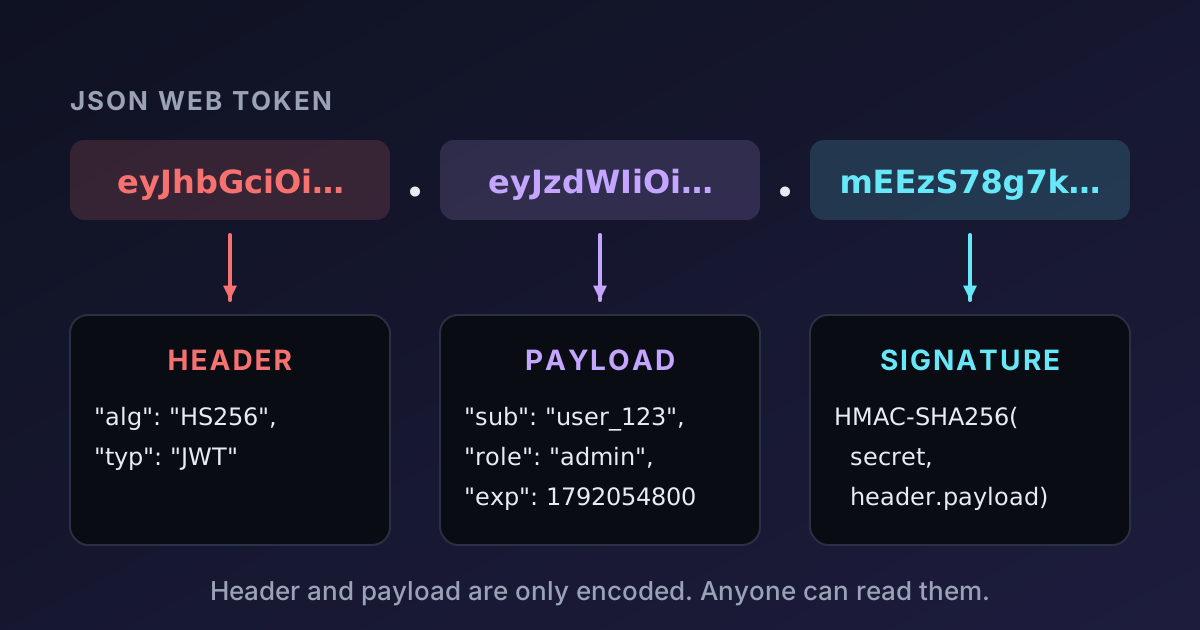
Authorization: Basic dXNlcjpwYTU1d29yZA==. That's justuser:pa55wordin Base64. Basic auth is only acceptable over HTTPS. - JWT payloads are Base64URL-encoded JSON, readable by anyone holding the token. See JWT explained.
- "Obfuscated" config values — API keys stored as Base64 in a repository are still leaked API keys.
- Kubernetes Secrets are Base64-encoded in YAML manifests. The encoding is there so binary values fit in YAML, not for protection; access control and encryption at rest do the protecting.
If data must be secret, encrypt it with a real algorithm (AES-GCM, for example) and manage the key properly. If data must be tamper-proof, sign it or use an HMAC; the Hash Generator can compute HMACs for testing.
When to use Base64
Use Base64 when you need to carry bytes through a channel that only accepts text:
- Embedding small images or fonts in CSS or HTML as
data:URLs. - Putting binary values (hashes, signatures, keys, small files) into JSON, XML or YAML.
- Email attachments (MIME does this automatically).
- Tokens and IDs in URLs — with the Base64URL variant.
Don't use it to hide data, to "compress" anything (it does the opposite), or to move large files through JSON APIs when a binary upload is available.
Summary
Base64 maps every 3 bytes to 4 characters from a 64-character alphabet, so binary data can travel through text-only channels at a 33% size cost. Padding (=) fills the last group, Base64URL swaps + and / for - and _, and JavaScript's btoa needs UTF-8 conversion for non-ASCII text. Above all, Base64 is an encoding, not encryption: anyone can reverse it.

Written by
Avinash Kori
Founder of Devtoolry
Avinash builds Devtoolry, a set of free developer tools that run entirely in the browser, and writes practical guides on the formats, encodings and techniques behind them.
Try it yourself
The free tools used in this article. They run in your browser, so nothing you paste is uploaded.
Base64 Encode / Decode
Encode text to Base64 or decode Base64 to text online, with full UTF-8 and URL-safe Base64 support. Conversion runs in your browser, so nothing is uploaded.
URL Encode / Decode
URL encode or decode text online: percent-encode query string values and full URLs, or turn %20-style escapes back into readable text.
JWT Decoder & Verifier
Decode JSON Web Tokens online: inspect the header and claims, check expiry and verify HMAC signatures. Tokens are decoded locally and never leave your browser.