JWT Explained: Structure, Claims and How to Verify a Token
What is inside a JSON Web Token, how the signature works, which claims to check, and the security mistakes (alg none, weak secrets, storage) that break JWTs.
 By Avinash KoriPublished 6 min read
On this page
JSON Web Tokens (JWTs) are everywhere in modern authentication: OAuth and OpenID Connect use them, single-page apps send them in Authorization headers, and microservices pass them to each other. They are also widely misunderstood. A JWT is not encrypted, decoding one is not the same as verifying it, and a few common shortcuts turn them into a security hole.
This guide takes a real token apart, explains every piece, and lists the checks your server must make before trusting one.
A real token, taken apart
Here is a complete JWT, signed with HS256 and the secret correct-horse-battery-staple:
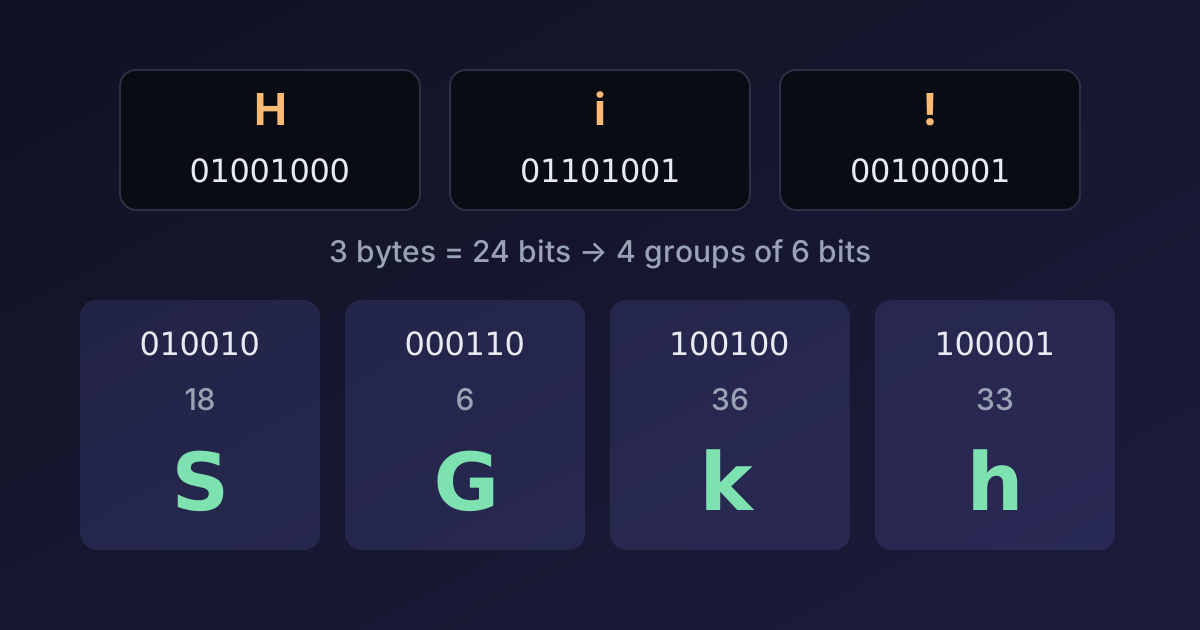
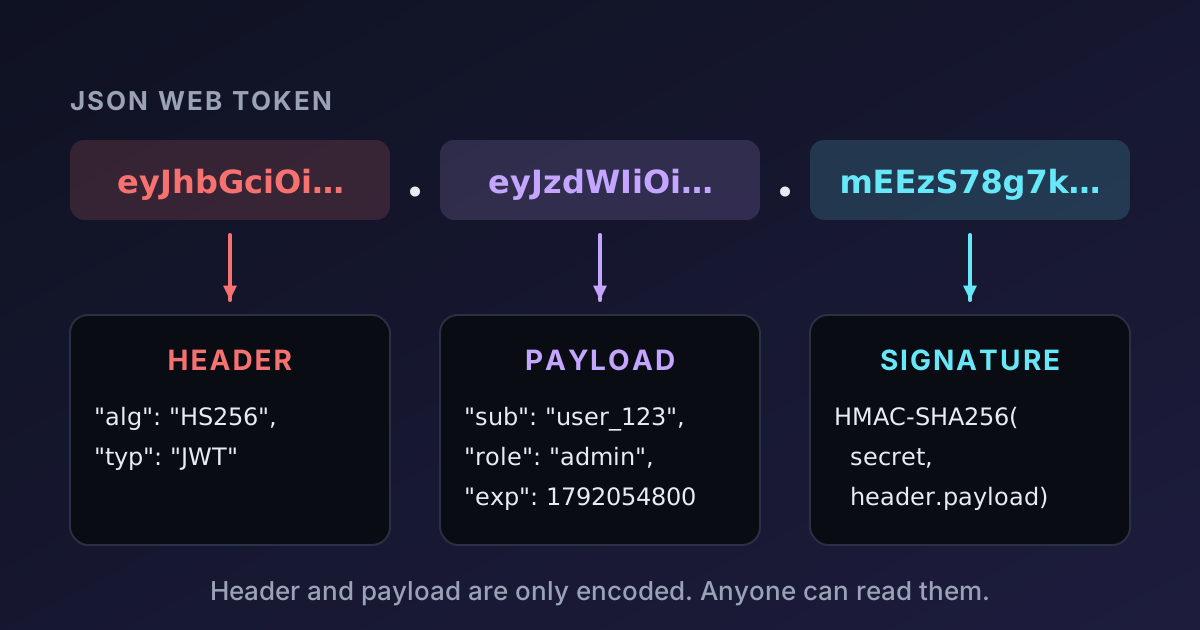
eyJhbGciOiJIUzI1NiIsInR5cCI6IkpXVCJ9.eyJzdWIiOiJ1c2VyXzEyMyIsIm5hbWUiOiJBZGEgTG92ZWxhY2UiLCJyb2xlIjoiYWRtaW4iLCJpYXQiOjE3OTIwNTEyMDAsImV4cCI6MTc5MjA1NDgwMH0.mEEzS78g7k66oYCyIa17SFw9_XR6J_6u5wH_eyT1qI0It looks like random text, but it's three parts separated by dots: header, payload and signature. The first two are just JSON encoded with Base64URL (Base64 with - and _ instead of + and /, and no = padding). Decode them and you get:
{ "alg": "HS256", "typ": "JWT" }{
"sub": "user_123",
"name": "Ada Lovelace",
"role": "admin",
"iat": 1792051200,
"exp": 1792054800
}Paste the token into the JWT Decoder to see the same thing, with the timestamps converted to readable dates. It runs in your browser, which matters: pasting a production token into a website that sends it to a server is a real leak.
The important lesson is already visible: anyone who has the token can read the payload. There is no secret involved in decoding. Never put passwords, API keys or personal data you wouldn't show the user into a JWT payload. If you need confidentiality, use encrypted tokens (JWE) or keep the data on the server.
The header
The header says how the token was signed:
algis the signing algorithm.HS256means HMAC with SHA-256 using a shared secret.RS256andES256use a private key to sign and a public key to verify.typis usuallyJWT.kid(key ID), when present, tells the verifier which key to use, which makes key rotation possible.
The payload and its claims
The payload holds claims: statements about the user and the token. Some names are registered by the JWT standard (RFC 7519):
| Claim | Meaning | Example |
|---|---|---|
iss | Issuer: who created the token | https://auth.example.com |
sub | Subject: who the token is about | user_123 |
aud | Audience: who the token is meant for | api.example.com |
exp | Expiration time (Unix seconds) | 1792054800 |
nbf | Not valid before (Unix seconds) | 1792051200 |
iat | Issued at (Unix seconds) | 1792051200 |
jti | Unique token ID (for revocation lists) | 9f1c… |
All times are Unix timestamps in seconds, not milliseconds. exp: 1792054800 is 15 October 2026 at 09:00 UTC, exactly one hour after iat. Mixing up seconds and milliseconds is a classic bug: Date.now() in JavaScript returns milliseconds, so a token created with exp: Date.now() + 3600 expires in the year 58,000-something. Our guide to Unix timestamps covers this trap and others.
Anything else in the payload (name, role) is a custom claim your application defines.
How the signature works
The signature is what makes a JWT trustworthy. For HS256 it is:
HMAC-SHA256(secret, base64url(header) + "." + base64url(payload))encoded with Base64URL. The server that issued the token computes this with its secret. Later, to verify the token, a server recomputes the HMAC over the first two parts and compares it with the third. If someone changes even one character of the payload (say, "role": "user" to "role": "admin"), the signature no longer matches, and the token is rejected.
With asymmetric algorithms (RS256, ES256), the issuer signs with a private key and anyone with the public key can verify. That's the standard choice when many services need to verify tokens but only one should be able to create them; the identity provider publishes its public keys at a JWKS URL.
You can see this in action with the JWT Generator: sign a payload, change one claim in the decoder, and watch verification fail.
Verifying a token step by step
Decoding is easy. Verifying means checking all of the following, in this order, and rejecting the token if any check fails:
- The algorithm is the one you expect. Configure your verifier with an allow-list (for example, only
RS256). Never let the token's ownalgheader decide. - The signature is valid for the key you trust.
expis in the future andnbf, if present, is in the past. Allow a small clock skew (30–60 seconds) between servers.issis your identity provider andaudis your service. A token issued for a different application, even by the same provider, must not work on yours.- Application rules: the user still exists, the token hasn't been revoked, the claimed role is allowed.
Here is what steps 1–3 look like with Node.js's built-in crypto, to show there is no magic involved:
import { createHmac, timingSafeEqual } from 'node:crypto';

const decodePart = (part) => JSON.parse(Buffer.from(part, 'base64url').toString('utf8'));

function verifyHs256(token, secret, now = Date.now() / 1000) {
  const [h, p, s] = token.split('.');
  const header = decodePart(h);
  if (header.alg !== 'HS256') throw new Error(`Unexpected algorithm ${header.alg}`);
  const expected = createHmac('sha256', secret).update(`${h}.${p}`).digest();
  const actual = Buffer.from(s, 'base64url');
  if (actual.length !== expected.length || !timingSafeEqual(actual, expected)) throw new Error('Bad signature');
  const claims = decodePart(p);
  if (typeof claims.exp === 'number' && now >= claims.exp) throw new Error('Token expired');
  return claims;
}
Note timingSafeEqual: comparing signatures with === can leak, through response timing, how many leading bytes matched. In production, use a maintained library rather than this sketch. With the popular jose package, the full check is:
import { jwtVerify } from 'jose';

const secret = new TextEncoder().encode(process.env.JWT_SECRET);
const { payload } = await jwtVerify(token, secret, {
  algorithms: ['HS256'],
  issuer: 'https://auth.example.com',
  audience: 'api.example.com',
});
Security mistakes to avoid
Decoding instead of verifying. Functions like jwt.decode() only read the payload. Using them to make authorisation decisions means anyone can forge a token by editing the JSON. Always verify.
Trusting alg from the token. Early libraries accepted "alg": "none" (no signature at all), and some could be tricked into verifying an RS256 token as HS256 using the public key as the HMAC secret. Both attacks are stopped by an algorithm allow-list.
Weak HMAC secrets. An HS256 token can be brute-forced offline: an attacker with one token can try millions of secrets per second until the signature matches. Use at least 32 random bytes (256 bits), such as a 64-character hex string from the Random String Generator. Our article on password entropy explains why length and randomness matter.
Long lifetimes. A JWT can't easily be revoked before it expires, because verification doesn't involve a database. Keep access tokens short-lived (5–15 minutes) and use refresh tokens, which are stored and revocable, to get new ones.
Storing tokens in localStorage. Any script on your page (including one injected through an XSS bug or a compromised dependency) can read localStorage. For browser apps, an HttpOnly, Secure, SameSite cookie keeps the token out of reach of JavaScript. If you use cookies, protect state-changing requests against CSRF.
Sensitive data in the payload. Repeat after me: the payload is only encoded, not encrypted. The Base64 decoder is all anyone needs to read it, as our guide to Base64 encoding shows.
JWTs or sessions?
JWTs shine when different services must verify identity without calling a central database, which is the reason OAuth and OpenID Connect use them. For a single web application with its own backend, a classic session (a random ID in a cookie, looked up on the server) is simpler, can be revoked instantly, and keeps nothing readable on the client. Choose JWTs for what they're good at, not because they're fashionable.
Summary
A JWT is a Base64URL-encoded header and payload plus a signature over both. Anyone can read it; only the holder of the key can create a valid one. Before trusting a token, check the algorithm against an allow-list, verify the signature, and validate exp, nbf, iss and aud. Use strong secrets, short lifetimes and safe storage, and keep secrets out of the payload.

Written by
Avinash Kori
Founder of Devtoolry
Avinash builds Devtoolry, a set of free developer tools that run entirely in the browser, and writes practical guides on the formats, encodings and techniques behind them.
Try it yourself
The free tools used in this article. They run in your browser, so nothing you paste is uploaded.
JWT Decoder & Verifier
Decode JSON Web Tokens online: inspect the header and claims, check expiry and verify HMAC signatures. Tokens are decoded locally and never leave your browser.
JWT Generator
Create signed JSON Web Tokens online with HS256, HS384 or HS512 from a custom header and payload. Signing happens in your browser; the secret stays local.
Base64 Encode / Decode
Encode text to Base64 or decode Base64 to text online, with full UTF-8 and URL-safe Base64 support. Conversion runs in your browser, so nothing is uploaded.