Pointers in C Explained: Addresses, Arrays and Memory with Runnable Examples
Learn C pointers step by step: & and *, passing pointers to functions, arrays and pointer arithmetic, malloc and free, const pointers and the bugs to avoid.
 By Avinash KoriPublished 7 min read
On this page
Pointers are the part of C that decides whether the language feels simple or impossible. The rules are small: a pointer is a variable that stores an address, & takes an address and * follows one. The difficulty comes from what those rules make possible: functions that change their arguments, arrays that turn into pointers, memory you allocate and must free yourself.
This guide builds that up one step at a time. Every program below was compiled and run with Clang 21 in the online C Compiler and with GCC 11, and the output shown is the real output. Paste any of them into the compiler, change a line and run it again: that is the fastest way to make pointers click.
What a pointer is
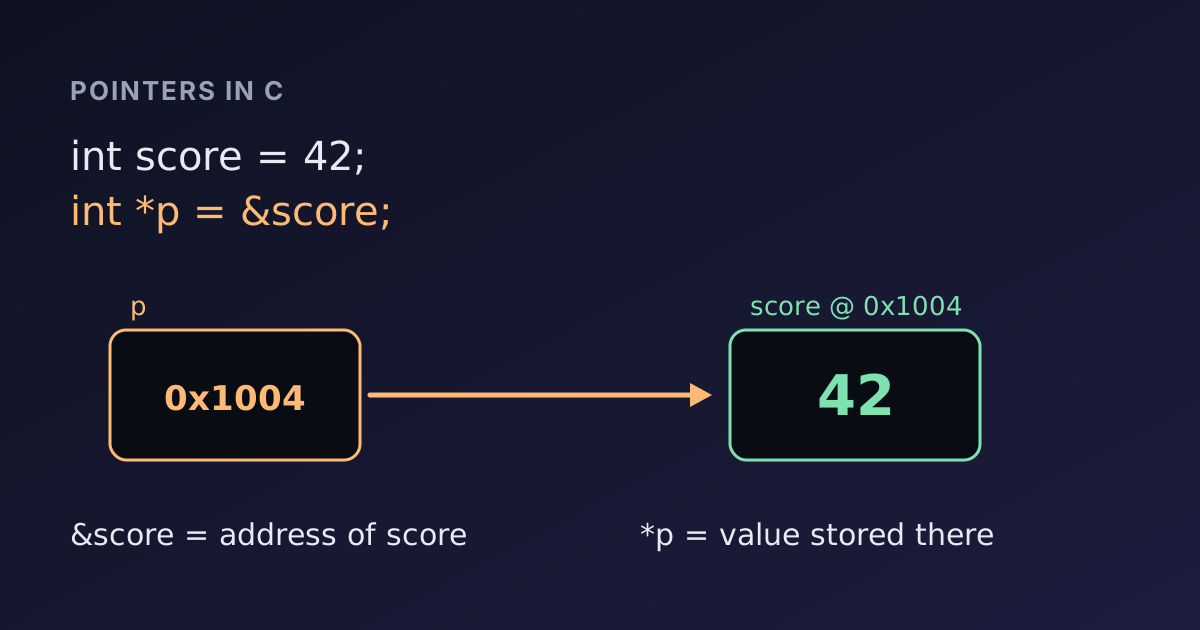
Every variable lives somewhere in memory, and that location has an address. A pointer is a variable whose value is such an address.
#include <stdio.h>

int main(void) {
    int score = 42;
    int *p = &score;

    printf("score = %d\n", score);
    printf("*p    = %d\n", *p);
    printf("p == &score: %s\n", p == &score ? "yes" : "no");

    *p = 99;
    printf("score after *p = 99: %d\n", score);
    return 0;
}score = 42
*p = 42
p == &score: yes
score after *p = 99: 99Read the declarations out loud and they make sense:
int *pdeclarespas a "pointer to int".&scoreis "the address of score".*pis "the int that p points to". Reading it gives 42; assigning to it changesscore, because*pandscoreare the same memory.
The * has two jobs, which is the first source of confusion. In a declaration (int *p) it says "this is a pointer". In an expression (*p = 99) it means "follow the pointer". The two uses are related but not the same thing.
You can print an address with printf("%p\n", (void *)p), but the number changes from run to run and machine to machine, so it is rarely useful except to see that two pointers are equal.
Why functions need pointers
C passes every argument by value: the function receives a copy. That is why this classic swap does nothing:
#include <stdio.h>

void swap_wrong(int a, int b) {
    int tmp = a; a = b; b = tmp;
}

void swap(int *a, int *b) {
    int tmp = *a; *a = *b; *b = tmp;
}

int main(void) {
    int x = 1, y = 2;
    swap_wrong(x, y);
    printf("after swap_wrong: x=%d y=%d\n", x, y);
    swap(&x, &y);
    printf("after swap:       x=%d y=%d\n", x, y);
    return 0;
}after swap_wrong: x=1 y=2
after swap: x=2 y=1swap_wrong swaps its own copies, which disappear when it returns. swap receives the addresses of x and y, so *a and *b are the caller's variables. This is also why scanf("%d", &n) needs the &: scanf has to write into your variable, so it needs its address. Our guide to reading input in C and C++ covers the scanf side in detail.
Pointers and arrays
An array name used in an expression turns ("decays") into a pointer to its first element. That is why indexing and pointer arithmetic are interchangeable:
#include <stdio.h>

void show_size(int arr[]) {
    printf("inside function: sizeof arr = %zu\n", sizeof arr);
}

int main(void) {
    int nums[5] = {10, 20, 30, 40, 50};
    int *p = nums;

    printf("nums[2] = %d, *(nums + 2) = %d, p[2] = %d\n", nums[2], *(nums + 2), p[2]);
    printf("in main: sizeof nums = %zu\n", sizeof nums);
    show_size(nums);
    return 0;
}nums[2] = 30, *(nums + 2) = 30, p[2] = 30
in main: sizeof nums = 20
inside function: sizeof arr = 4nums[2] is defined as *(nums + 2), so all three expressions read the same element. The surprise is the last line. In main, nums is a real array of five 4-byte ints, 20 bytes. In show_size, the parameter int arr[] is really int *arr, so sizeof gives the size of a pointer: 4 bytes in the WebAssembly build of the online compiler, 8 bytes with GCC on a 64-bit PC. Both compilers warn about it (-Wsizeof-array-argument).
The practical rule: a function never knows the length of an array you pass it. Pass the length as a separate argument, as every standard function from qsort to fgets does.
Pointer arithmetic
Adding 1 to a pointer moves it to the next element, not the next byte. The compiler scales by the size of the type:
#include <stdio.h>

int main(void) {
    double prices[3] = {9.5, 12.25, 3.75};
    double *first = &prices[0];
    double *last = &prices[2];

    printf("elements between: %td\n", last - first);
    printf("bytes between:    %td\n", (char *)last - (char *)first);

    double total = 0;
    for (double *p = prices; p < prices + 3; p++) total += *p;
    printf("total: %.2f\n", total);
    return 0;
}elements between: 2
bytes between: 16
total: 25.50Subtracting two pointers into the same array gives the number of elements between them (type ptrdiff_t, printed with %td). Casting to char * shows the bytes: two doubles of 8 bytes each. The loop walks the array with a pointer instead of an index, a style you will see often in older C code. Pointing one past the last element (prices + 3) is allowed as a loop end; reading through it is not.
Allocating memory with malloc and free
Arrays declared inside a function vanish when it returns. When the size is known only at run time, or the data must outlive the function, allocate it on the heap:
#include <stdio.h>
#include <stdlib.h>

int *make_squares(int n) {
    int *a = malloc(n * sizeof *a);
    if (a == NULL) return NULL;
    for (int i = 0; i < n; i++) a[i] = i * i;
    return a;
}

int main(void) {
    int n = 6;
    int *sq = make_squares(n);
    if (sq == NULL) {
        printf("out of memory\n");
        return 1;
    }
    for (int i = 0; i < n; i++) printf("%d ", sq[i]);
    printf("\n");
    free(sq);
    sq = NULL;
    return 0;
}0 1 4 9 16 25Three habits make heap code safe. Write n * sizeof *a rather than n * sizeof(int), so the size stays right if the type changes. Check for NULL, because malloc can fail. And call free exactly once for every successful malloc, then set the pointer to NULL so an accidental second free or later use is easy to spot.
Pointers to pointers
A function that must change which address the caller's pointer holds needs a pointer to that pointer, char **:
#include <stdio.h>
#include <stdlib.h>
#include <string.h>

int duplicate(const char *src, char **out) {
    char *copy = malloc(strlen(src) + 1);
    if (copy == NULL) return -1;
    strcpy(copy, src);
    *out = copy;
    return 0;
}

int main(void) {
    char *name = NULL;
    if (duplicate("devtoolry", &name) == 0) {
        printf("copy: %s (%zu chars)\n", name, strlen(name));
        free(name);
    }
    return 0;
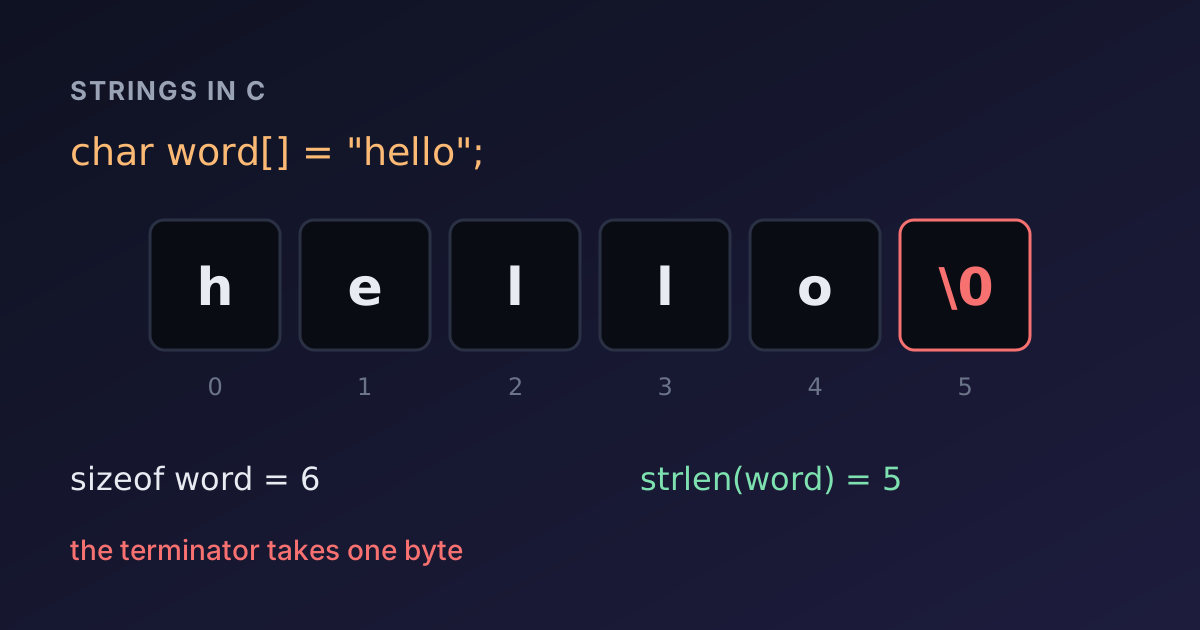
}copy: devtoolry (9 chars)It is the same idea as swap: to change an int you pass an int *; to change a char * you pass a char **. The + 1 in the malloc call makes room for the string's terminating '\0', which strlen does not count.
const and pointers
const can protect the data, the pointer, or both, depending on where it goes:
int main(void) {
    int a = 1, b = 2;
    const int *p = &a;
    int *const q = &a;
    *p = 5;
    q = &b;
    return 0;
}main.c:5:8: error: read-only variable is not assignable
5 | *p = 5;
| ~~ ^
main.c:6:7: error: cannot assign to variable 'q' with const-qualified type 'int *const'
6 | q = &b;
| ~ ^Read the declaration from right to left. const int *p is "a pointer to a constant int": you can move p, but not change the int through it. int *const q is "a constant pointer to an int": you can change the int, but q always points to a. Function parameters such as const char *src in duplicate above promise the caller that the function will not modify their data.
The bugs pointers cause
Most pointer bugs fall into a few groups:
- Uninitialised pointers.
int *p; *p = 1;writes to a random address. Initialise every pointer, toNULLif nothing else. - Dangling pointers. Returning the address of a local variable, or using memory after
free. The program may appear to work, and different compilers behave differently: forint *broken(void) { int local = 7; return &local; }, GCC at-O2returnsNULLwhile Clang returns the stale address. Both warn, so never ignore that warning. - Off-by-one access. Reading
a[n]in an array ofnelements. C does not check bounds. - Memory leaks. Losing the only pointer to allocated memory before freeing it.
- Double free. Calling
freetwice on the same pointer.
Compiler warnings catch a surprising number of these. Always compile with -Wall (the online compiler does), read every warning, and when a program crashes, look at the compiler errors guide and the line numbers the compiler gives you. Printing values and addresses step by step is still the most effective debugging tool for pointer code.
Summary
- A pointer stores an address.
&xgets the address ofx;*preads or writes the value at that address. - C passes arguments by value, so functions that change the caller's variables take pointers.
- Arrays decay to pointers.
a[i]is*(a + i), and a function cannot know an array's length unless you pass it. - Pointer arithmetic counts elements, not bytes.
- Every
mallocneeds aNULLcheck and exactly onefree. - Read
constdeclarations right to left.
Try changing the examples in the C Compiler: remove an &, pass the wrong length, free twice, and read what the compiler and the program say. If you prefer containers to raw pointers, the same programs can be rewritten with std::vector in the C++ Compiler, and the Number Base Converter helps when you print addresses or bit patterns in hex.

Written by
Avinash Kori
Founder of Devtoolry
Avinash builds Devtoolry, a set of free developer tools that run entirely in the browser, and writes practical guides on the formats, encodings and techniques behind them.
Try it yourself
The free tools used in this article. They run in your browser, so nothing you paste is uploaded.
C Compiler
Compile and run C code online with Clang 21, a GCC-compatible compiler, and stdin input. Programs run in your browser as WebAssembly, so your code stays private.
C++ Compiler
Compile and run C++20 code online with Clang 21, libc++ and stdin input. Programs compile to WebAssembly and run in your browser, so your code stays private.
Number Base Converter
Convert numbers online between binary, octal, decimal, hexadecimal and any base from 2 to 36, with BigInt precision for very large values.