Reading Input in C and C++: scanf, cin and getline Explained
Why getline returns an empty string after cin, how to read until end of input, validate numbers, read lines safely in C and speed up input, with tested code.
 By Avinash KoriPublished 6 min read
On this page
Reading input is the first thing every C and C++ program does, and the source of a famous bug: you read a number with cin >>, then a line with getline, and getline returns an empty string before the user has typed anything. Competitive programmers meet a second problem: input that is read correctly but too slowly.
This guide explains how the input stream actually works, then walks through correct, tested patterns for C++ and C. Every program here can be pasted into the C++ Compiler or C Compiler, with input in the stdin box.
How input really works: one buffer of characters
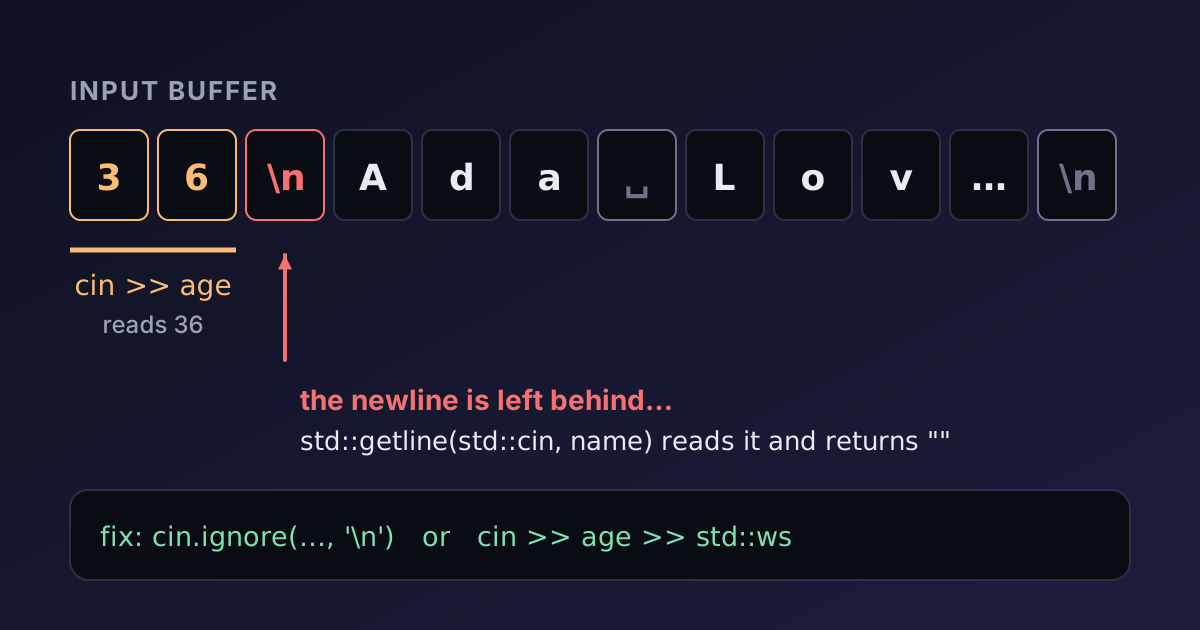
Standard input is a stream of characters, not of "answers". When you type 36, press Enter, then type Ada Lovelace and press Enter, the program's input buffer contains:
3 6 \n A d a ␣ L o v e l a c e \nEvery reading function consumes some of these characters and leaves the rest for the next one. Bugs happen when a function leaves behind something the next function doesn't expect, and the most common leftover is that \n.
The classic bug: getline after cin >>
#include <iostream>
#include <string>

int main() {
    int age;
    std::string name;
    std::cout << "Age: ";
    std::cin >> age;
    std::cout << "Name: ";
    std::getline(std::cin, name);
    std::cout << "\n[" << name << "] is " << age << '\n';
}
With the input above, this prints [] is 36. The name is empty.
cin >> age skips leading whitespace, reads the digits 36 and stops at the newline, leaving it in the buffer. getline reads characters up to the next newline, finds one immediately, and returns an empty string. The name Ada Lovelace is still waiting, unread.
There are two clean fixes. Discard the rest of the line after reading the number:
#include <limits>

std::cin >> age;
std::cin.ignore(std::numeric_limits<std::streamsize>::max(), '\n');
std::getline(std::cin, name);   // "Ada Lovelace"
Or skip whitespace with the std::ws manipulator, which consumes the newline (and any blank lines) before the next read:
std::cin >> age >> std::ws;
std::getline(std::cin, name);
Use std::ws only when the next line can't legitimately be empty, since it would skip blank lines too.
A note on prompts: when you run programs with prepared input (online compilers, judges, ./prog < input.txt), the input isn't echoed, so prompts like Age: appear glued together in the output. That's expected. Judges usually compare output exactly, so leave prompts out of competitive programming solutions.
Reading until the end of input
When you don't know how many values are coming, read until the stream fails:
#include <iostream>

int main() {
    long long x, sum = 0;
    int count = 0;
    while (std::cin >> x) {
        sum += x;
        ++count;
    }
    std::cout << count << " numbers, sum " << sum << '\n';
}
With the input 1 2 3, 4, 5 6 on three lines, it prints 6 numbers, sum 21. cin >> x treats spaces and newlines the same, so the layout of the input doesn't matter. The loop ends at end-of-file (or at the first token that isn't a number).
Don't write while (!std::cin.eof()). The EOF flag is only set after a read fails, so that loop processes the last value twice or uses an uninitialised one.
Reading line by line
When lines matter (each line is one record with a variable number of values), read whole lines and parse each one with a string stream:
#include <iostream>
#include <sstream>
#include <string>
#include <vector>

int main() {
    int rows;
    std::cin >> rows >> std::ws;
    for (int r = 0; r < rows; ++r) {
        std::string line;
        std::getline(std::cin, line);
        std::istringstream in(line);
        std::vector<int> values;
        for (int v; in >> v;) values.push_back(v);
        std::cout << "row " << r + 1 << ": " << values.size() << " values\n";
    }
}
With the input 3, 1 2 3, an empty line and 4 5, it prints 3, 0 and 2 values: the empty line in the middle counts as a row with no values. There's one subtlety: if an empty row came first, the std::ws after rows would swallow it. Choosing between ignore and std::ws is really choosing whether blank lines carry meaning in your input.
Validating numbers
cin >> n fails when the input isn't a number, and a failed stream stays failed: every later read is skipped silently. Always check:
int n;
if (!(std::cin >> n)) {
    std::cerr << "Expected a number\n";
    return 1;
}
To recover and keep reading (in an interactive menu, say), clear the error and discard the bad line:
std::cin.clear();
std::cin.ignore(std::numeric_limits<std::streamsize>::max(), '\n');
Also note that cin >> n with input 7x reads 7 and leaves x behind. If "the whole line must be a number" is your rule, read the line with getline and parse it with std::stoi or std::from_chars, checking that everything was consumed.
Reading input in C
C's scanf has the same leftover-newline behaviour, plus a few dangers of its own.
#include <stdio.h>

int main(void) {
    int age;
    char name[64];
    if (scanf("%d", &age) != 1) {
        fprintf(stderr, "Expected a number\n");
        return 1;
    }
    if (scanf(" %63[^\n]", name) != 1) {   /* leading space skips the leftover newline */
        fprintf(stderr, "Expected a name\n");
        return 1;
    }
    printf("[%s] is %d\n", name, age);
    return 0;
}
Three details make this correct:
- Check the return value.
scanfreturns the number of items it assigned. Ignoring it means using uninitialised variables when input is bad; GCC even warns about it. - The space before
%63[^\n]skips whitespace, including the newline left by%d.%[^\n]reads everything up to a newline, so names with spaces work, unlike%s, which stops at the first space. - The width
63limits the read to the buffer size minus one for the terminating\0. Without it, a long line overflowsname, which is a classic security bug. Never usegets(); it was removed from C11 for exactly this reason.
For robust programs, a better pattern is to read whole lines with fgets and parse them with strtol:
#include <stdio.h>
#include <stdlib.h>
#include <string.h>

int main(void) {
    char line[128];
    while (fgets(line, sizeof line, stdin)) {
        line[strcspn(line, "\n")] = '\0';   /* strip the newline fgets keeps */
        char *end;
        long value = strtol(line, &end, 10);
        if (end == line || *end != '\0') {
            printf("not a number: \"%s\"\n", line);
            continue;
        }
        printf("%ld squared is %ld\n", value, value * value);
    }
    return 0;
}
For the input 12, abc, 7x, -3, it prints 12 squared is 144, rejects abc and 7x, and prints -3 squared is 9. strtol reports where it stopped parsing through end, so you can reject partial numbers like 7x, which scanf("%d") and atoi would quietly accept as 7.
Fast input for large data
By default, C++ streams are synchronised with C's stdio so you can mix cin and scanf safely, and cin is tied to cout, flushing output before every read. Both cost time when reading millions of numbers. Competitive programmers start main with:
std::ios::sync_with_stdio(false);
std::cin.tie(nullptr);
After that, cin is typically as fast as scanf. Two rules come with it: don't mix cin/cout with scanf/printf in the same program, and use '\n' instead of std::endl, which flushes the output on every line.
A quick reference
| Task | C++ | C |
|---|---|---|
| Read a number | std::cin >> n (check it) | scanf("%d", &n) == 1 |
| Read a word | std::cin >> s | scanf("%63s", buf) |
| Read a whole line | std::getline(std::cin, line) | fgets(buf, sizeof buf, stdin) |
| Line after a number | cin.ignore(…, '\n') or >> std::ws | scanf(" %63[^\n]", buf) |
| Read until end | while (std::cin >> x) | while (scanf("%d", &x) == 1) |
| Strict number parsing | getline + std::from_chars | fgets + strtol |
Try it yourself
Paste any program above into the C++ Compiler (Clang 21 with libc++, C++20) or the C Compiler, put the input in the stdin box, and run it. Both compile to WebAssembly and run in your browser, so you can experiment without installing a toolchain. Change the input to break each program on purpose: it's the fastest way to learn what each function leaves in the buffer.
If you also work in Python, its input() reads a whole line and strips the newline, so this whole class of bug doesn't exist there. Our article on running Python in the browser explains how stdin works in that environment.
Summary
Input is one stream of characters, and each reading function leaves something behind. cin >> and scanf("%d") leave the newline, which makes the next getline return empty: discard it with ignore or std::ws in C++, or a leading space in scanf. Loop on the read itself (while (cin >> x)), always check for failure, give scanf field widths, prefer fgets with strtol for strict parsing in C, and switch off stream syncing when speed matters.

Written by
Avinash Kori
Founder of Devtoolry
Avinash builds Devtoolry, a set of free developer tools that run entirely in the browser, and writes practical guides on the formats, encodings and techniques behind them.
Try it yourself
The free tools used in this article. They run in your browser, so nothing you paste is uploaded.
C++ Compiler
Compile and run C++20 code online with Clang 21, libc++ and stdin input. Programs compile to WebAssembly and run in your browser, so your code stays private.
C Compiler
Compile and run C code online with Clang 21, a GCC-compatible compiler, and stdin input. Programs run in your browser as WebAssembly, so your code stays private.