Strings in C: char Arrays, the Null Terminator and the Bugs to Avoid
How strings work in C: char arrays and the \0 terminator, sizeof vs strlen, reading lines safely, strcmp, snprintf instead of strcpy, and buffer overflows.
 By Avinash KoriPublished 6 min read
On this page
C has no string type. What C calls a string is a convention: a sequence of char values in memory that ends with a zero byte, '\0'. Every string function in the standard library, from printf("%s") to strlen, depends on that zero being there, and almost every string bug in C comes from it being missing, misplaced or overwritten.
This guide explains how strings are stored, how to read, copy and compare them safely, and what goes wrong when you don't. Each program was run with Clang 21 in the online C Compiler and with GCC 11; the outputs are real, and you can paste any example into the compiler to experiment.
A string is a char array ending in \0
#include <stdio.h>
#include <string.h>

int main(void) {
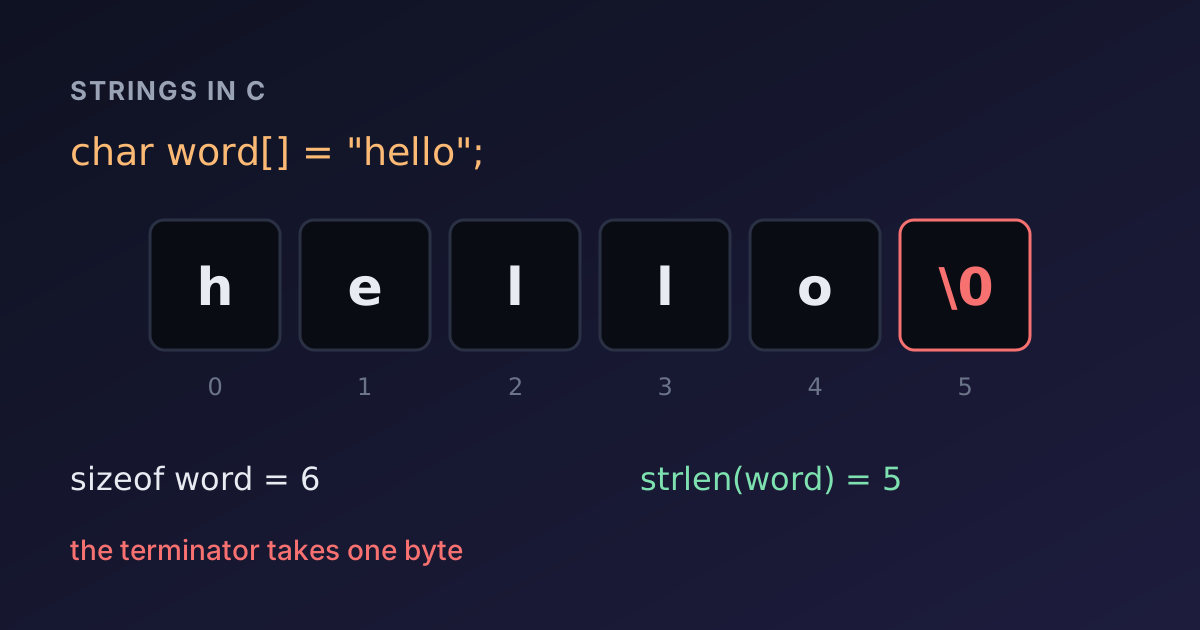
    char word[] = "hello";
    char buffer[20] = "hi";

    printf("sizeof word   = %zu, strlen(word)   = %zu\n", sizeof word, strlen(word));
    printf("sizeof buffer = %zu, strlen(buffer) = %zu\n", sizeof buffer, strlen(buffer));
    printf("last byte of word is %d\n", word[5]);
    return 0;
}sizeof word = 6, strlen(word) = 5
sizeof buffer = 20, strlen(buffer) = 2
last byte of word is 0The literal "hello" has five letters but occupies six bytes: the compiler adds the terminator. Two numbers describe every string, and mixing them up causes most of the trouble:
sizeofis the size of the array, fixed when it is declared. It includes the terminator and any unused space.strlenis the length of the text: it counts characters until it finds'\0', which is not counted.
A buffer of N bytes can hold at most N - 1 characters of text. Forgetting the extra byte is the classic off-by-one error.
Not every char array is a string. char letters[3] = {'a', 'b', 'c'}; has no terminator, so passing it to printf("%s") or strlen reads past the end until a zero byte happens to turn up. If you must print such an array, give the length explicitly: printf("%.3s", letters).
String literals are read-only
These two declarations look alike but behave differently:
#include <stdio.h>

int main(void) {
    char editable[] = "cat";
    const char *literal = "cat";

    editable[0] = 'b';
    printf("%s %s\n", editable, literal);
    return 0;
}bat catchar editable[] = "cat" creates a new four-byte array and copies the text into it, so you can change it. const char *literal = "cat" points at the literal itself, which lives in read-only memory. C allows writing char *literal = "cat" without const, but modifying it through that pointer is undefined behaviour: on a PC it usually crashes with a segmentation fault. Declaring such pointers const lets the compiler catch the mistake.
Reading strings: scanf versus fgets
scanf("%s") reads one word: it stops at the first space, tab or newline. fgets reads a whole line, including spaces, and keeps the newline at the end:
#include <stdio.h>
#include <string.h>

int main(void) {
    char first[32], full[64];

    scanf("%31s", first);
    getchar();                      /* skip the rest of the line: the '\n' */
    fgets(full, sizeof full, stdin);

    printf("scanf read: [%s]\n", first);
    printf("fgets read: [%s]\n", full);
    full[strcspn(full, "\n")] = '\0';
    printf("trimmed:    [%s]\n", full);
    return 0;
}
With Ada on the first line of input and Ada Lovelace on the second, it prints:
scanf read: [Ada]
fgets read: [Ada Lovelace
]
trimmed:    [Ada Lovelace]
Three details matter here. The width in %31s stops scanf from writing more than 31 characters into a 32-byte array; a bare %s has no limit and can overflow the buffer. The getchar() consumes the newline scanf leaves behind; without it, fgets would read that empty rest of the line. And full[strcspn(full, "\n")] = '\0' removes the newline fgets keeps, and does nothing if there is none. Our guide to reading input in C and C++ goes deeper into mixing scanf and fgets.
Never use gets(). It cannot know the size of the buffer, so it was removed from the language in C11. Modern compilers reject it: Clang 21 reports "call to undeclared function 'gets'".
Comparing strings: == compares addresses
#include <stdio.h>
#include <string.h>

int main(void) {
    char typed[16] = "admin";
    const char *expected = "admin";

    printf("typed == expected:         %s\n", typed == expected ? "true" : "false");
    printf("strcmp(typed, expected):   %d\n", strcmp(typed, expected));
    printf("strcmp(\"apple\", \"banana\") < 0: %s\n", strcmp("apple", "banana") < 0 ? "true" : "false");
    return 0;
}typed == expected: false
strcmp(typed, expected): 0
strcmp("apple", "banana") < 0: true== on two strings compares two addresses, and typed and expected are stored in different places, so the answer is false even though the text is identical. strcmp compares the characters and returns 0 when the strings are equal, a negative number when the first sorts before the second, and a positive number otherwise. Only the sign is meaningful: don't test for -1 or 1. A common bug is if (strcmp(a, b)), which is true when the strings are different.
Copying safely: snprintf instead of strcpy
strcpy and strcat copy until the terminator, however small the destination is:
#include <stdio.h>
#include <string.h>

int main(void) {
    char name[4];
    strcpy(name, "Alexander");
    printf("%s\n", name);
    return 0;
}
Clang warns at compile time that "'strcpy' will always overflow; destination buffer has size 4, but the source string has length 10". What happens at run time depends on the platform. GCC on Ubuntu builds with fortified string functions, so the program stops with *** buffer overflow detected ***: terminated. The WebAssembly build of the online compiler has no such check and prints Alexander, having silently overwritten the memory after name. The second outcome is the dangerous one: in real programs, buffer overflows like this are a classic source of security holes.
Use snprintf instead. It takes the buffer size, never writes past it, always adds the terminator, and returns how many characters it wanted to write, so you can detect truncation:
#include <stdio.h>
#include <string.h>

int main(void) {
    char small[8];
    int needed = snprintf(small, sizeof small, "%s-%d", "order", 12345);

    printf("result: [%s]\n", small);
    printf("needed %d chars, buffer holds %zu\n", needed, sizeof small - 1);

    char dest[6];
    strncpy(dest, "abcdefgh", sizeof dest - 1);
    dest[sizeof dest - 1] = '\0';
    printf("strncpy + terminator: [%s]\n", dest);
    return 0;
}result: [order-1]
needed 11 chars, buffer holds 7
strncpy + terminator: [abcde]strncpy looks like the safe version of strcpy, but it does not add a terminator when the source is too long, which is why the example sets the last byte by hand. In most code, snprintf(dest, sizeof dest, "%s", src) is the simpler safe copy.
Working with characters
A string is an array, so you can walk it with an index or a pointer until you reach '\0'. The functions in <ctype.h> classify and convert single characters:
#include <ctype.h>
#include <stdio.h>

int main(void) {
    char text[] = "Hello, C World 2026!";
    int letters = 0, digits = 0, spaces = 0;

    for (char *p = text; *p != '\0'; p++) {
        if (isalpha((unsigned char)*p)) letters++;
        else if (isdigit((unsigned char)*p)) digits++;
        else if (isspace((unsigned char)*p)) spaces++;
        *p = (char)toupper((unsigned char)*p);
    }
    printf("%s\nletters=%d digits=%d spaces=%d\n", text, letters, digits, spaces);
    return 0;
}HELLO, C WORLD 2026!
letters=11 digits=4 spaces=3The (unsigned char) casts are not decoration: passing a negative char (any byte above 127 on platforms where char is signed) to the ctype functions is undefined behaviour. They only understand single bytes, so for UTF-8 text with accents or emoji you need a Unicode library. The Text Statistics tool shows how character and byte counts differ for such text.
The string functions you will use most
| Function | What it does | Watch out for |
|---|---|---|
strlen(s) | Length of the text, without \0 | Walks the whole string each call |
strcmp(a, b) | Compares; 0 means equal | Only the sign of the result matters |
snprintf(d, n, fmt, ...) | Formats into a buffer of size n | Returns the length it wanted |
strncpy(d, s, n) | Copies at most n bytes | May leave d unterminated |
strcat(d, s) | Appends s to d | No size check; prefer snprintf |
strchr(s, c) / strstr(s, t) | Finds a character / substring | Returns NULL if not found |
strcspn(s, set) | Length before any char in set | Handy for trimming newlines |
strtol(s, &end, 10) | Converts text to a number | Check end to detect bad input |
Summary
- A C string is a
chararray terminated by'\0'. Leave room for it: a buffer ofNbytes holdsN - 1characters. sizeofgives the array size,strlenthe text length.- String literals are read-only; point to them with
const char *. - Read words with
scanf("%31s")(always with a width) and lines withfgets, then trim the newline. - Compare with
strcmp, never==. - Copy and build strings with
snprintf; avoidstrcpy,strcatandgets.
To go further, see how strings relate to pointers in C, and run the examples above in the C Compiler with your own input. If you would rather let the language manage memory, std::string in the C++ Compiler grows automatically and compares with ==.

Written by
Avinash Kori
Founder of Devtoolry
Avinash builds Devtoolry, a set of free developer tools that run entirely in the browser, and writes practical guides on the formats, encodings and techniques behind them.
Try it yourself
The free tools used in this article. They run in your browser, so nothing you paste is uploaded.
C Compiler
Compile and run C code online with Clang 21, a GCC-compatible compiler, and stdin input. Programs run in your browser as WebAssembly, so your code stays private.
C++ Compiler
Compile and run C++20 code online with Clang 21, libc++ and stdin input. Programs compile to WebAssembly and run in your browser, so your code stays private.
Word & Character Counter
Count words, characters, lines, sentences and bytes online, with estimated reading time. Check essays, posts and meta descriptions against length limits.