GCC vs Clang: What Is the Difference for C Programmers?
GCC vs Clang compared with real output: error messages, warnings, GNU extensions, undefined behaviour, flags and platforms, and which one to use for C code.
 By Avinash KoriPublished 5 min read
On this page
GCC and Clang are the two big open-source C compilers. They accept the same language, read the same command-line flags and produce programs that run at similar speed, so for most code you can switch between them without noticing. The differences show up at the edges: in how they explain errors, which extensions they accept, and what they do with code that has undefined behaviour.
This article compares them with real output. The Clang messages come from Clang 21, the compiler behind the online C Compiler; the GCC messages come from GCC 11 on Ubuntu, run with the same flags (-std=c17 -O2 -Wall).
A short history
GCC, the GNU Compiler Collection, was first released in 1987 as part of the GNU project. It is the default compiler on almost every Linux distribution and builds the Linux kernel. It is licensed under the GPL.
Clang is the C, C++ and Objective-C front end of the LLVM project, started around 2007 with strong backing from Apple. It is the system compiler on macOS (where the gcc command is actually Clang), on FreeBSD and for Android's native code, and it powers Xcode and many editors' code intelligence. It uses the Apache 2.0 license with an LLVM exception.
Clang was designed to be a drop-in replacement for GCC, which is why the two are so interchangeable today.
Same flags, same language
Both compilers accept the common options with the same meaning:
| Flag | Meaning |
|---|---|
-std=c17 | Use the C17 standard (also c99, c11, c23) |
-Wall -Wextra | Turn on the most useful warnings |
-O0, -O2, -O3 | No optimisation, normal, aggressive |
-g | Include debugging information |
-fsanitize=address,undefined | Detect memory errors and undefined behaviour at run time |
-o program | Name of the output file |
Clang also defines the macros GCC defines, such as __GNUC__, so most code that checks for GCC works with Clang too. To tell them apart, test __clang__ first:
#include <stdio.h>

int main(void) {
#if defined(__clang__)
    printf("Clang %d.%d\n", __clang_major__, __clang_minor__);
#elif defined(__GNUC__)
    printf("GCC %d.%d\n", __GNUC__, __GNUC_MINOR__);
#endif
    printf("__STDC_VERSION__ = %ldL\n", __STDC_VERSION__);
    return 0;
}
The online compiler prints Clang 21.1; the Ubuntu machine prints GCC 11.4. Both report __STDC_VERSION__ = 201710L, the value for C17.
Error messages compared
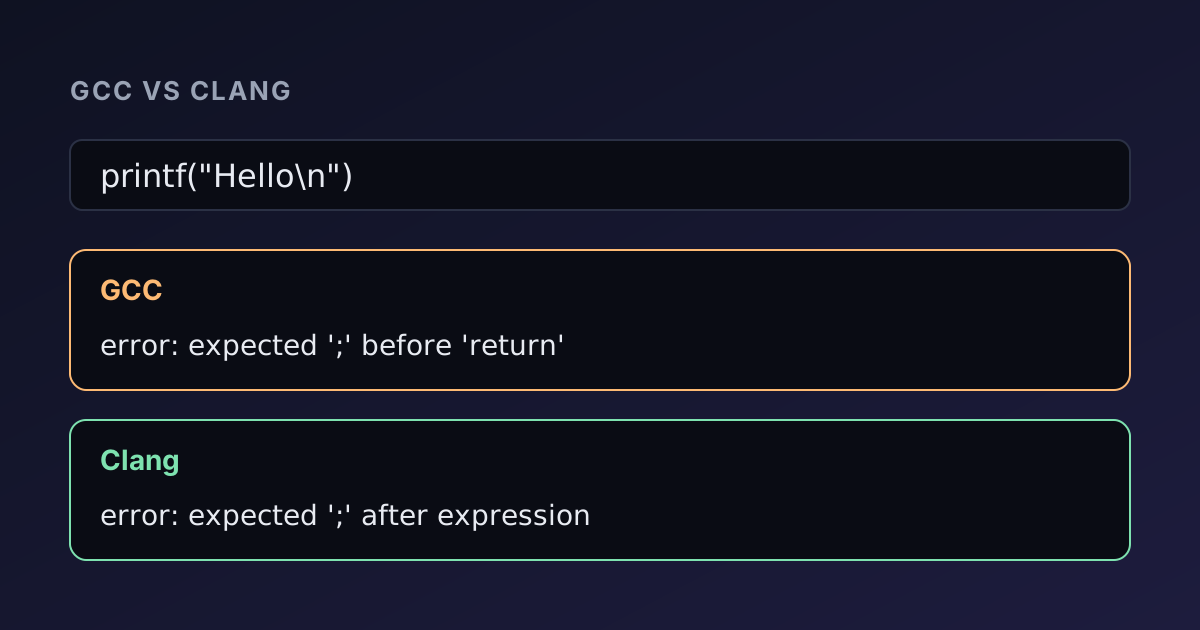
Clang made its name with readable diagnostics, and GCC has caught up a lot since. Here is a missing semicolon:
#include <stdio.h>

int main(void) {
    printf("Hello\n")
    return 0;
}
Clang:
main.c:4:22: error: expected ';' after expression
    4 |     printf("Hello\n")
      |                      ^
      |                      ;
GCC:
main.c: In function ‘main’:
main.c:4:22: error: expected ‘;’ before ‘return’
    4 |     printf("Hello\n")
      |                      ^
      |                      ;
    5 |     return 0;
      |     ~~~~~~
Both point at the same column and suggest the fix. Clang describes what is missing after the expression; GCC names the token that surprised it. A typo in a variable name gets a "did you mean" suggestion from both:
main.c:5:33: error: use of undeclared identifier 'countr'; did you mean 'counter'?main.c:5:33: error: ‘countr’ undeclared (first use in this function); did you mean ‘counter’?The format warning for printing a long with %d shows a difference in style: GCC labels both types under the code, Clang states the mismatch in one sentence. Both propose %ld. In practice, if one compiler's message is unclear, the other's often helps, which is a good reason to try your code with both. The guide to C compiler errors lists the common messages and their fixes.
GNU extensions: not everything is portable
GCC accepts several extensions to C by default, even with -std=c17, unless you add -pedantic. The best-known is nested functions:
#include <stdio.h>

int main(void) {
    int base = 10;
    int add(int x) { return base + x; }
    printf("%d\n", add(5));
    return 0;
}
GCC compiles it and prints 15. Clang refuses:
main.c:5:20: error: function definition is not allowed hereClang supports most GNU extensions (statement expressions, typeof, __attribute__, case ranges), but not nested functions or variable-length arrays inside structs. If code must build with both, compile it with -pedantic on GCC, or simply test it on Clang. The online compiler is a quick way to do that without installing anything.
Undefined behaviour: different compilers, different results
Code with undefined behaviour has no correct output, and the two compilers often produce different ones. Returning the address of a local variable is a good example:
#include <stdio.h>

int *broken(void) {
    int local = 7;
    return &local;
}

int main(void) {
    int *p = broken();
    printf("%d\n", p != NULL);
    return 0;
}
Both compilers warn. GCC says "function returns address of local variable"; Clang says "address of stack memory associated with local variable 'local' returned". But the programs disagree: the GCC build prints 0, because GCC replaces the dangling address with NULL on purpose (so the bug crashes early instead of reading stale memory), while the Clang build prints 1.
Buffer overflows differ too. Copying "Alexander" into a char name[4] with strcpy stops the GCC program on Ubuntu with *** buffer overflow detected ***, because the distribution enables fortified string functions, while the program from the online compiler prints the name and silently corrupts memory. Different results like these are a sign of a bug, not a compiler problem. Running code on both compilers, and with -fsanitize=address,undefined, is one of the cheapest ways to find such bugs. More examples are in our articles on pointers in C and strings in C.
Speed, platforms and tooling
Performance. Neither compiler is consistently faster. Benchmarks swing a few percent either way depending on the code and the version. Clang has historically compiled faster, especially C++, though the gap has narrowed.
Platforms. GCC targets more processor architectures, including many embedded ones. Clang is the standard on Apple platforms and supports cross-compiling to many targets from a single binary, including WebAssembly, which is how the online C compiler runs Clang inside your browser.
Tooling. LLVM's library design gave Clang a large ecosystem: clang-format for formatting, clang-tidy for linting, clangd for editor autocompletion, and the sanitizers that GCC later adopted. These tools work on code you build with GCC too.
Windows. Neither is the native Windows compiler; that is Microsoft's MSVC. You can use GCC through MinGW-w64 or Cygwin, and Clang either directly or as clang-cl, which accepts MSVC-style options.
Which one should you use?
- On Linux: GCC is already installed and is a fine default. Install Clang as a second opinion.
- On macOS: you are using Clang, even when you type
gcc. - For portable code: build with both, plus
-Wall -Wextra -pedantic. Anything that only one accepts deserves a second look. - For learning and quick tests: use whatever is at hand. An online compiler that runs standard C17 behaves like
gcc -std=c17for almost every beginner and exam program.
Summary
GCC and Clang implement the same C standard, share flags and run code at similar speeds. Clang's error messages are slightly more direct, GCC's have become just as helpful, and the most visible differences are GNU-only extensions such as nested functions and how undefined behaviour plays out.
You can try Clang without installing anything in the online C Compiler or the C++ Compiler, and paste the output of both compilers into the Text Diff tool to see exactly where they disagree.

Written by
Avinash Kori
Founder of Devtoolry
Avinash builds Devtoolry, a set of free developer tools that run entirely in the browser, and writes practical guides on the formats, encodings and techniques behind them.
Try it yourself
The free tools used in this article. They run in your browser, so nothing you paste is uploaded.
C Compiler
Compile and run C code online with Clang 21, a GCC-compatible compiler, and stdin input. Programs run in your browser as WebAssembly, so your code stays private.
C++ Compiler
Compile and run C++20 code online with Clang 21, libc++ and stdin input. Programs compile to WebAssembly and run in your browser, so your code stays private.
Text & Code Diff
Compare two texts or code files online side by side. Additions, deletions and modified lines are highlighted with inline word changes. Runs in your browser.