How to Preview HTML Code Online Safely: Sandboxed iframes Explained
Preview and render HTML code without risk: how sandboxed iframes, srcdoc and CSP isolate untrusted markup, why scripts stay off, and fixes for broken previews.
 By Avinash KoriPublished 5 min read
On this page
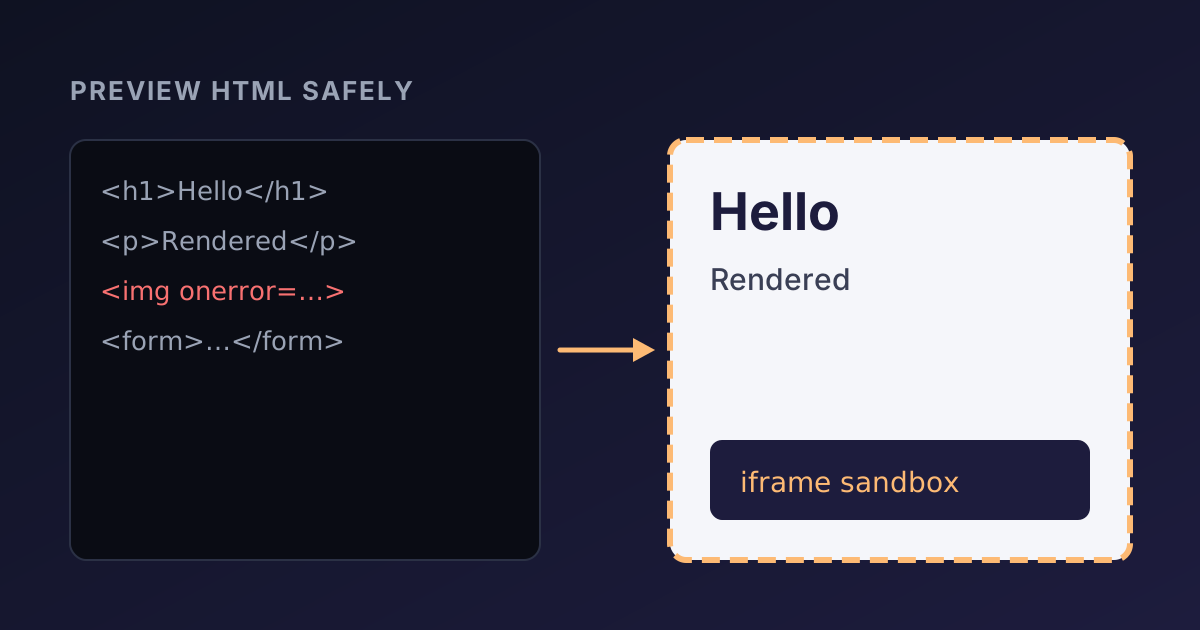
Previewing HTML sounds trivial: put the markup in a page and let the browser draw it. It stops being trivial as soon as the HTML comes from somewhere you don't fully trust, such as an email template from a vendor, a snippet from a forum, a file a user uploaded or output from a language model. HTML can carry scripts, forms and links that act with the permissions of whatever page displays it.
This article explains how to look at any HTML safely: the <iframe sandbox> attribute, inline documents with srcdoc, how the Content Security Policy adds a second wall, and why previews sometimes look broken. The same techniques power the HTML Viewer on this site, which you can use to try every example below.
Why rendering HTML can be dangerous
When a page inserts HTML into itself, for example with element.innerHTML = untrusted, that HTML becomes part of the page. Any script it manages to run can read the page's cookies (unless they are HttpOnly), its local storage and everything the user sees, and can send requests as the signed-in user. This is cross-site scripting (XSS), one of the most common web vulnerabilities.
Scripts don't need a <script> tag. Event handler attributes run code too:
<img src="does-not-exist.png" onerror="alert('this runs')">The image fails to load, the onerror handler fires, and the code runs. Filtering out <script> tags with a regular expression doesn't make HTML safe; there are far too many ways to run code. There are two reliable approaches: sanitise the HTML with a proven library such as DOMPurify, or render it somewhere it cannot reach your page. For a preview, the second approach is simpler and keeps the markup exactly as written.
The sandboxed iframe
An <iframe> displays a separate document inside a rectangle on the page. The sandbox attribute puts that document under strict restrictions. With an empty value, everything is switched off:
<iframe sandbox srcdoc="<h1>Hello</h1><p>Rendered safely.</p>"></iframe>In a sandboxed frame with no permissions:
- scripts don't run, including
onerrorand other event handlers; - forms can't be submitted;
- pop-ups, new windows and modal dialogs are blocked;
- the frame can't navigate the page around it;
- the content gets a unique, opaque origin, so it can't read the parent page's cookies, storage or DOM, even though it was created by that page.
You switch individual capabilities back on by listing them: sandbox="allow-scripts", sandbox="allow-forms allow-popups" and so on. The rule is to grant as little as possible.
srcdoc holds the HTML of the framed document directly, so nothing has to be uploaded or served from a URL. That is how an online HTML viewer can render your code entirely in the browser.
The one combination to avoid
Two permissions are dangerous together: allow-scripts and allow-same-origin. With both, a framed document that is same-origin with its parent (and a srcdoc document is) can run a script that reaches into the parent page and removes the sandbox attribute from its own iframe. At that point the sandbox does nothing.
So a safe preview that needs JavaScript uses sandbox="allow-scripts" without allow-same-origin. The scripts run, but in an opaque origin with no access to your page. That is exactly what the HTML Viewer does when you switch on "Run scripts": it adds allow-scripts (and allow-modals, so alert() works) and nothing else.
A second wall: Content Security Policy
A sandbox limits what the framed document can do to its parent. A Content Security Policy (CSP) limits what any document on the site can load and run. An srcdoc iframe inherits the CSP of the page that creates it, so if the site only allows scripts from its own origin, a preview can't load a script from a random CDN either, even with scripts enabled.
This is why a pasted snippet with <script src="https://example.com/library.js"> may not work in a preview while inline <script> blocks do. It is a deliberate trade-off: the preview shows your markup and inline code, but it can't be used to pull in arbitrary third-party code.
Why your preview looks broken
Most "the preview is wrong" problems have one of these causes:
- Relative URLs.
src="images/logo.png"orhref="style.css"are resolved against a base URL, and an inline document has no folder to resolve them against. Use absolutehttps://URLs, or add a<base href="https://your-site.example/">tag inside the snippet. - Missing styles. The framed document is isolated, so it doesn't inherit the CSS of the page around it. Add a
<style>block or link a public stylesheet. - Scripts switched off. Content generated by JavaScript (frameworks, charts, sliders) stays empty until scripts are allowed.
- Forms do nothing. Submitting is blocked in the sandbox, which is what you want for untrusted markup.
- Server-side templates. PHP, Razor (
.cshtml), JSX or Jinja code is executed on a server before a browser ever sees it. Paste the HTML the server produces, not the template, or the directives appear as plain text.
Hard-to-read markup is another common complaint. Run minified or machine-generated HTML through the HTML Formatter first, and the structure becomes obvious.
Previewing HTML emails
HTML emails are a common reason to need a quick preview. A viewer shows how a browser renders the markup, which is a good first check of the layout, images and links. Email clients are stricter than browsers, though: some ignore <style> blocks, most block scripts entirely, and many need tables for layout and inline style attributes. Treat a browser preview as a draft check, and test the final email in the real clients your readers use.
The same goes for meta tags and social cards: a viewer renders the visible page, while tags in the <head> only matter to search engines and social networks. Our guide to HTML meta tags for SEO explains which ones count.
How to see the HTML of any web page
To inspect how an existing page is built, open its source in the browser with Ctrl+U (Cmd+Option+U in Chrome on a Mac), or put view-source: in front of the address. You can copy parts of that source into a viewer to render them in isolation, for example to debug a single card or table.
Keep in mind that the source is the HTML the server sent. Pages built by JavaScript frameworks may contain little more than an empty <div id="root">; the browser's developer tools (F12, Elements tab) show the live document after scripts have run.
Summary
- Never insert untrusted HTML directly into a page: event handlers like
onerrorrun code even without<script>tags. - Render previews in an
<iframe sandbox>withsrcdoc. An empty sandbox blocks scripts, forms, pop-ups and access to the parent page. - If scripts are needed, use
allow-scriptsalone. Never combine it withallow-same-origin. - A CSP adds a second layer by controlling what any document can load.
- Broken previews usually come down to relative URLs, missing styles or disabled scripts.
Paste your markup into the HTML Viewer to see it rendered safely as you type. When it looks right, the HTML to PDF converter turns the same HTML into a document, and the HTML Entity Encoder escapes code samples you want to show as text rather than render.

Written by
Avinash Kori
Founder of Devtoolry
Avinash builds Devtoolry, a set of free developer tools that run entirely in the browser, and writes practical guides on the formats, encodings and techniques behind them.
Try it yourself
The free tools used in this article. They run in your browser, so nothing you paste is uploaded.
HTML Viewer
Free online HTML viewer: paste HTML code and see it rendered live in a secure sandboxed preview. Check snippets, emails and templates with scripts off.
HTML Formatter
Format and beautify messy or minified HTML into clean, indented markup with Prettier, including embedded CSS and JavaScript. Runs locally in your browser.
HTML to PDF Converter
Convert HTML to a downloadable PDF online with live preview, paper sizes, orientation, margins, page breaks and page numbers. Your file is not stored.