How Strong Is Your Password? Entropy Explained with Examples
Calculate password strength in bits of entropy, see how long real passwords take to crack, compare passphrases with random strings, and generate them safely.
 By Avinash KoriPublished 5 min read
On this page
"Use at least 8 characters with an uppercase letter, a number and a symbol." That rule is on half the sign-up forms on the internet, and it produces passwords like Password1!, which are cracked in the first second of any attack. Password strength isn't about ticking boxes. It's about how many guesses an attacker needs, and that can be measured.
This guide explains entropy, the number that measures password strength, works through real examples, and shows how to generate passwords that are actually strong.
Entropy: counting guesses in bits
If a password is chosen at random from a set of possibilities, its strength is the number of possibilities. Entropy expresses that number in bits:
entropy = length × log2(alphabet size)Each bit doubles the number of guesses. A 40-bit password has about 1.1 trillion possibilities; a 41-bit one twice as many.
Common alphabets give these values per character:
| Characters used | Alphabet size | Bits per character |
|---|---|---|
| Digits (PIN) | 10 | 3.32 |
| Lowercase letters | 26 | 4.70 |
| Upper + lower + digits | 62 | 5.95 |
| All printable ASCII | 94 | 6.55 |
| Words from a 7,776-word Diceware list | 7,776 | 12.92 per word |
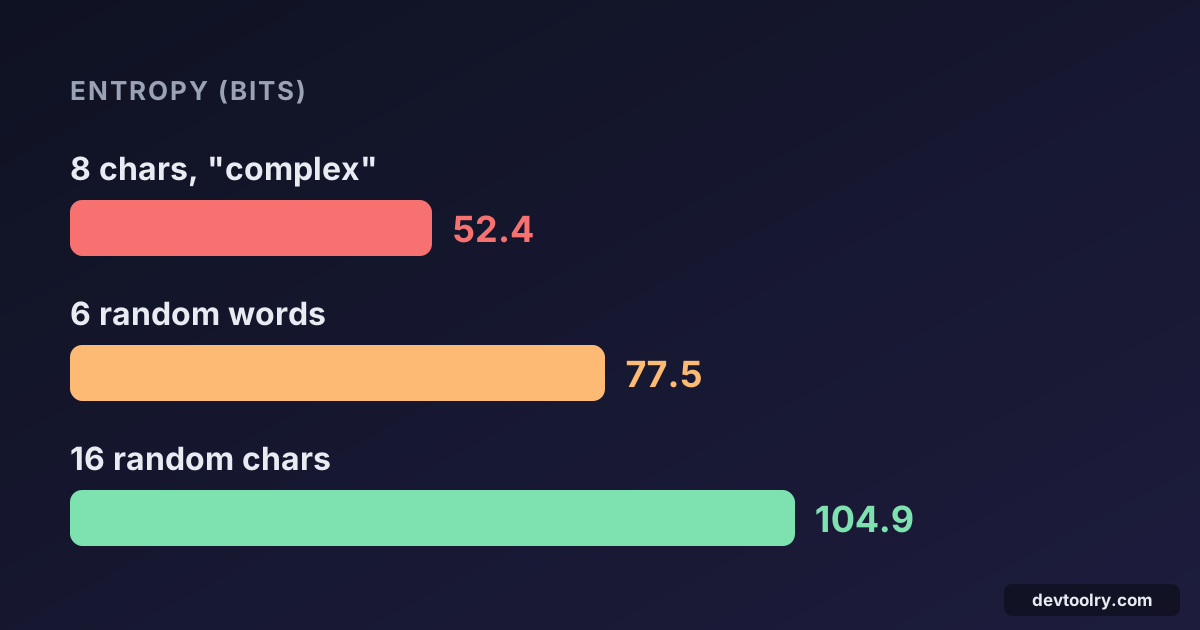
So an 8-character password using all 94 printable characters has 8 × 6.55 = 52.4 bits. A 16-character one has 104.9 bits.
Notice what moves the number. Adding symbols to the alphabet raises bits per character from 5.95 to 6.55, about 10%. Doubling the length doubles the entropy. Length beats complexity.
How long does cracking take?
Entropy becomes meaningful once you know the attacker's speed. That depends on the situation:
- Online attacks (guessing at a login form) are slow: maybe thousands of guesses per second at best, and rate limiting and lockouts cut that further.
- Offline attacks happen after a database breach, when the attacker has password hashes and can test guesses on their own hardware. Against a fast hash like MD5 or SHA-256, a rig of GPUs can test around 10 billion guesses per second, and more.
Here's the average time to find a random password at 10 billion guesses per second (half the search space, on average):
| Password | Entropy | Average time to crack |
|---|---|---|
| 8 lowercase letters | 37.6 bits | 10 seconds |
| 8 characters, letters + digits | 47.6 bits | 3 hours |
| 8 characters, all printable | 52.4 bits | 3.5 days |
| 4 random Diceware words | 51.7 bits | 2 days |
| 12 characters, all printable | 78.7 bits | 750,000 years |
| 6 random Diceware words | 77.5 bits | 350,000 years |
| 16 characters, all printable | 104.9 bits | far longer than the age of the universe |
The 8-character "complex" password that satisfies the classic rules falls in days. At 12 random characters the attack is hopeless. That's why current guidance, such as NIST SP 800-63B, focuses on length and on blocking known-breached passwords instead of composition rules.
A slow password hash like Argon2 or bcrypt on the server cuts the attacker's speed by orders of magnitude, which helps users with weaker passwords. Our comparison of MD5, SHA-1 and SHA-256 explains why fast hashes are the wrong tool for passwords.
The catch: entropy only applies to random passwords
The formula assumes every character was chosen randomly. Human-chosen passwords aren't random, and attackers know it. They don't try aaaaaaaa, aaaaaaab, … in order. They try:
- Leaked passwords first. Billions of real passwords from past breaches are public.
Summer2026!has been used by thousands of people. - Dictionary words with rules. Capitalise the first letter, add a year, replace
awith@, append!. Cracking tools apply thousands of such rules automatically. - Personal information. Names, birthdays, pets and sports teams, which are easy to find online.
P@ssw0rd2026! looks like 13 characters from a 94-character alphabet, or 85 bits. In reality it's a dictionary word with common substitutions and a year, cracked in seconds. Its real entropy is closer to 20 bits.
This is why "strength meters" that just count character classes are misleading. Better meters (like the open-source zxcvbn) look for words, patterns, dates and keyboard sequences, and estimate guesses the way an attacker would.
Passphrases: strong and memorable
For the few passwords you have to remember (your computer login, your password manager's master password), a passphrase of random words is the best compromise. The famous example is correct horse battery staple.
The key word is random. Choose words with dice or a generator from a large list, not by thinking of a sentence:
- 4 random words from a 7,776-word list: 51.7 bits. Fine for an online account with rate limiting, weak against an offline attack.
- 6 random words: 77.5 bits. Comparable to a random 12-character password, and much easier to type and remember.
A sentence you made up yourself ("my dog loves the beach") has far less entropy, because natural language is predictable.
Generating passwords correctly
For everything else, let a password manager generate and remember a unique random password for every site. Uniqueness matters as much as strength: if one site leaks your password, attackers try it everywhere else ("credential stuffing").
When you generate passwords or tokens in code, two rules matter:
1. Use a cryptographically secure random source. Math.random() in JavaScript and Python's random module are predictable and must never be used for secrets. Use crypto.getRandomValues() in browsers and Node.js, or Python's secrets module.
2. Avoid modulo bias. Mapping a random byte (0–255) onto an alphabet with byte % alphabet.length makes some characters slightly more likely unless the alphabet size divides 256. Reject values above the largest multiple:
function randomPassword(length, alphabet) {
  // Values at or above `limit` are rejected so every character is equally likely.
  const limit = 256 - (256 % alphabet.length);
  const out = [];
  while (out.length < length) {
    for (const byte of crypto.getRandomValues(new Uint8Array(length * 2))) {
      if (byte < limit && out.length < length) out.push(alphabet[byte % alphabet.length]);
    }
  }
  return out.join('');
}

const ALPHABET = 'ABCDEFGHIJKLMNOPQRSTUVWXYZabcdefghijklmnopqrstuvwxyz0123456789!@#$%^&*-_=+';
randomPassword(20, ALPHABET); // e.g. "x7DggBbto1qqg$@x44!U" — 20 × log2(74) ≈ 124 bits
In Python, the standard library does it for you:
import secrets, string

alphabet = string.ascii_letters + string.digits + "!@#$%^&*-_=+"
password = "".join(secrets.choice(alphabet) for _ in range(20))
token = secrets.token_urlsafe(32)  # 32 random bytes as Base64URL, for API keys
The Password Generator uses the browser's secure generator and shows the strength as you change the length and character sets. For API keys, session secrets and HMAC keys, which nobody types, use the Random String Generator with 32 or more bytes of hex or Base64URL.
How strong is strong enough?
| Use | Recommendation |
|---|---|
| Accounts in a password manager | 16+ random characters (100+ bits), unique per site |
| Master password, device login | 6–7 random Diceware words (77–90 bits) |
| API keys, tokens, HMAC secrets | 32 random bytes (256 bits) |
| PINs | Only with strict attempt limits (a 4-digit PIN is 13.3 bits) |
And whatever the password, turn on multi-factor authentication where you can. A stolen password is far less useful when it isn't enough on its own.
Summary
Password strength is the number of guesses needed, measured in bits: length × log2(alphabet size), but only for passwords that are truly random. Length matters more than symbols, human-made patterns are much weaker than they look, and offline attacks run at billions of guesses per second. Use random passphrases for what you must remember, a password manager with 16+ random characters for everything else, and a secure random generator whenever you create secrets in code.

Written by
Avinash Kori
Founder of Devtoolry
Avinash is a full-stack web developer from Surat, India, with eight years of experience in PHP, Laravel and Angular. He built Devtoolry so developers can solve everyday problems quickly with free tools that run entirely in the browser, and writes practical guides on the formats, encodings and techniques behind them.
Try it yourself
The free tools used in this article. They run in your browser, so nothing you paste is uploaded.
Password Generator
Generate strong, random passwords online with your browser's cryptographically secure generator. Choose length and character sets; check the strength meter.
Random String Generator
Generate random strings, tokens and API keys online in hex, Base64URL or a custom alphabet, using your browser's cryptographically secure generator.
Hash Generator
Generate MD5, SHA-1, SHA-256, SHA-384 and SHA-512 hashes and HMACs of any text online. Hashing runs in your browser, so the input never leaves your device.