URL Encoding Explained: Percent-Encoding, encodeURIComponent and Common Bugs
How percent-encoding works, when to use encodeURIComponent vs encodeURI, why + sometimes means a space, and how to fix double encoding and broken query strings.
 By Avinash KoriPublished 5 min read
On this page
A user searches your site for Tom & Jerry. The link you build is /search?q=Tom & Jerry, and your server receives a search for Tom plus a mysterious empty parameter called Jerry. Nothing crashed, nothing was logged, and the results are wrong.
That's a URL encoding bug, and it's one of the most common bugs on the web. This guide explains how percent-encoding works, which function to use in each situation, and how to diagnose the classic problems: spaces, plus signs, double encoding and Unicode.
Why URLs need encoding
A URL is made of parts, and certain characters separate those parts:
https://example.com/path/to/page?key=value&other=1#section/ separates path segments, ? starts the query, & separates parameters, = separates a name from its value, and # starts the fragment. These are reserved characters. If one of them appears inside a value, it must be encoded, or the URL means something different. Spaces, quotes, non-ASCII letters and control characters aren't allowed at all and must always be encoded.
How percent-encoding works
Percent-encoding replaces a byte with % followed by its two-digit hexadecimal value. A space is byte 0x20, so it becomes %20. An ampersand is 0x26, so it becomes %26.
For non-ASCII characters, the text is first converted to UTF-8 bytes, and each byte is encoded:
é  → UTF-8 bytes C3 A9       → %C3%A9
🚀 → UTF-8 bytes F0 9F 9A 80 → %F0%9F%9A%80
So café 🚀 becomes caf%C3%A9%20%F0%9F%9A%80. Unreserved characters (A–Z a–z 0–9 - _ . ~) are never encoded.
You can try any value in the URL Encoder/Decoder, and see how a full URL splits into parts with the URL Parser.
encodeURIComponent vs encodeURI
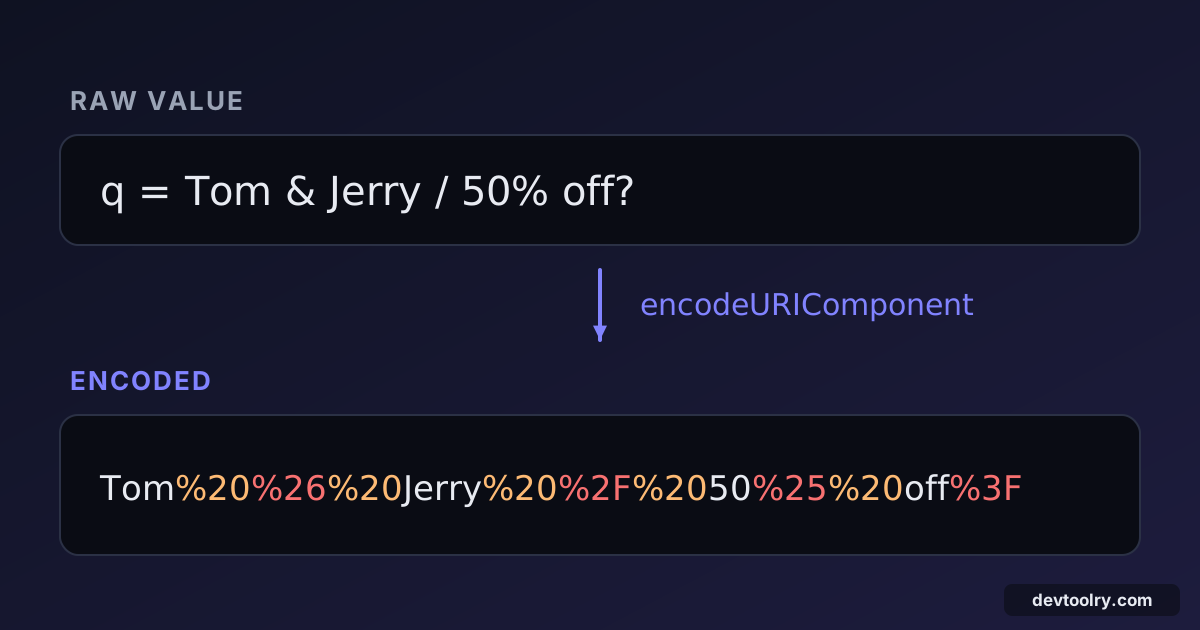
JavaScript has two encoding functions, and choosing the wrong one is behind many bugs. Here's what they do with the same input:
const value = 'Tom & Jerry / 50% off?';

encodeURIComponent(value); // "Tom%20%26%20Jerry%20%2F%2050%25%20off%3F"
encodeURI(value);          // "Tom%20&%20Jerry%20/%2050%25%20off?"
encodeURIComponent encodes everything except unreserved characters (and ! * ' ( )). It's meant for a single piece of a URL: a query value, a path segment. This is the one you want almost every time.
encodeURI assumes you're giving it a complete URL, so it leaves the reserved characters & / ? = # : alone. That's fine for fixing spaces in a whole URL, but disastrous for a value: the & and ? above survive and break the query string.
Rule: build URLs from parts, and encode each part with encodeURIComponent. Never use encodeURI on a value.
Even better: let the URL API do it
Modern JavaScript has URL and URLSearchParams, which encode correctly without you choosing a function:
const url = new URL('https://example.com/search');
url.searchParams.set('q', 'C++ & Rust');
url.searchParams.set('page', '2');

url.href; // "https://example.com/search?q=C%2B%2B+%26+Rust&page=2"
Reading is just as easy, and decoding is automatic:
new URL(location.href).searchParams.get('q'); // "C++ & Rust"Python's equivalent is urllib.parse.urlencode({'q': 'C++ & Rust'}), which gives q=C%2B%2B+%26+Rust. Most languages and HTTP libraries have something similar, so you rarely need to call an encoding function directly.
The plus sign problem
Notice that URLSearchParams wrote the space as +, not %20. This comes from HTML forms: the application/x-www-form-urlencoded format, used when a form is submitted, encodes spaces as +. In query strings, + and %20 therefore both commonly mean "space".
This causes two opposite bugs:
- A literal plus becomes a space. If you build
?q=C++by hand, a form-style parser readsC(C and two spaces). The plus must be encoded as%2B. - A plus isn't decoded.
decodeURIComponent('a+b')returnsa+b, because it only handles percent escapes.new URLSearchParams('q=a+b').get('q')returnsa b.
Outside the query string, in the path, + is just a plus. /files/a+b.txt is a file called a+b.txt. So: decode query strings with a query-string parser, and decode paths with decodeURIComponent.
Double encoding
Double encoding happens when an already-encoded value is encoded again. The % itself gets encoded as %25:
"my file" → my%20file → my%2520fileThe server decodes once and gets my%20file: a literal percent sign, a 2 and a 0. Symptoms are %2520, %253A or %252F in your logs, and "file not found" for files that exist.
It usually happens when two layers each think they're responsible for encoding: you call encodeURIComponent, then pass the result to an HTTP library that encodes query parameters again. Or a redirect URL is encoded, stored, and encoded again when used. The fix is to encode exactly once, at the point where the URL is assembled, and to pass raw values everywhere else.
To diagnose, decode the value repeatedly until it stops changing: if it takes more than one decode to get readable text, something encoded it twice.
Malformed percent sequences
A % that isn't followed by two hex digits is invalid:
decodeURIComponent('100%'); // URIError: URI malformedThis often comes from user input like "50% off" that was put into a URL without encoding. Encode it properly (50%25%20off). On the server side, wrap decoding in a try/catch and return a 400 response rather than crashing.
Security notes
URL encoding is about correctness, but getting it wrong has security consequences:
- Open redirects. A
?next=parameter that is decoded and followed without validation lets attackers send users to any site. Allow only relative paths or a list of known hosts. - Path traversal.
%2e%2e%2fdecodes to../. Validate paths after decoding, and never build file paths from URL segments without normalising them. - Encoding is not escaping for HTML. A percent-encoded value placed into a page must still be HTML-escaped. Different contexts need different escaping; decoding a URL value and inserting it into the DOM with
innerHTMLis an XSS bug.
And as with Base64, encoding hides nothing: tokens and passwords in URLs end up in browser history, server logs and Referer headers. Send secrets in headers or request bodies instead.
A checklist for building URLs
- Use
URLandURLSearchParams(or your language's URL builder) instead of string concatenation. - If you must encode manually, use
encodeURIComponentfor each value — neverencodeURI. - Encode once, at the moment the URL is assembled.
- Encode literal
+as%2Bin query values; decode query strings with a form-aware parser. - Validate redirect targets and file paths after decoding.
- When something looks wrong, paste the URL into the URL Parser to see exactly how each part and parameter is read.
Summary
Percent-encoding turns unsafe characters into % plus their UTF-8 bytes in hex, so values can't be confused with the URL's structure. Use encodeURIComponent (or, better, URLSearchParams) for values, remember that + means a space in query strings, and encode exactly once to avoid %2520. Most URL bugs disappear when URLs are built from parts by a real URL API.

Written by
Avinash Kori
Founder of Devtoolry
Avinash is a full-stack web developer from Surat, India, with eight years of experience in PHP, Laravel and Angular. He built Devtoolry so developers can solve everyday problems quickly with free tools that run entirely in the browser, and writes practical guides on the formats, encodings and techniques behind them.
Try it yourself
The free tools used in this article. They run in your browser, so nothing you paste is uploaded.
URL Encode / Decode
URL encode or decode text online: percent-encode query string values and full URLs, or turn %20-style escapes back into readable text.
URL Parser
Parse a URL online into protocol, host, port, path, query parameters and fragment. Read long tracking links and debug query strings at a glance.
Base64 Encode / Decode
Encode text to Base64 or decode Base64 to text online, with full UTF-8 and URL-safe Base64 support. Conversion runs in your browser, so nothing is uploaded.