Prettier for PHP: Format PHP Code with @prettier/plugin-php
How to use Prettier for PHP: install @prettier/plugin-php, set up .prettierrc, choose braceStyle and phpVersion, format on save and check PHP formatting in CI.
 By Avinash KoriPublished 7 min read
On this page
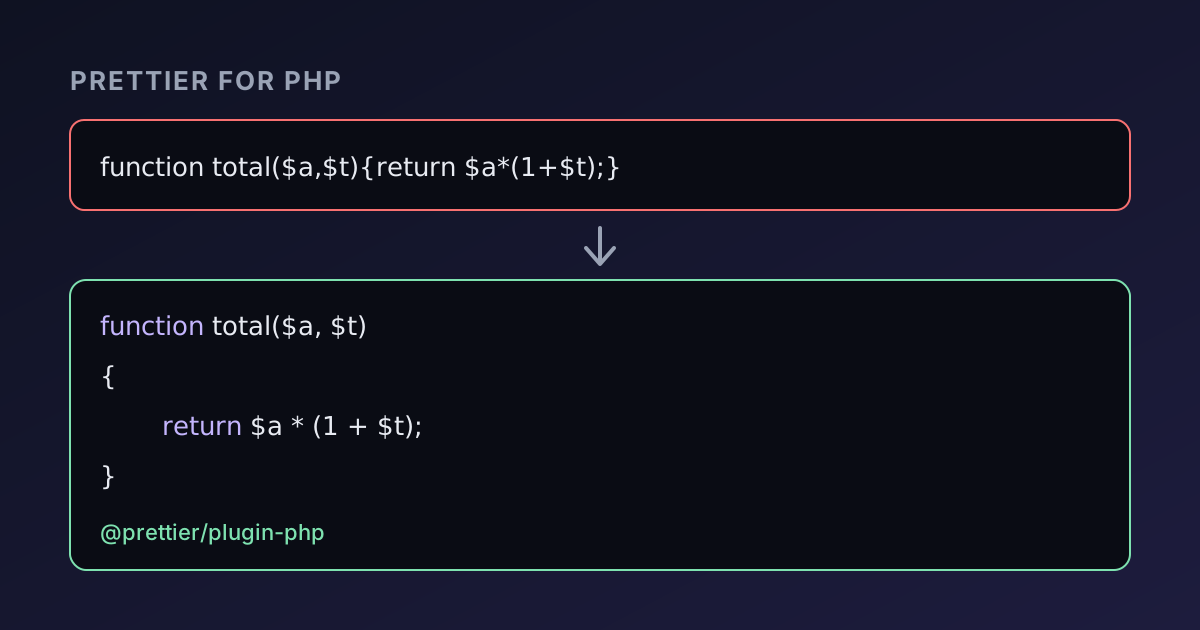
Prettier is the formatter most JavaScript projects use, and it formats PHP too. The PHP support lives in a separate package, @prettier/plugin-php, maintained by the Prettier team on GitHub. Install it next to Prettier and every .php file gets the same treatment as your JavaScript: one consistent layout, no style debates in code review, and diffs that only show real changes.
This guide shows how to set up Prettier for PHP in a project, what each PHP option does, how to run it in your editor and in CI, and where it differs from PHP-CS-Fixer. Every output below was produced with Prettier 3.9 and @prettier/plugin-php 0.25. To see the result on your own code without installing anything, paste it into the PHP Formatter, which runs the same plugin in your browser.
What the plugin does to your code
Prettier doesn't apply a list of style rules. It parses the file into a syntax tree, throws away the original layout and prints the code again from scratch, wrapping lines that would exceed the print width (80 characters by default). That's why the result is the same no matter how the code was written before.
Here is a cramped Laravel-style controller:
<?php
namespace App\Http;
use Illuminate\Http\Request;
class OrderController{
public function store(Request $request){
$data=$request->validate(['email'=>'required|email','items'=>'required|array']);
if(count($data['items'])>10){throw new \RuntimeException('Too many items');}
return response()->json(['ok'=>true,'count'=>count($data['items'])],201);}}
And the output with no configuration at all:
<?php
namespace App\Http;
use Illuminate\Http\Request;
class OrderController
{
    public function store(Request $request)
    {
        $data = $request->validate([
            "email" => "required|email",
            "items" => "required|array",
        ]);
        if (count($data["items"]) > 10) {
            throw new \RuntimeException("Too many items");
        }
        return response()->json(
            ["ok" => true, "count" => count($data["items"])],
            201,
        );
    }
}
A few things are worth noticing:
- Class and method braces go on their own line, while
ifbraces stay on the same line. This is the PER Coding Style (the successor of PSR-12) and the plugin's default. - Indentation is four spaces. The plugin overrides Prettier's usual two-space default for PHP files.
- Arrays and argument lists that don't fit on one line are broken up one item per line, with a trailing comma after the last one.
- Simple single-quoted strings became double-quoted, because
singleQuoteisfalseby default, just as in JavaScript. - No blank lines were added after
namespaceoruse. Prettier keeps the blank lines you write (collapsing several into one) but doesn't insert new ones, so this file still breaks a PSR-12 rule. Add the blank lines once and Prettier will keep them.
Installing Prettier for PHP
The plugin is an npm package, so the project needs a package.json. Laravel and Symfony projects that build front-end assets already have one; otherwise run npm init -y first.
npm install --save-dev prettier @prettier/plugin-phpThen tell Prettier to load the plugin. Create .prettierrc in the project root:
{
  "plugins": ["@prettier/plugin-php"]
}
Now Prettier recognises .php files. Format everything in one go, or check without changing anything:
npx prettier --write "src/**/*.php"
npx prettier --check "src/**/*.php"
--check lists every file that would change and exits with code 1 when there is at least one, which is what you want in CI. On a formatted project it prints All matched files use Prettier code style! and exits with 0.
Keep vendor code and generated files out with a .prettierignore file, which uses .gitignore syntax:
vendor/
storage/
bootstrap/cache/
*.blade.php
Blade templates are in the list because the plugin only understands PHP. In a .blade.php file, directives like @foreach and {{ $name }} are plain text to the PHP parser, so Prettier can't format the template in any useful way.
The PHP options
The plugin adds three options of its own and respects the standard Prettier options:
| Option | Default | What it controls |
|---|---|---|
phpVersion | "auto" | Which syntax the output may use; auto reads composer.json |
trailingCommaPHP | true | Trailing commas in multi-line arrays, calls and parameter lists |
braceStyle | "per-cs" | per-cs, psr-2 or 1tbs brace placement |
singleQuote | false | Prefer 'single' quotes for strings |
printWidth | 80 | Line length Prettier tries to stay within |
tabWidth | 4 for PHP | Spaces per indentation level |
Many PHP teams prefer single quotes, so a typical configuration is:
{
  "plugins": ["@prettier/plugin-php"],
  "singleQuote": true,
  "printWidth": 100
}
singleQuote never changes what a string means. With the default, 'plain' becomes "plain", but 'cost $5' stays single-quoted, because in double quotes $5 would look like interpolation.
If your team prefers opening braces on the same line everywhere, set "braceStyle": "1tbs":
class OrderController {
    public function store(Request $request) {
        // ...
    }
}
If the same .prettierrc also formats JavaScript, put PHP-only settings in an override so the JavaScript keeps its own style:
{
  "plugins": ["@prettier/plugin-php"],
  "overrides": [{ "files": "*.php", "options": { "singleQuote": true } }]
}
phpVersion and trailing commas
Trailing commas after the last argument of a function call are only valid from PHP 7.3, and after the last parameter of a function definition only from PHP 8.0. Prettier must not print syntax your server can't run, which is what phpVersion is for.
With the default auto, the plugin reads the PHP requirement from composer.json. Take this call:
<?php
$r = some_function_with_a_long_name($firstArgumentValue, $secondArgumentValue, $thirdArgument);
With no composer.json, the latest PHP version is assumed and the broken-up call ends with a comma:
<?php
$r = some_function_with_a_long_name(
    $firstArgumentValue,
    $secondArgumentValue,
    $thirdArgument,
);
With "require": { "php": ">=7.2" } in composer.json, the same file is printed without the last comma, because PHP 7.2 would reject it. If your project has no Composer file but runs an older PHP, set the version explicitly, for example "phpVersion": "7.4". To drop trailing commas entirely, set "trailingCommaPHP": false.
Format on save in VS Code and PhpStorm
In VS Code, install the Prettier extension (esbenp.prettier-vscode). It uses the Prettier and plugin versions from your project's node_modules and the project's .prettierrc. Add this to .vscode/settings.json so the whole team gets the same behaviour:
{
  "prettier.documentSelectors": ["**/*.php"],
  "[php]": {
    "editor.defaultFormatter": "esbenp.prettier-vscode",
    "editor.formatOnSave": true
  }
}
prettier.documentSelectors tells the extension to handle PHP files, which it doesn't register by default; the [php] block makes Prettier the formatter for them. Restart VS Code after installing the plugin so the extension loads it.
PhpStorm has built-in Prettier support under Settings → Languages & Frameworks → JavaScript → Prettier. Point it at the project's Prettier package, add php to the "Run for files" pattern (for example **/*.{js,ts,php}) and tick "Run on save".
Checking formatting in CI
Run the same --check command in your pipeline, so unformatted code can't be merged. A GitHub Actions job looks like this:
name: Format
on: [push, pull_request]
jobs:
  prettier:
    runs-on: ubuntu-latest
    steps:
      - uses: actions/checkout@v4
      - uses: actions/setup-node@v4
        with:
          node-version: 22
      - run: npm ci
      - run: npx prettier --check "src/**/*.php"
When you introduce Prettier into an existing codebase, reformat everything in a single commit that contains nothing else, then list that commit's hash in a .git-blame-ignore-revs file (the team guide to Prettier covers this step by step). git blame (and GitHub's blame view) will skip it, so blame still points at the people who wrote each line. Review that big commit with a diff checker set to ignore whitespace: what remains should only be quote and line-break changes.
Prettier, PHP-CS-Fixer or PHP_CodeSniffer?
They solve overlapping problems in different ways:
- Prettier with the PHP plugin only changes layout, and reprints whole files. It has very few options, which is the point: there is nothing to argue about. It suits teams that already use Prettier for JavaScript and want one tool and one config for both.
- PHP-CS-Fixer applies individual rules, and some of them change code, not just layout: ordering
usestatements, addingdeclare(strict_types=1);, convertingarray()to[]or removing unused imports. It has rule sets for PSR-12 and PER-CS and is written in PHP, so it needs no Node.js. - PHP_CodeSniffer (
phpcs) reports violations of a coding standard, and its companionphpcbffixes many of them. It's often used to enforce a standard such as PSR-12 or WordPress's in CI.
Some teams combine them: Prettier for layout, plus PHP-CS-Fixer with only the rules Prettier doesn't cover. Don't let two tools fight over the same thing, such as brace placement or quote style, or every run will undo the other.
Common problems
A file comes back unchanged. Code without an opening <?php tag is read as inline HTML, which is printed as it is. function f($a){return $a;} alone is left untouched; add <?php at the top.
Parse errors. Prettier must parse the whole file before it can print anything, so one syntax error stops it. The message gives the line and points at the token:
Parse Error : syntax error, unexpected '{' on line 1
> 1 | <?php function f( $a { return $a; }
    |                     ^
Here the closing parenthesis of the parameter list is missing. If you're not sure whether a snippet is valid, run it in the PHP Compiler first: PHP's own error message is often clearer.
Templates with mixed HTML and PHP. PHP blocks are formatted, but the HTML around them is kept as written:
<ul>
<?php foreach ($items as $i) { ?>
  <li><?= $i ?></li>
<?php } ?>
</ul>
Only foreach($items as $i) changed, to foreach ($items as $i). Prettier won't indent the HTML for you.
Different results on different machines. Pin the versions in package.json and commit package-lock.json. Formatting can change slightly between plugin releases, and two developers on different versions will keep reformatting each other's files.
Summary
To use Prettier for PHP, install prettier and @prettier/plugin-php, add the plugin to .prettierrc, and run npx prettier --write once. Choose singleQuote and braceStyle to match your team, let phpVersion follow composer.json, and add --check to CI. For a one-off file, or to try the options before you commit to them, paste the code into the PHP Formatter.

Written by
Avinash Kori
Founder of Devtoolry
Avinash builds Devtoolry, a set of free developer tools that run entirely in the browser, and writes practical guides on the formats, encodings and techniques behind them.
Try it yourself
The free tools used in this article. They run in your browser, so nothing you paste is uploaded.
PHP Formatter
Format PHP code online with Prettier for PHP (@prettier/plugin-php): PSR-12 braces, spacing and 4-space indentation. No install, and nothing is uploaded.
PHP Compiler
Run PHP 8.4 code online and see the output instantly, with stdin input and mbstring. PHP runs in your browser with WebAssembly, so your code stays private.
Text & Code Diff
Compare two texts or code files online side by side. Additions, deletions and modified lines are highlighted with inline word changes. Runs in your browser.