GCC Command Line Options Explained: -o, -c, -Wall, -std, -O2, -g and -lm
The GCC options you use every day, with real output from GCC 11: naming the output, compiling in steps, warnings, -std, -O levels, -g, -I, -D and -lm.
 By Avinash KoriPublished 9 min read
On this page
gcc main.c is enough to build a C program, but the options around it decide what you get: the name of the program, which warnings you see, which C standard is used, how fast the code runs and whether a debugger can follow it. This guide covers the options you will use every day, each with the real output of GCC 11.4 on Ubuntu 22.04.
Every option here works the same way in Clang, which is why most Makefiles can switch between gcc and clang by changing one word. The differences between the two compilers are in our GCC vs Clang comparison.
The everyday options at a glance
| Option | What it does |
|---|---|
-o name | Name the output file (otherwise it is a.out) |
-c | Compile to an object file (.o) without linking |
-Wall -Wextra | Turn on the useful warnings |
-Werror | Treat every warning as an error |
-std=c17 | Choose the C standard (c89, c99, c11, c17, c2x) |
-O0, -O2, -O3, -Os | Choose the optimisation level |
-g | Add debugging information for gdb |
-I dir | Look for header files in dir |
-D NAME=value | Define a macro, as #define would |
-l name | Link a library, for example -lm for the maths library |
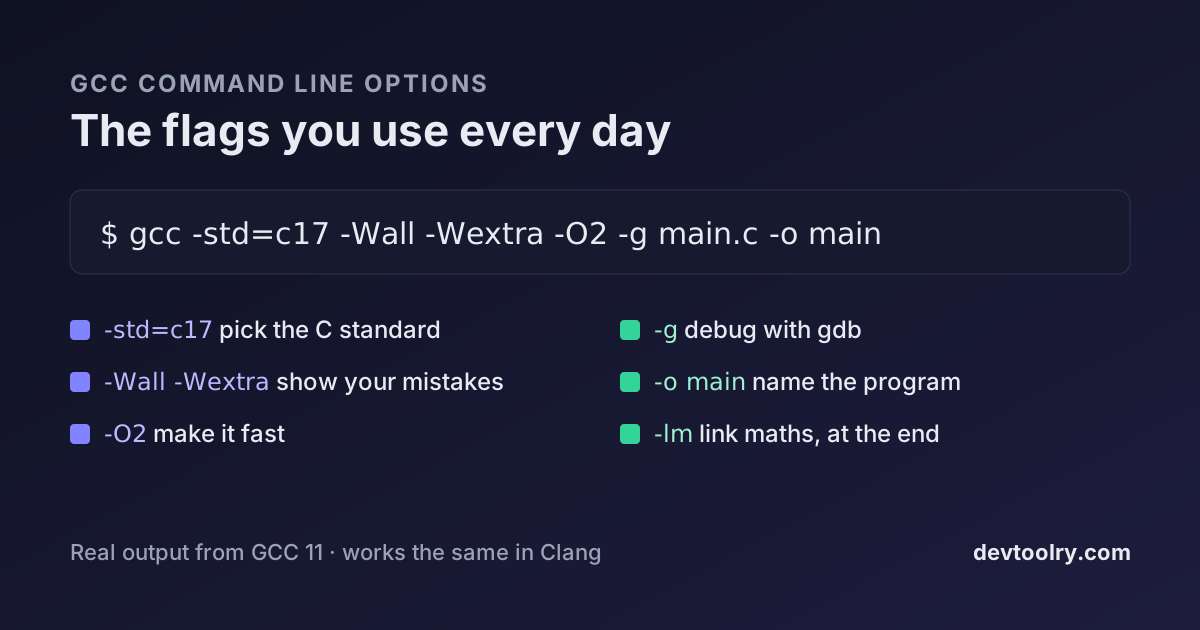
A good command line for learning and development combines most of them:
gcc -std=c17 -Wall -Wextra -pedantic -O2 -g main.c -o mainBuild and name the program: -o
Without options, GCC compiles and links in one go and calls the program a.out:
#include <stdio.h>

int main(void) {
    printf("Hello, GCC!\n");
    return 0;
}$ gcc hello.c
$ ./a.out
Hello, GCC!-o gives the program a name. The order of the arguments does not matter for -o, so gcc -o hello hello.c and gcc hello.c -o hello do the same thing:
$ gcc hello.c -o hello
$ ./hello
Hello, GCC!
On Windows with MinGW, the output is a.exe and -o hello creates hello.exe.
Compile in steps: -c, and what linking means
Building a program is two steps: compiling turns each .c file into machine code in an object file, and linking joins the object files with the libraries into one program. gcc main.c does both, which hides the second step until it fails.
Take a small project with a header in its own folder:
// include/mathutil.h
#ifndef MATHUTIL_H
#define MATHUTIL_H
int add(int a, int b);
#endif// mathutil.c
#include "mathutil.h"
int add(int a, int b) {
return a + b;
}// main.c
#include <stdio.h>
#include "mathutil.h"
int main(void) {
printf("2 + 3 = %d\n", add(2, 3));
return 0;
}Compiling only main.c fails twice, at two different steps. First the compiler cannot find the header:
$ gcc main.c -o app
main.c:2:10: fatal error: mathutil.h: No such file or directory
    2 | #include "mathutil.h"
      |          ^~~~~~~~~~~~
compilation terminated.
-I include adds the folder to the header search path. Now compiling works, but the linker cannot find the code for add, because mathutil.c was never compiled:
$ gcc -Iinclude main.c -o app
/usr/bin/ld: /tmp/ccrdIxYI.o: in function `main':
main.c:(.text+0x13): undefined reference to `add'
collect2: error: ld returned 1 exit status
An undefined reference is always a linker error: the declaration was fine, but no file that was linked contains the function. Pass every source file:
$ gcc -Iinclude main.c mathutil.c -o app
$ ./app
2 + 3 = 5
With -c, you can compile each file separately and link at the end. Build tools such as Make do this so that changing one file recompiles only that file:
$ gcc -Iinclude -c mathutil.c
$ gcc -Iinclude -c main.c
$ gcc main.o mathutil.o -o app
$ ./app
2 + 3 = 5
Two more options show the steps before machine code. -E stops after the preprocessor: our five-line hello.c becomes 744 lines once stdio.h is pasted in. -S stops after compiling and writes assembly to hello.s.
Warnings: -Wall, -Wextra, -Werror
By default GCC warns about very little. This program has three real problems, and plain gcc compiles it silently:
#include <stdio.h>

int sign(int x) {
    if (x > 0) return 1;
    if (x < 0) return -1;
}

int main(void) {
    int unused = 42;
    unsigned int limit = 10;
    int i = -1;
    if (i < limit) printf("smaller\n");
    printf("%d\n", sign(5));
    return 0;
}
-Wall finds two of them: a variable that is never used, and a function that can end without returning a value (sign(0) returns garbage):
$ gcc -Wall warn.c -o warn
warn.c: In function ‘main’:
warn.c:9:9: warning: unused variable ‘unused’ [-Wunused-variable]
    9 |     int unused = 42;
      |         ^~~~~~
warn.c: In function ‘sign’:
warn.c:6:1: warning: control reaches end of non-void function [-Wreturn-type]
    6 | }
      | ^
Despite its name, -Wall is not all warnings. -Wextra adds more, including the third bug: comparing a signed int with an unsigned int. Here -1 is converted to a huge unsigned number, so i < limit is false and the program never prints "smaller":
$ gcc -Wall -Wextra warn.c -o warn
warn.c: In function ‘main’:
warn.c:12:11: warning: comparison of integer expressions of different signedness: ‘int’ and ‘unsigned int’ [-Wsign-compare]
   12 |     if (i < limit) printf("smaller\n");
      |           ^
Each warning ends with the option that controls it, such as [-Wsign-compare]. You can turn one off with the -Wno- form (-Wno-sign-compare), but fix the code first. -Werror turns warnings into errors, so a build with warnings fails; use it in continuous integration, where nobody reads warnings:
$ gcc -Wall -Werror warn.c -o warn
warn.c:9:9: error: unused variable ‘unused’ [-Werror=unused-variable]
...
cc1: all warnings being treated as errors
-pedantic adds warnings for anything that is not standard C, such as GNU extensions. Together, -Wall -Wextra -pedantic catches most beginner mistakes before the program even runs. Many error messages are explained in our guide to C compiler errors.
Choose the C standard: -std
GCC 11 compiles gnu17 by default: C17 plus GNU extensions. -std= picks a standard explicitly, and __STDC_VERSION__ shows which one is active:
#include <stdio.h>

int main(void) {
    // a C99-style comment
    for (int i = 0; i < 2; i++) printf("%d\n", i);
    printf("__STDC_VERSION__ = %ldL\n", __STDC_VERSION__);
    return 0;
}$ gcc -std=c17 std.c -o std
$ ./std
0
1
__STDC_VERSION__ = 201710LThe same file is not valid C89, the 1989 standard many old textbooks and some university courses still use. -std=c89 -pedantic reports every feature it lacks:
$ gcc -std=c89 -pedantic std.c -o std
std.c:4:5: error: C++ style comments are not allowed in ISO C90
std.c:5:5: error: ‘for’ loop initial declarations are only allowed in C99 or C11 mode
std.c:6:41: error: ‘__STDC_VERSION__’ undeclared (first use in this function)
The newest standard, C23, needs a recent compiler. GCC 11 does not know the name yet and suggests its draft spelling:
$ gcc -std=c23 std.c -o std
gcc: error: unrecognized command-line option ‘-std=c23’; did you mean ‘-std=c2x’?
With -std=c2x, GCC 11 reports __STDC_VERSION__ = 202000L, a placeholder value for the unfinished standard. GCC 14 and later accept -std=c23. The gnu variants (-std=gnu17) keep GNU extensions enabled; the plain ones (-std=c17) turn off extensions that clash with the standard.
Optimisation: -O0, -O2, -O3, -Os
-O0 (the default) compiles fast and keeps the code close to your source, which makes debugging easy. -O2 is the usual setting for programs you run: it makes code several times faster without the risks of the most aggressive options. -O3 adds more loop optimisations, and -Os optimises for size.
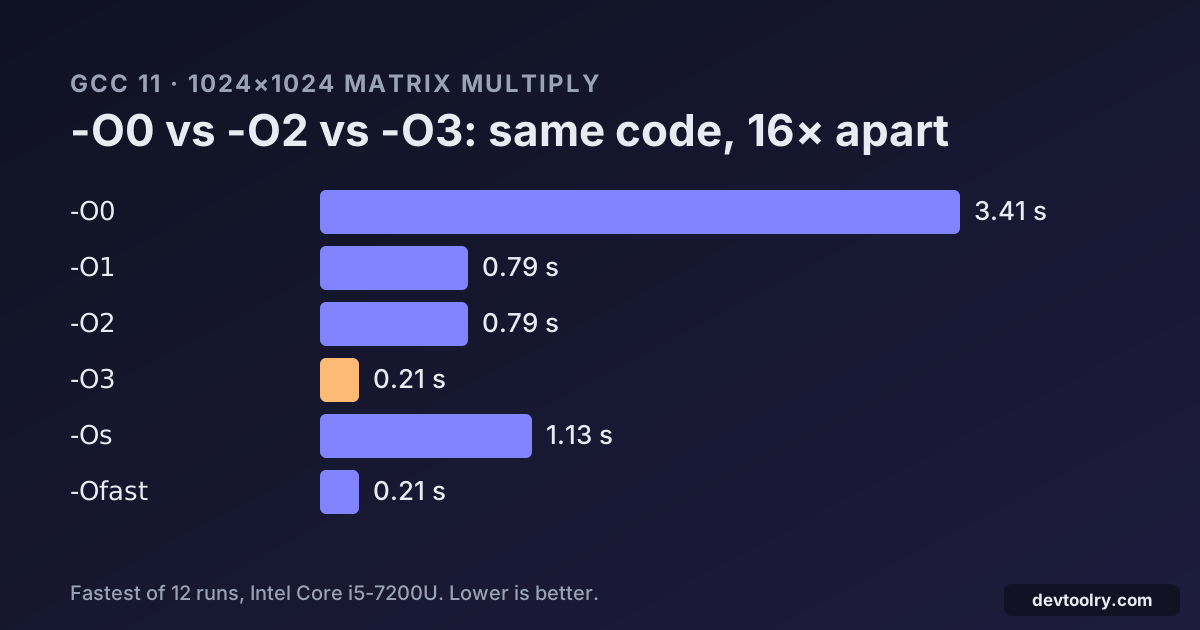
How much it matters depends on the code. In our benchmark of -O0, -O2 and -O3, the same matrix multiplication took 3.41 seconds at -O0 and 0.79 seconds at -O2. Optimisation can also surface bugs: code with undefined behaviour may work at -O0 and break at -O2, so test with the level you ship.
Debugging: -g and the sanitizers
-g stores the mapping from machine code back to your source lines, so gdb can show where a program crashed and what the variables held. It makes the file bigger (15,960 bytes for hello without it, 17,080 with it) but not slower, and you can combine it with -O2.
For memory bugs, -fsanitize=address,undefined adds checks that stop the program with a report at the exact line that writes past an array or uses freed memory. The sanitizer example in GCC vs Clang shows such a report. Use it during development; it makes programs slower.
Libraries: -l, -L and why -lm goes last
Functions from math.h, such as sqrt, live in a separate maths library on Linux. Without it, the linker fails with the same kind of error as before:
#include <math.h>
#include <stdio.h>
#include <stdlib.h>

int main(int argc, char **argv) {
    double x = argc > 1 ? atof(argv[1]) : 2.0;
    printf("sqrt(%g) = %.4f\n", x, sqrt(x));
    return 0;
}$ gcc root.c -o root
/usr/bin/ld: /tmp/ccvA7aWK.o: in function `main':
root.c:(.text+0x48): undefined reference to `sqrt'
collect2: error: ld returned 1 exit status-lm links libm. The position matters: the linker reads arguments from left to right and only takes what earlier files need, so a library must come after the files that use it. On Ubuntu, -lm before the source file fails with the same error:
$ gcc -lm root.c -o root
root.c:(.text+0x48): undefined reference to `sqrt'

$ gcc root.c -o root -lm
$ ./root 2
sqrt(2) = 1.4142
-l name looks for a file called libname.so or libname.a, so -lpthread links libpthread and -lcurl links libcurl. -L dir adds a folder to search, just as -I does for headers. If sqrt(2.0) with a constant appears to work without -lm, that is because GCC calculated the result while compiling; the error comes back as soon as the value is only known at run time.
Define macros: -D
-D defines a macro from the command line, as if the file started with #define. It is the usual way to switch debug output or features on and off without editing the code:
#include <stdio.h>

int main(void) {
#ifdef DEBUG
    printf("debug build, level %d\n", DEBUG);
#endif
    printf("running\n");
    return 0;
}$ gcc debug.c -o debug
$ ./debug
running
$ gcc -DDEBUG=2 debug.c -o debug
$ ./debug
debug build, level 2
running-DNDEBUG is a common one: it switches off every assert() in release builds.
Using these options in the online C compiler
The online C Compiler runs Clang in your browser with a fixed command line: -O2 -Wall, the maths library linked, and the C standard you pick from the menu (C89 to C23, C17 by default). You cannot type your own options there, but the most useful ones are already on, so warnings like the ones above appear under your code. The C++ Compiler uses -std=c++20 -O2 -Wall.
To try -Wextra, -Werror or a multi-file build with -c, use GCC or Clang on your own machine. The commands in this article work unchanged with either.
Frequently asked questions
What does gcc -o mean?
-o sets the name of the output file. gcc hello.c -o hello creates a program called hello instead of the default a.out. With -c, it names the object file instead.
What is the difference between gcc -c and gcc -o?
-c stops after compiling and writes an object file (main.o) without linking. -o only chooses the name of whatever GCC produces. You often use both: gcc -c main.c -o build/main.o.
Which warnings should I turn on?
-Wall -Wextra for all code, plus -pedantic if the code must be portable, and -Werror in automated builds. gcc -Q --help=warnings lists every warning your GCC version knows; GCC 11 enables 89 of them with no options at all, mostly about outright errors.
Why do I get "undefined reference to sqrt"?
The maths library is not linked. Add -lm at the end of the command: gcc root.c -o root -lm. Putting it before the source file fails on many Linux systems.
What is the default C standard in GCC?
gnu17 in GCC 8 to GCC 14, which is C17 with GNU extensions. GCC 15 changed the default to gnu23. Pass -std=c17 (or the standard your course requires) to be sure.
Summary
Five options cover most of daily C work: -o to name the program, -Wall -Wextra to see your mistakes, -std= to pin the language, -O2 for speed and -g for debugging. Add -c when a project has several files, -I and -D for headers and switches, and libraries such as -lm at the end of the line. To try a program quickly without installing anything, paste it into the online C Compiler.

Written by
Avinash Kori
Founder of Devtoolry
Avinash is a full-stack web developer from Surat, India, with eight years of experience in PHP, Laravel and Angular. He built Devtoolry so developers can solve everyday problems quickly with free tools that run entirely in the browser, and writes practical guides on the formats, encodings and techniques behind them.
Try it yourself
The free tools used in this article. They run in your browser, so nothing you paste is uploaded.
C Compiler
Compile and run C code online with Clang 21, a GCC-compatible compiler: pick C89 (ANSI C), C99, C11, C17 or C23 and add stdin input. Your code stays private.
C++ Compiler
Run C++ code online for free: compile C++20 with Clang 21 and libc++, type stdin input and see the output. It runs in your browser, so your code stays private.