robots.txt Mistakes on the Top 1,000 Sites: What We Found (2026 Study)
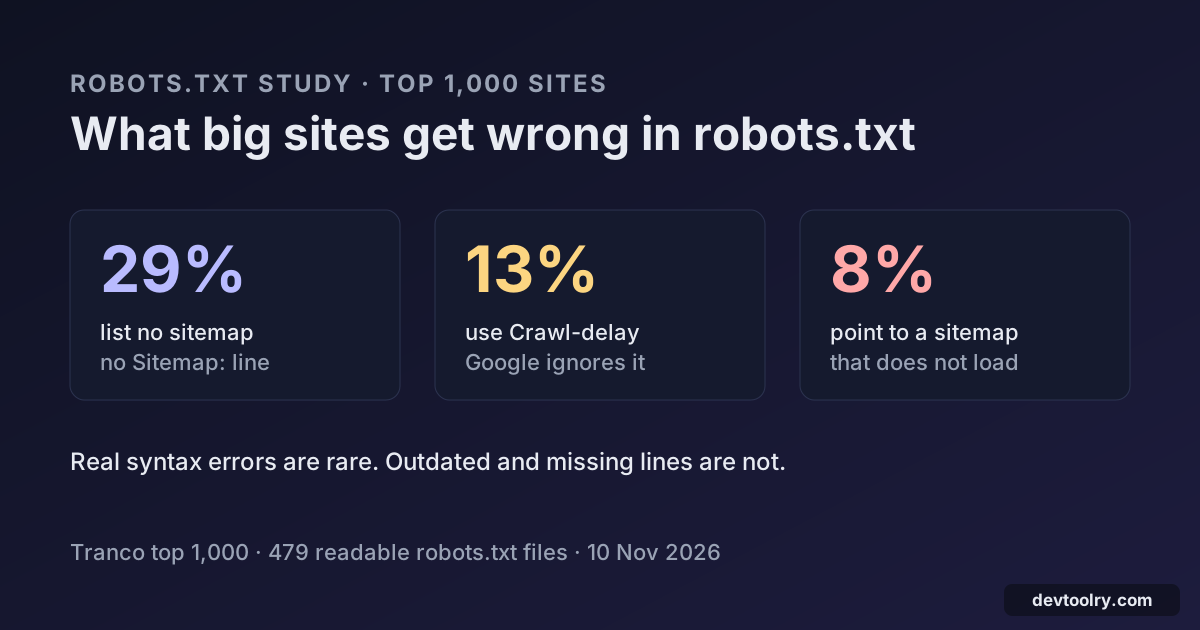
We checked the robots.txt of the top 1,000 sites: 29% list no sitemap, 13% use Crawl-delay that Google ignores, and 8% point to a sitemap that does not load.
 By Avinash KoriPublished 7 min read
On this page
robots.txt is one of the oldest files on the web, and one of the easiest to get wrong without noticing. A typo does not throw an error: crawlers skip the line and carry on. We wanted to know how often that happens on sites with real engineering teams, so on 10 November 2026 we downloaded the robots.txt files of the 1,000 most popular domains and ran each one through the same checks as our Robots.txt Checker.
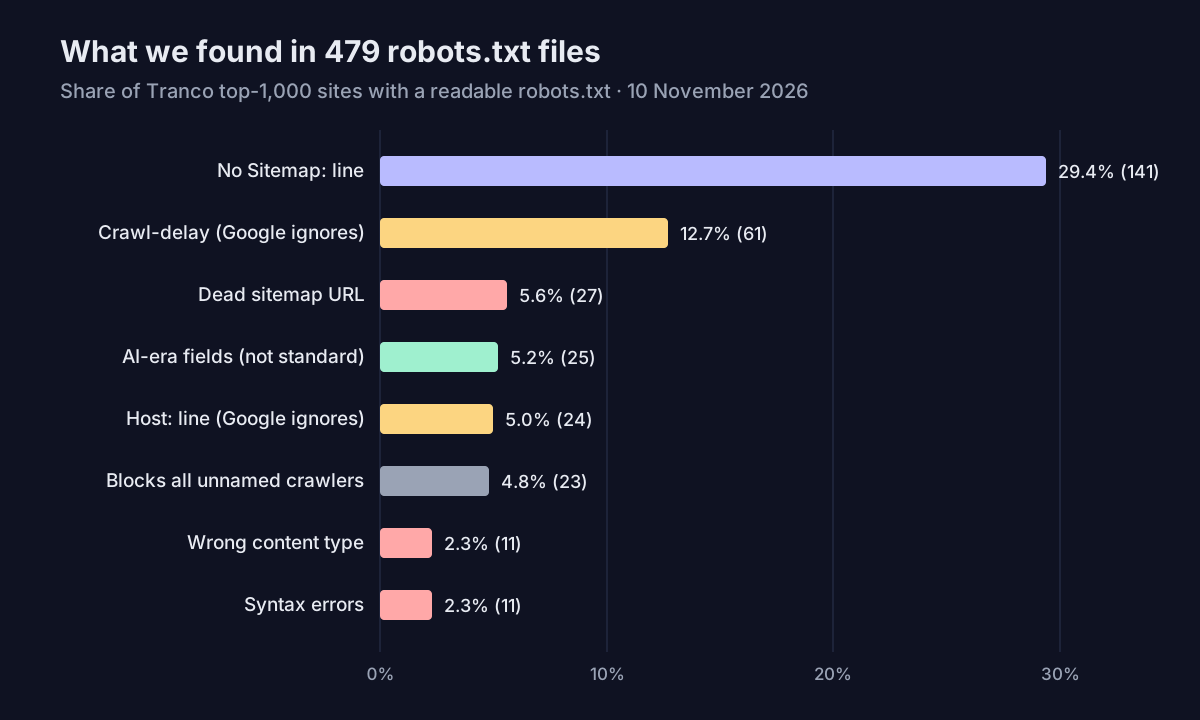
The short version: real syntax errors are rare (about 2% of files), but outdated and missing lines are common. 29% of top sites do not list a sitemap, 13% still use Crawl-delay, which Google ignores, and 8% of the sites that do list a sitemap point to one that returns an error.
How we ran the study
We took the top 1,000 domains of the Tranco list (list 947N2, downloaded on 10 November 2026), the ranking we also used for our AI crawler blocking study. For each domain we requested https://<domain>/robots.txt with an identifying user agent, followed up to five redirects as Google does, and recorded the status code, content type and size.
642 domains answered. The other 358 are mostly infrastructure names without a website (CDN, DNS and API hosts that do not resolve or refuse HTTPS connections). Of the 642, 479 served a readable robots.txt: a 2xx answer whose body is a text file, not an HTML page. Every percentage below uses those 479 files unless it says otherwise.
Each file then went through our parser, which follows RFC 9309 and Google's documented behaviour: the status code rules, the 500 KiB limit, syntax, groups, Allow and Disallow matching and Sitemap lines. For every sitemap URL listed (up to five per site) we checked that it loads.
One caution. robots.txt is served by the site to whoever asks, and some large sites answer unknown bots differently from Googlebot, with a login wall, a 403 or a different file. Our numbers describe what an honest, identified crawler receives, which is also what most SEO tools and smaller search engines see.
What came back at /robots.txt
Before reading any rules, a crawler has to get the file. Here is what the 642 responding domains returned:
| Answer | Domains | What Google does |
|---|---|---|
| 200 with a text file | 479 (74.6%) | Reads and follows the rules |
| 200 with an HTML page | 54 (8.4%) | Finds no valid rules, so crawls everything |
| 403 Forbidden | 55 (8.6%) | Treats it as "no robots.txt" and crawls everything |
| 404 Not Found | 43 (6.7%) | Crawls everything (allowed, and fine) |
| 5xx or 429 | 3 (0.5%) | Treats the whole site as disallowed |
| Still redirecting after 5 hops | 3 (0.5%) | Gives up and acts as if there is no file |
| Other 4xx | 5 (0.8%) | Crawls everything |
The 403 and HTML answers mostly come from bot protection: the firewall decides our request is not a browser and sends a challenge page instead. That is harmless for Google if Googlebot gets the real file, but it is worth checking, because a robots.txt that only Google can read is invisible to Bing, to AI search crawlers and to every audit tool.
The rare 5xx answer is the dangerous one. Google reads a server error on robots.txt as "do not crawl anything" and pauses crawling until the file comes back. A robots.txt that depends on the same application server as the rest of the site can take the whole site out of the crawl during an outage.
Redirects were normal: 423 domains redirected robots.txt, almost always from the bare domain to www or to another domain of the same company. Google follows that, and the rules of the target apply.
Real syntax errors are rare
Only 11 of the 479 files (2.3%) had a line that breaks the rules a crawler is meant to follow. They fall into a few patterns:
- A
Disallowline before anyUser-agentline, so it belongs to no group and no crawler applies it. - A rule with a full URL instead of a path, such as
Disallow: https://example.com/private/. Rules take paths only; this one matches nothing. - A relative sitemap, such as
Sitemap: /sitemap.xml. The Sitemap field needs a full URL includinghttps://. - A
Noindex:line. Google dropped support for noindex in robots.txt in September 2019; it now does nothing. - Prose or JSON pasted into the file, so lines are not
field: valuepairs.
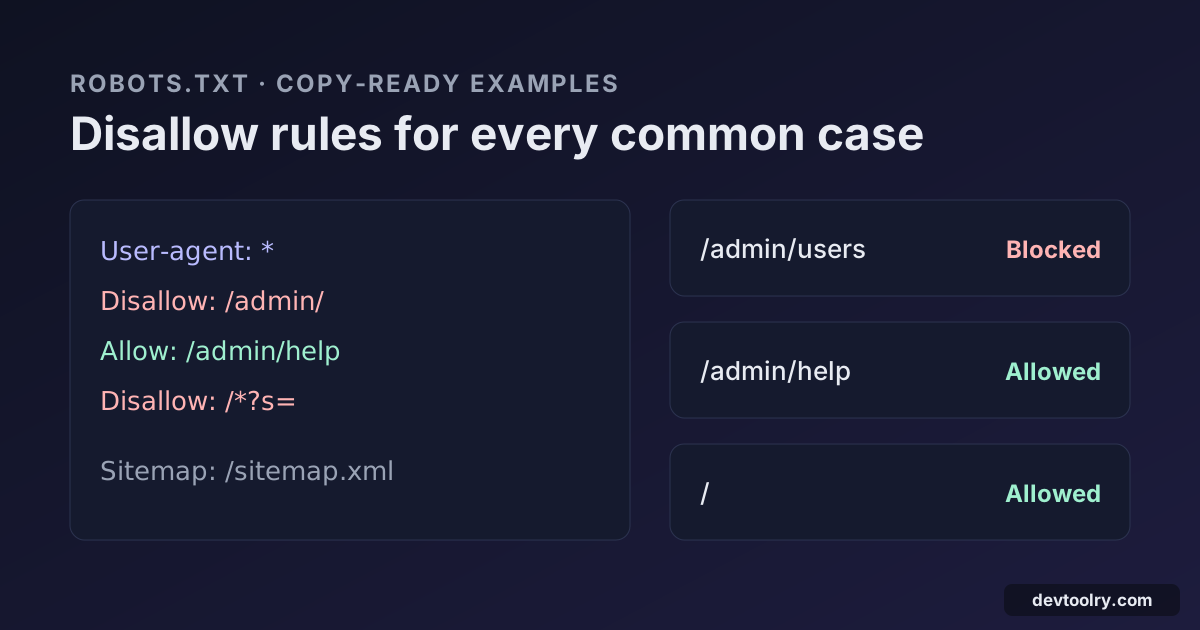
Here is a compact version of the first two mistakes and the fix:
# Broken: the rule comes before any group, and uses a full URL
Disallow: https://example.com/admin/
User-agent: *
Disallow: /cart/

# Fixed
User-agent: *
Disallow: /admin/
Disallow: /cart/
Big sites mostly get the grammar right, which matches what we see in the checker: syntax errors cluster on small sites where robots.txt was edited by hand once and never looked at again. Wildcards are routine at this scale, with 67.6% of files using * or $ in a path, and the median file has 32 rules and weighs 1.4 KiB. The largest file we saw, at 384 KiB with over 9,000 rules, is still inside Google's 500 KiB limit.
Outdated lines Google ignores
The more common problem is lines that do nothing for Google:
- Crawl-delay appears in 61 files (12.7%), including those of GitHub, Wikipedia and Vimeo. Bing and Yandex read it; Google never has. To slow Googlebot down, your server has to answer with 429 or 503 for a while, which Google treats as a signal to back off.
- Host appears in 24 files (5.0%). Only Yandex ever used it, to pick the main mirror of a site, and Yandex has since moved to redirects. Google and Bing ignore it.
- AI-era fields such as
Content-Signal,LLMs,LicenseandDisallowAITrainingappear in 25 files (5.2%). Some are proposals with real support behind them, but none is part of RFC 9309, so standard parsers skip them. They are not mistakes; just do not rely on them alone to keep a crawler out.
Sitemaps: missing or broken
141 of the 479 files (29.4%) have no Sitemap line. The share is similar at every rank: 26.2% of the top 100, 30.9% of ranks 101 to 500 and 29.0% of ranks 501 to 1,000. A sitemap you submitted in Search Console still works for Google, but the Sitemap line is how every other crawler finds it.
Of the 336 sites that list a sitemap with a full URL, 27 (8.0%) list at least one that does not load: 404, 410, a server error or a timeout. Another 23 returned 403 to our request, most likely bot protection again. A dead sitemap in robots.txt wastes crawler requests, and it usually means the sitemap moved in a redesign while robots.txt kept the old address. Our Sitemap Validator checks the file itself, including every URL in it.
Allow-lists: blocking every crawler you do not name
35 files (7.3%) block every crawler that is not named with User-agent: * and Disallow: /. Twelve of those also block Googlebot; they are CDN, image and ad domains that should not be in search at all. The other 23 sites use robots.txt as an allow-list: they name Googlebot, Bingbot and a few partners, and shut everyone else out. Instagram, Pinterest, IMDb, Reuters, Yelp and Trustpilot work this way.
It is a legitimate policy, but it has side effects. Every new search engine, AI search crawler and SEO tool is blocked by default, so your pages disappear from places you may want them, such as answer engines that cite sources. If you run an allow-list, review it whenever a new crawler matters to you; the AI Crawler Checker shows which ones get through.
A robots.txt checklist from the data
- Make sure /robots.txt answers 200 with plain text to an ordinary request, not an HTML page or a challenge. Serve it as
text/plain; 11 top sites sent it as JSON, an image, Markdown or with no type at all. - Keep it independent of your application, so a backend outage turns into a 404, not a 5xx that stops all crawling.
- List your sitemaps with full URLs, and check that each one loads after every redesign or migration.
- Delete lines that do nothing:
Noindex,Host, andCrawl-delayif Google is the crawler you care about. - Validate after every edit. Our Robots.txt Checker runs the same checks as this study on a live site or on a draft you paste, and shows which line decides for each crawler. If you are starting from scratch, the Robots.txt Generator writes a clean file, and our robots.txt examples cover WordPress, Shopify and other common setups.
We plan to repeat this study alongside the AI crawler study every few months. The data is a snapshot of one day: sites change their files, and some answer different crawlers differently.

Written by
Avinash Kori
Founder of Devtoolry
Avinash is a full-stack web developer from Surat, India, with eight years of experience in PHP, Laravel and Angular. He built Devtoolry so developers can solve everyday problems quickly with free tools that run entirely in the browser, and writes practical guides on the formats, encodings and techniques behind them.
Connect on LinkedInTry it yourself
The free tools used in this article. They run in your browser, so nothing you paste is uploaded.
Robots.txt Checker
Validate a live or pasted robots.txt the way Google reads it: syntax errors, blocked pages and resources, sitemaps, 21 search and AI crawlers, and a URL tester.
Robots.txt Generator
Create a robots.txt file with rules per crawler, sitemap links and presets for WordPress or blocking AI bots, then test any URL against it in your browser.
Sitemap Validator
Validate an XML sitemap or sitemap index: format, URL limits, duplicates, lastmod dates, robots.txt blocks, and the status of every listed URL (404s, redirects, noindex).
AI Crawler Checker
Check which AI crawlers a site allows: GPTBot, ClaudeBot, PerplexityBot, Google-Extended and 12 more, split into AI training, AI search and search engines.