Remove Object from Photo
Remove unwanted objects, people and blemishes from photos free: paint over them and AI fills the background on your device. No upload, no sign-up, full size.
Runs in your browser · Nothing uploadedFree · No sign-up
Something not working, or missing a feature? Send feedback
About the Remove Object from Photo
Remove Object from Photo erases what you do not want in a picture, such as a stranger in the background, a bin, a power line or a blemish, and fills the gap so it looks like it was never there. Paint over the object and MI-GAN, an open-source inpainting model, rebuilds the background from what surrounds it. The model downloads once and runs in your browser, so the photo is never uploaded and the result keeps the full size of your original.
The fill comes from MI-GAN, an open-source AI model (28 MB) downloaded from Devtoolry once and run in your browser. The photo is never uploaded, and the download is a new image without the original's metadata.
How to use the Remove Object from Photo
- Choose a photo, drop it on the page, paste it with Ctrl+V, or try one of the samples.
- Paint over the object with the brush, a little past its edges, and include its shadow.
- Press Remove. The first time, the AI model downloads once (28 MB); later removals take a few seconds.
- Switch on Show original to compare, use Undo to step back, then download the photo.
Real results
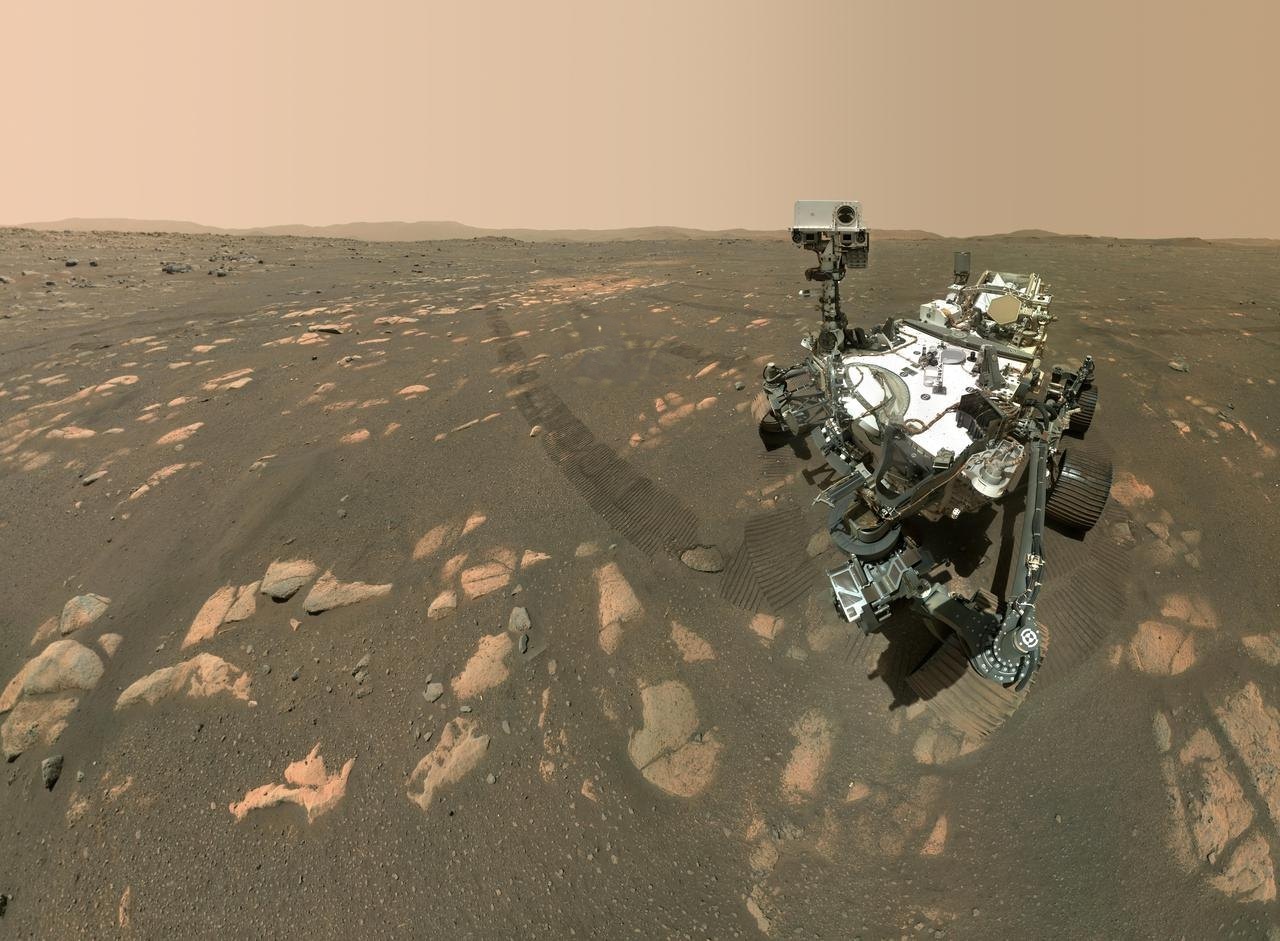
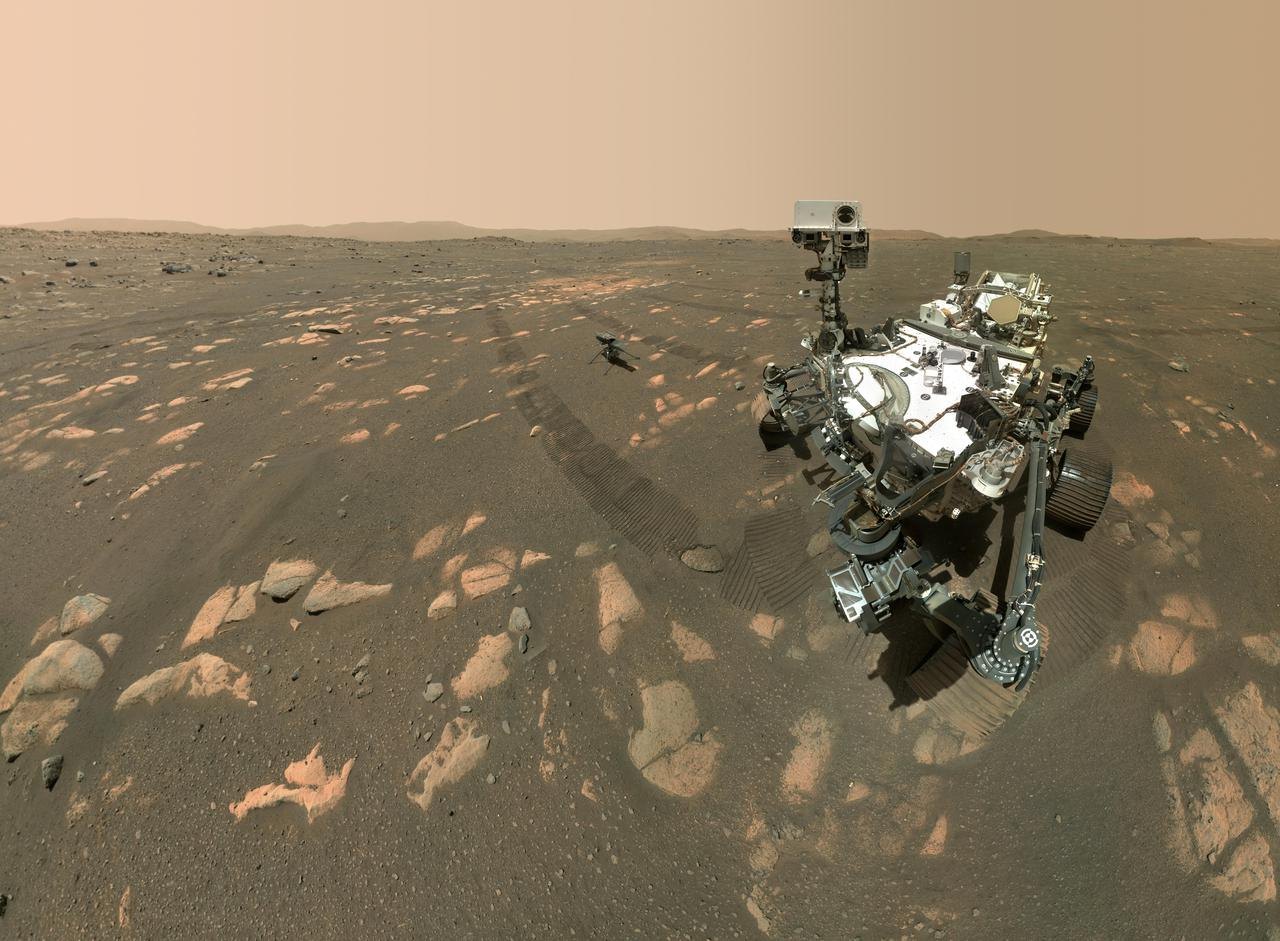
Actual output from this tool on the sample images, not mockups. Drag the slider to compare.
Removing the helicopter from a Mars photo
Where it works well
- Small and medium objects on natural textures: a person in the background, a bin, a wire, a bird, a logo on a wall.
- Skin blemishes, dust spots and date stamps on scanned prints.
- Sky, sand, grass, water, walls and other surfaces that repeat or change smoothly.
Where it struggles
- Large objects that cover much of the photo: the fill has to invent a lot, and it is drawn at about 512 pixels before being scaled up, so it looks soft in a big photo.
- Things in front of detailed or regular structures, such as faces, text, tiles, fences and window grids: the model continues the texture but not the exact lines.
- Hard shadows and reflections of the removed object: paint over them too, or they stay behind.
Works well with the Remove Object from Photo
- Remove Text from Image: finds and removes captions, dates and labels for you.
- Background Remover: to cut the subject out instead of removing something around it.
- Image Compressor: to shrink the cleaned photo before you upload it.
Frequently asked questions
Is my photo uploaded?
No. The inpainting model is downloaded from Devtoolry once and runs in your browser with WebAssembly; the photo is never sent anywhere. The Network tab of your browser's developer tools shows no request carrying it.
Why does a large area look blurry?
The model fills each marked area at about 512 × 512 pixels and the result is scaled to the size of your photo. Small areas get plenty of detail; a large one in a big photo looks soft. Remove big things in a few smaller strokes, one part at a time.
Does it keep the full resolution?
Yes. Only the marked areas change; every other pixel of the original is kept, and the download has the same width and height as your photo.
Can I remove a watermark with it?
Only from images you own or have the rights to, such as your own photo with an old date stamp or logo. Removing someone else's watermark or copyright notice to reuse their image can break copyright law (in the US, for example, 17 U.S.C. § 1202).
Is it free?
Yes: no sign-up, no credits, no watermark and no limit on the number of photos, because the work is done by your own device.
Related tools
Background Remover
Remove the background from photos free with AI: full HD resolution, bulk images, transparent PNG or white background. No upload, no sign-up, no watermark.
Remove Text from Image
Remove text from images free: words, dates and captions are found automatically and AI rebuilds the background. Works on photos and screenshots, no upload.
Edit Text in Image
Edit text in images online free: change words, prices and dates in photos and screenshots. Old text is removed with AI and new text matches size and colour.
AI Image Upscaler
Upscale images 2× or 4× with AI (Real-ESRGAN): sharper photos, logos and screenshots in higher resolution. Runs in your browser, nothing is uploaded.
Passport Photo Maker
Make passport and visa photos online: US 2×2 in, UK, Schengen, India 3.5×4.5 cm and more, with AI white background, head guides and a 4×6 print sheet. No upload.
Image to Text (OCR)
Extract text from images, screenshots and scanned PDFs with free OCR in your browser. English, Hindi and 20 more languages; nothing is uploaded.