RAW vs JPEG: What's the Difference, and How to Convert RAW to JPG
What a camera RAW file holds that a JPEG doesn't, when to shoot each, why RAW files hide a JPEG inside, and how to turn CR2, NEF or ARW photos into JPGs.
 By Avinash KoriPublished 5 min read
On this page
Most cameras can save each photo as a RAW file, a JPEG, or both. The JPEG opens anywhere; the RAW file is two to ten times larger, opens in few programs, and looks flatter at first. Yet photographers keep shooting RAW. The reason is what the file contains, and once you know that, it's easy to decide which to use and how to get shareable JPGs out of a card full of RAW photos.
This article explains the difference, shows what's inside real RAW files from three cameras, and walks through converting them to JPG.
What a RAW file contains
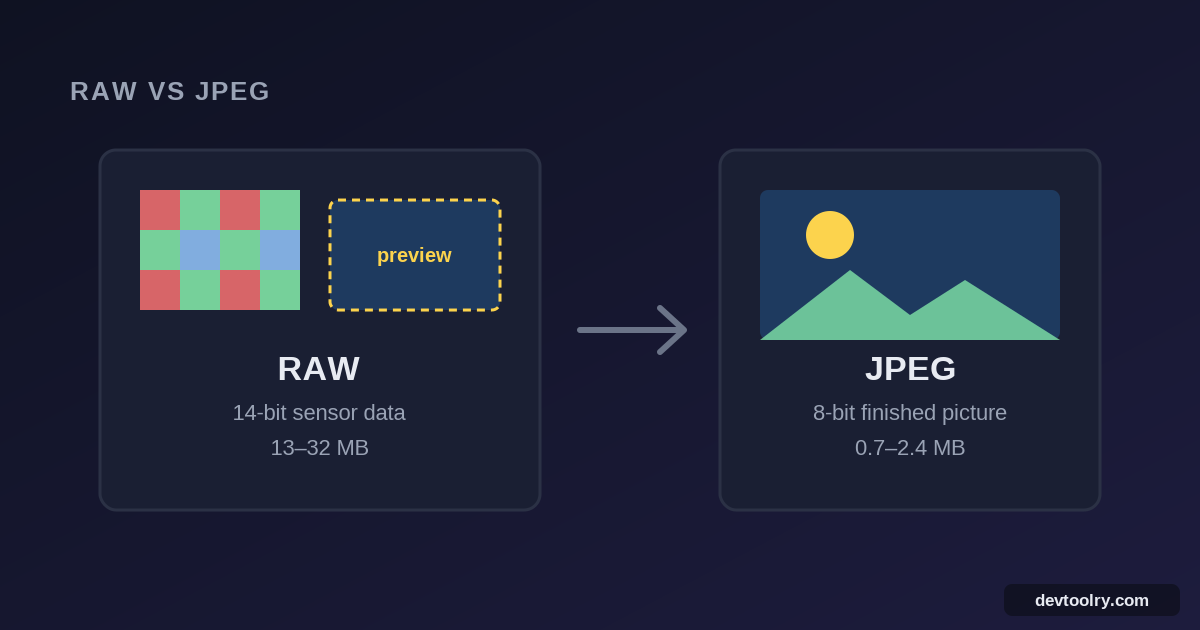
A camera sensor doesn't record colour pictures. Each pixel sits behind a red, green or blue filter and measures one brightness value. A RAW file stores those measurements almost untouched, usually with 12 or 14 bits per value: 4,096 or 16,384 levels of brightness, against 256 per channel in a JPEG.
A JPEG is what the camera makes from that data. It fills in the missing colours at every pixel (demosaicing), applies the white balance, the picture style, sharpening, noise reduction and lens corrections, reduces everything to 8 bits per channel, and compresses the result with lossy JPEG compression. The decisions are baked in.
That's the whole difference in one sentence: a RAW file is the ingredients, a JPEG is the finished dish. With RAW you, or a program like Lightroom or darktable, make those decisions later and can change your mind. With JPEG the camera made them at the moment of shooting.
What you gain with RAW, and what it costs
The extra bits pay off when a photo needs fixing:
- Exposure. A slightly underexposed RAW can be brightened by a stop or two before noise and banding appear; a JPEG falls apart much sooner, because the shadows only had a few of its 256 levels.
- Highlights. Bright skies that look white in the JPEG often still hold detail in the RAW data.
- White balance. In RAW it's just a setting, applied when the file is developed. In a JPEG, fixing a wrong colour cast means pushing already-mixed colours around.
The costs are just as real. RAW files are large, they need a program that understands your camera, and every photo needs developing before it looks finished. For holiday snaps, events where you need photos straight away, or long bursts, JPEG is often the better tool. Many photographers shoot RAW + JPEG: the JPEG for sharing today, the RAW for the few photos worth editing.
The JPEG hidden inside every RAW file
Here's the part that surprises people: almost every RAW file already contains a JPEG. Cameras embed a preview so that their own screen, and programs that can't develop RAW data, can show the photo quickly. It's the camera's own JPEG, with its picture style and white balance, and on many cameras it's full size.
We looked inside three RAW files from the public-domain sample collection at raw.pixls.us and converted their largest previews to JPG at quality 90 with our RAW to JPG converter:
| Camera | RAW file | Sensor | Largest preview | JPG at quality 90 |
|---|---|---|---|---|
| Nikon D3200 | NEF, 21.5 MB | 24 megapixels (6016 × 4000) | 6016 × 4000 (full size) | 2.4 MB |
| Fujifilm X-T1 | RAF, 32.2 MB | 16 megapixels | 1920 × 1280 | 0.7 MB |
| Sony DSLR-A230 | ARW, 13.3 MB | 10 megapixels | 1616 × 1080 | 0.8 MB |
The Nikon stores a full-resolution preview, so the JPG has every pixel of the sensor. The Fujifilm and the older Sony store smaller ones, which are still fine for a screen or a social post but not for a large print. The Nikon and Sony files also held smaller copies (570 × 375 and 1632 × 1080 in the NEF, 160 × 120 in the ARW) for the camera's playback screen.
This is why RAW to JPG can be fast and need no installation: the converter reads the file in your browser, finds the largest preview, turns it the right way up using the camera's orientation tag and saves it. Nothing is developed, and nothing is uploaded.
How to convert RAW to JPG
For quick, shareable JPGs (an event, a trip, sending photos to family):
- Open the RAW to JPG converter and drop your RAW files onto it: CR2, CR3, NEF, ARW, DNG, ORF, RAF, RW2, PEF and others.
- Keep JPEG at quality 90, or choose PNG or WebP.
- Download the photos one by one or all at once as a ZIP file. The size of each preview is shown next to it, so you can see straight away if a camera stored a smaller one.
You get the camera's own look, the same picture you saw on its screen. To brighten a dark shot or add a filter, open the JPGs in the Photo Editor; to make them smaller for email, use the Image Resizer.
For the best quality (prints, difficult light, photos you want to edit seriously), develop the RAW data itself:
- Your camera maker's free software: Canon Digital Photo Professional, Nikon NX Studio, Sony Imaging Edge, Fujifilm X RAW Studio and others reproduce the camera's colours closely.
- Free open-source programs: darktable and RawTherapee give you full control over exposure, colour and noise.
- Adobe Lightroom and Photoshop (Camera Raw), on subscription.
These programs read the sensor data, so you can recover highlights, fix white balance and export at full resolution even when the embedded preview is small.
Which RAW format is which?
Each maker has its own format, and some have several:
- Canon: CR2 on older cameras, CR3 since about 2018 (smaller files, a different container).
- Nikon: NEF, and NRW on some compact cameras.
- Sony: ARW (and SRF, SR2 on very old models).
- Fujifilm: RAF. Olympus/OM System: ORF. Panasonic: RW2. Pentax: PEF.
- DNG: Adobe's open RAW format, used natively by Leica, Pentax, many phones and Adobe's free DNG Converter.
Most of them are built on the same structure as TIFF files, which is why a NEF file can look like a TIFF to some programs. That shared structure is also where the orientation tag and the preview images live.
RAW, JPEG or HEIC on phones
Phones blur the line. iPhones save HEIC by default, a more efficient format than JPEG (see how to open HEIC files on Windows), and recent models also offer Apple ProRAW, which is a DNG file. Many Android phones save RAW as DNG in their "Pro" camera mode. The same rule applies: keep RAW for photos you'll edit, and share JPGs.
Keep the originals
Whatever you convert to, keep the RAW files. A JPG is a finished picture: blown highlights can't be recovered and the white balance can't really be changed. The RAW is your negative. Storage is cheap compared with a photo you can't take again, and a converted JPG can always be made again later, with better software than today's.

Written by
Avinash Kori
Founder of Devtoolry
Avinash is a full-stack web developer from Surat, India, with eight years of experience in PHP, Laravel and Angular. He built Devtoolry so developers can solve everyday problems quickly with free tools that run entirely in the browser, and writes practical guides on the formats, encodings and techniques behind them.
Connect on LinkedInTry it yourself
The free tools used in this article. They run in your browser, so nothing you paste is uploaded.
RAW to JPG
Convert camera RAW photos to JPG online: CR2, CR3, NEF, ARW, DNG, ORF, RAF, RW2 and more, many at once. Runs in your browser, nothing is uploaded.
Photo Editor
Edit photos online free: filters, brightness, contrast and colour, text, stickers and frames, for one photo or a batch at once. Nothing is uploaded.
Image Resizer
Resize images online to exact pixels, a percentage or presets like 1200×630 for Open Graph. Crop to fill, pad or stretch, in batches, without uploading.