Security Headers on the Top 1,000 Sites: Only 1% Get an A+ (2026 Study)
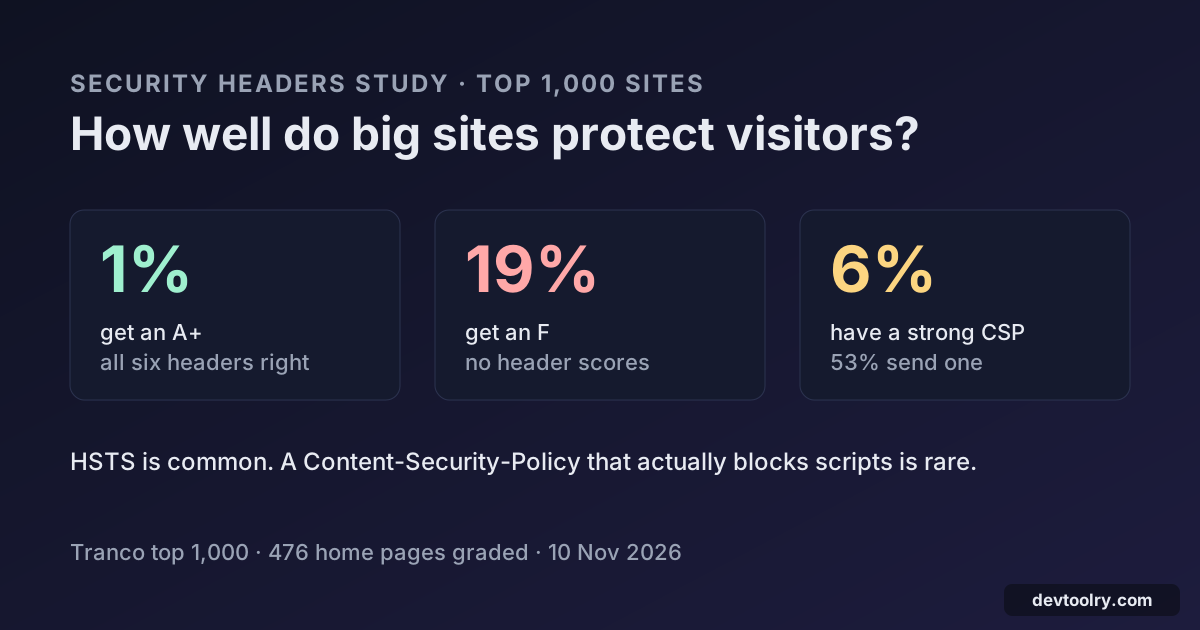
We graded the security headers of 476 top sites: 1% get an A+, 19% an F, and only 6% send a Content-Security-Policy that really limits scripts.
 By Avinash KoriPublished 5 min read
On this page
HTTP security headers are a few lines of server config that tell the browser how to protect visitors: always use HTTPS, do not let other sites frame this page, only run scripts from these places. They cost nothing and need no code changes, so we expected the most visited sites on the web to have them sorted. On 10 November 2026 we graded the home pages of the top 1,000 domains with the same checks as our Security Headers Checker.
The short version: only 6 of 476 sites (1.3%) get an A+, while 90 (18.9%) get an F. HSTS is common, but only 6.3% send a Content-Security-Policy that actually limits where scripts can come from, and bigger sites are not better than smaller ones.
How we ran the study
We took the top 1,000 domains of the Tranco list (list 947N2), the same set we used for our robots.txt mistakes study. For each domain we requested https://<domain>/ with an identifying user agent, followed redirects like a browser, and kept the headers of the final response. A second request to http://<domain>/ checked whether plain HTTP is redirected to HTTPS. We kept headers only, never page content, and replaced cookie values with a placeholder.
476 domains served an HTML home page with a 2xx status; every percentage below is of those 476 unless it says otherwise. The rest are mostly infrastructure names without a website (CDN, DNS, ad and API hosts), sites that refused our request (often with a 403 bot challenge) or sites that did not answer.
Each response was graded on six headers, the set browsers act on today:
| Header | What it does | Full point when |
|---|---|---|
| Strict-Transport-Security | Browser only uses HTTPS for the site | max-age of at least one year |
| Content-Security-Policy | Limits where scripts, styles and frames load from | Present and without unsafe script sources |
| X-Frame-Options or CSP frame-ancestors | Stops other sites framing the page (clickjacking) | DENY, SAMEORIGIN or a frame-ancestors directive |
| X-Content-Type-Options | Stops the browser guessing file types | nosniff |
| Referrer-Policy | Controls how much of the URL other sites see | Present and not unsafe-url |
| Permissions-Policy | Turns off camera, microphone and other features | Present |
A header that is present but weak earns half a point. A+ means all six earn a full point; A needs five points, B four, C three, D two, E one, and F means less than one.
Only 1% of top sites get an A+
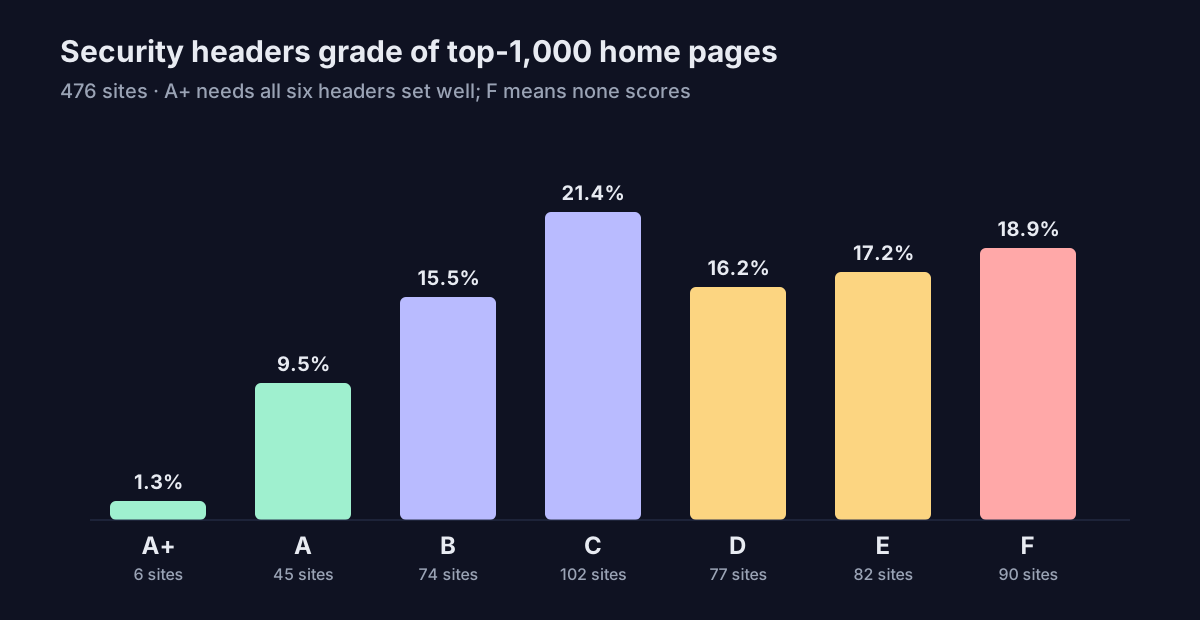
The A+ sites were publicnode.com, bbc.co.uk, www.gov.uk, usatoday.com, service.gov.uk and perplexity.ai. GitHub, Cloudflare, ChatGPT, The Guardian, Bloomberg, Docker and DuckDuckGo were among the 45 sites with an A. At the other end, 75 sites (15.8%) send none of the six headers at all.
Rank does not buy security. Among the top 100 domains with a home page, 12.8% get an A or A+ and 34.0% get a D, E or F. For ranks 501 to 1,000 it is 9.1% and 55.4%: worse, but not by as much as you might expect from sites with smaller security teams.
HSTS is common, a strong CSP is rare
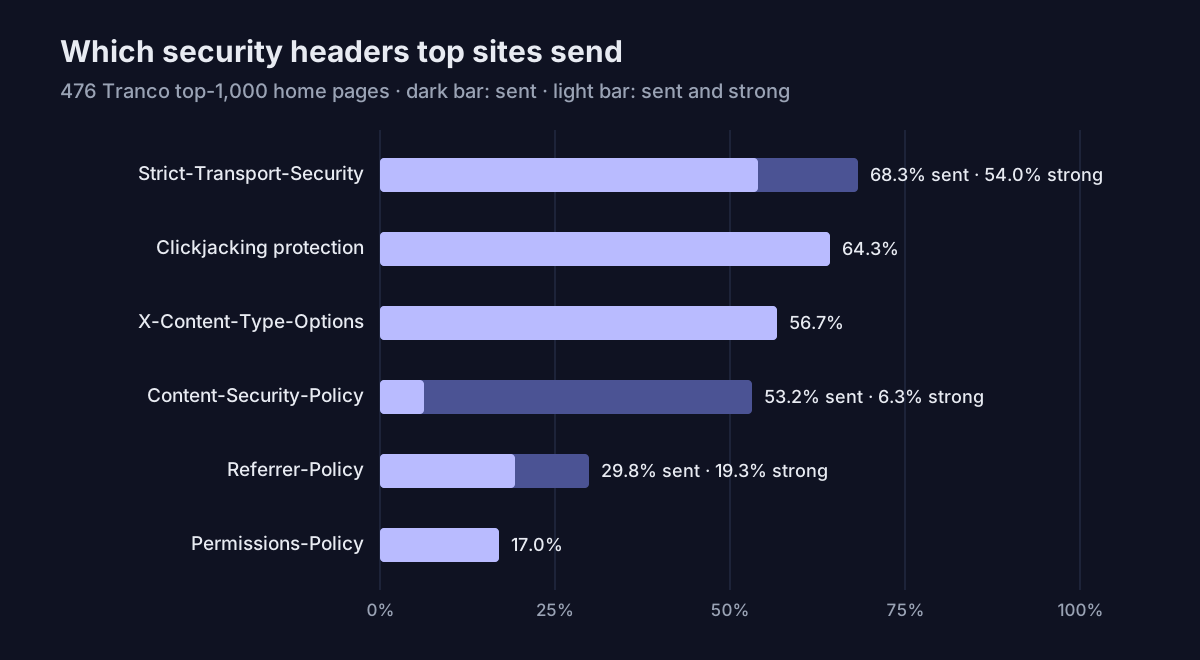
- Strict-Transport-Security is the most common header, on 68.3% of sites, and 54.0% set it for at least a year. 28.6% include the preload flag. Nearly every home page (99.4%) ended on HTTPS, and 93.3% of the 405 sites that answered plain HTTP redirected it to HTTPS.
- Clickjacking protection (X-Frame-Options or CSP frame-ancestors) is on 64.3%, and X-Content-Type-Options: nosniff on 56.7%.
- Content-Security-Policy looks healthy at 53.2%, but most policies do not control scripts. 19.3% of all sites send a CSP with no script or default source at all, typically only
frame-ancestorsorupgrade-insecure-requests. Another 23.9% allow inline scripts without nonces or hashes, which leaves the door open to the cross-site scripting attacks CSP exists to stop. Only 30 sites (6.3%) have a policy without those gaps, and 21 more run it in report-only mode. - Referrer-Policy is on only 29.8%. Browsers default to a safe policy now, so the risk is small, but sites that set it often choose a weak one: 10.5% of all sites send a policy that leaks full URLs.
- Permissions-Policy is the least adopted, on 17.0%. It is also the easiest to add: one line that switches off features the site never uses.
Old headers and small leaks
Some of the headers we saw do more harm than good, or say more than they should:
- 27.1% still enable X-XSS-Protection, a header for an XSS filter that browsers removed years ago and that could itself be abused. Only 11.3% set it to 0, as current advice says.
- 12.4% reveal software versions in headers such as
Server: nginx/1.18.0orX-Powered-By, which tells attackers which known bugs to try. - 63.2% set cookies on the home page, and 81.4% of those leave at least one cookie without Secure, HttpOnly or SameSite. HttpOnly is sometimes skipped on purpose for cookies that scripts must read, so this is an upper bound, but it is a high one.
What to add to your own site
If your site gets a C or worse, five of the six headers are safe to add today. In an Apache .htaccess file (mod_headers) they look like this; Nginx, Cloudflare and most frameworks have an equivalent setting:
<IfModule mod_headers.c>
  Header always set Strict-Transport-Security "max-age=31536000; includeSubDomains"
  Header always set X-Content-Type-Options "nosniff"
  Header always set X-Frame-Options "SAMEORIGIN"
  Header always set Referrer-Policy "strict-origin-when-cross-origin"
  Header always set Permissions-Policy "camera=(), microphone=(), geolocation=()"
  Header always set Content-Security-Policy-Report-Only "default-src 'self'; object-src 'none'; frame-ancestors 'self'"
</IfModule>- Add HSTS only once every subdomain works over HTTPS. includeSubDomains applies to all of them, and browsers remember the rule for the whole max-age.
- Start CSP in report-only mode, as above. Watch the reports, add the sources your pages really use, then switch the header name to Content-Security-Policy. Avoid
'unsafe-inline'for scripts; use nonces or hashes instead. - Drop X-XSS-Protection (or set it to 0) and hide version numbers in your server config.
- Check the result with the Security Headers Checker, which shows the grade and the line to add for each missing header, and confirm the certificate with the SSL Checker.
Limits of this study
Headers can differ by page, so a home page grade is not a whole-site grade. Some large sites answer unknown bots with a challenge page or a different response, which is why several well-known domains are missing from the 476, and why we do not name individual sites with low grades. Grades are also a simplification: a site with a strict CSP and nothing else can be safer than one with five easy headers. The numbers describe what an honest, identified client received on one day.
We plan to repeat this check alongside our AI crawler blocking study and robots.txt study every few months.

Written by
Avinash Kori
Founder of Devtoolry
Avinash is a full-stack web developer from Surat, India, with eight years of experience in PHP, Laravel and Angular. He built Devtoolry so developers can solve everyday problems quickly with free tools that run entirely in the browser, and writes practical guides on the formats, encodings and techniques behind them.
Connect on LinkedInTry it yourself
The free tools used in this article. They run in your browser, so nothing you paste is uploaded.
Security Headers Checker
Scan a site's HTTP security headers and get an A+ to F grade: HSTS, Content-Security-Policy, X-Frame-Options, nosniff, Referrer-Policy, Permissions-Policy and cookies.
SSL Checker
Check a website's SSL certificate: expiry date, issuer, name match, missing intermediates and TLS version, with the full certificate chain explained.
Website Technology Checker
Find out what any website is built with: CMS, ecommerce platform, JavaScript framework, analytics, CDN, hosting and web server, detected from its HTML and headers.
Redirect Checker
Check the HTTP status code and full redirect chain of up to 100 URLs: 301, 302, 404 and 5xx, response headers, loops and HTTPS downgrades, with fixes and CSV.