SQL Formatting Best Practices: Writing Queries Your Team Can Read
A practical SQL style guide: clause-per-line layout, keyword case, aliases, CTEs instead of nesting, and the logic bugs that clear formatting helps you spot.
 By Avinash KoriPublished 6 min read
On this page
SQL is often the least-formatted code in a project. Queries get written in a console, pasted into an ORM string, logged on one line and copied into a ticket. Then someone has to debug a 400-character SELECT with three joins, and the bug turns out to be an AND in the wrong place, which would have been obvious if the query had been laid out properly.
This guide is a practical style guide for SQL: a layout that makes queries easy to scan, conventions for names and aliases, and the logic bugs that good formatting exposes.
Start with one clause per line
Here's a real-looking reporting query as it often appears in logs:
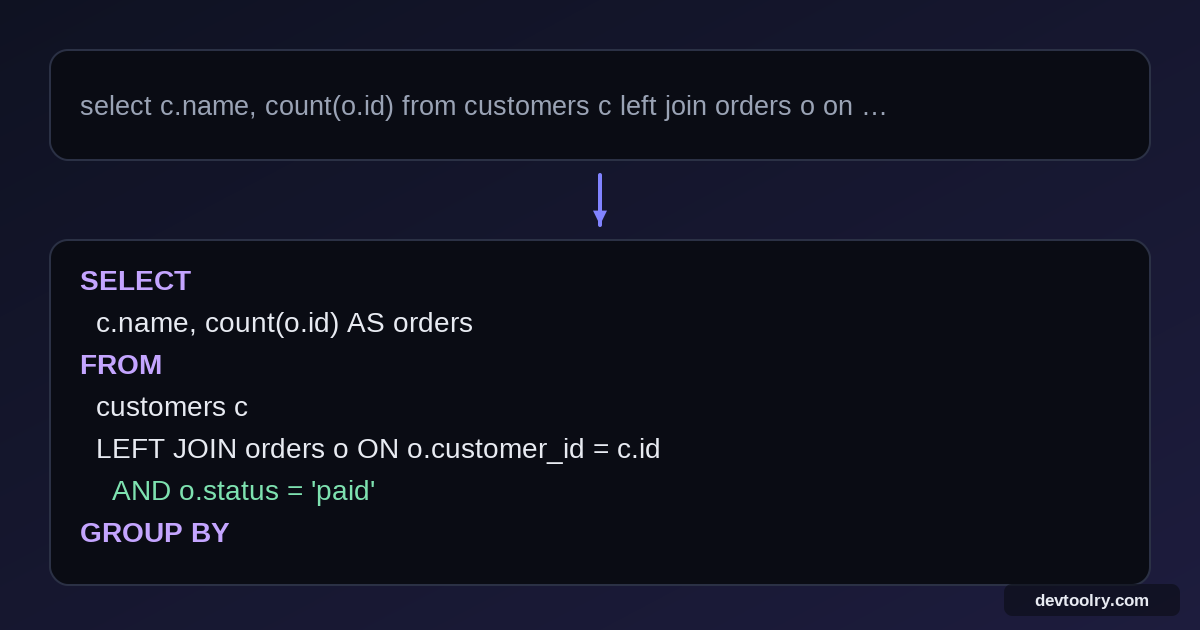
select c.id, c.name, count(o.id) as order_count, sum(o.total) as revenue from customers c left join orders o on o.customer_id = c.id and o.status = 'paid' where c.created_at >= '2026-01-01' and c.country in ('DE','FR') group by c.id, c.name having sum(o.total) > 1000 order by revenue desc limit 20The same query through the SQL Formatter, with upper-case keywords and 2-space indentation:
SELECT
  c.id,
  c.name,
  count(o.id) AS order_count,
  sum(o.total) AS revenue
FROM
  customers c
  LEFT JOIN orders o ON o.customer_id = c.id
  AND o.status = 'paid'
WHERE
  c.created_at >= '2026-01-01'
  AND c.country IN ('DE', 'FR')
GROUP BY
  c.id,
  c.name
HAVING
  sum(o.total) > 1000
ORDER BY
  revenue DESC
LIMIT
  20
Now the query's structure is visible at a glance: what it returns, where the data comes from, how it's filtered, grouped and sorted. Each major clause starts at the left margin, and its contents are indented beneath it. That single rule does most of the work of SQL readability.
Keyword case: pick one and automate it
Upper-case keywords (SELECT, FROM, WHERE) are the traditional convention: they separate the language from your table and column names, which helps in a plain editor or a log file. Lower-case keywords are popular in teams that rely on syntax highlighting and find upper case shouty. Either is fine. What matters is consistency, and that a formatter applies it rather than people. The SQL Formatter supports both, for a range of dialects, so you can match your codebase.
Names (tables, columns) should be snake_case and lower case. Quoted identifiers ("OrderTotal" in PostgreSQL) are case-sensitive and must be quoted forever after, so avoid them.
Name things so the query explains itself
Use meaningful aliases. c for customers and o for orders are fine in a short query. In a query with six joins, t1…t6 are a puzzle. Prefer short, recognisable names: cust, ord, inv.
Always use AS for column aliases. sum(o.total) AS revenue is clearer than sum(o.total) revenue, and avoids a classic bug: a missing comma silently turns the next column into an alias.
SELECT
  id
  name        -- missing comma: returns one column, the id, labelled "name"
FROM customers;
Qualify columns with their table alias in any query with a join. Unqualified names break when someone later adds a column with the same name to another table.
Avoid SELECT * in application code. It fetches columns you don't use, breaks when columns are added or reordered, and hides which data the code depends on. It's fine for exploring in a console.
Prefer CTEs to nested subqueries
Deeply nested subqueries are read inside-out, which is hard. Common table expressions (WITH) let you name each step and read the query top to bottom:
WITH paid_orders AS (
  SELECT
    customer_id,
    sum(total) AS revenue
  FROM
    orders
  WHERE
    status = 'paid'
  GROUP BY
    customer_id
),
top_customers AS (
  SELECT
    customer_id,
    revenue
  FROM
    paid_orders
  WHERE
    revenue > 1000
)
SELECT
  c.name,
  t.revenue
FROM
  top_customers t
  JOIN customers c ON c.id = t.customer_id
ORDER BY
  t.revenue DESC;
Each CTE has one job and a name that says what it is. You can also debug them one at a time by selecting from an intermediate step. Modern PostgreSQL, MySQL 8 and SQL Server all optimise CTEs well, so readability doesn't usually cost performance.
Bugs that good formatting reveals
Formatting doesn't change what a query does, but it makes some very common logic errors easy to see. All of these were checked against a real database.
AND binds tighter than OR
WHERE status = 'paid' OR status = 'refunded' AND total > 300This reads naturally as "paid or refunded orders over 300", but AND is evaluated first, so it means "paid orders of any amount, or refunded orders over 300". Once each condition is on its own line, the missing parentheses stand out:
WHERE
  (status = 'paid' OR status = 'refunded')
  AND total > 300
Better still, status IN ('paid', 'refunded'). Rule: whenever AND and OR are mixed, use parentheses.
A WHERE filter that cancels a LEFT JOIN
SELECT c.name, count(o.id)
FROM customers c
LEFT JOIN orders o ON o.customer_id = c.id
WHERE o.status = 'paid'
GROUP BY c.id, c.name;
The intent is "every customer with their number of paid orders, including zero". But customers with no orders have NULL in o.status, and the WHERE clause removes them, so the LEFT JOIN behaves like an inner join. In our test, this returned only the one customer with a paid order instead of all three. Moving the condition into the join keeps everyone:
LEFT JOIN orders o ON o.customer_id = c.id AND o.status = 'paid'The formatted query at the start of this article does exactly that, which is why its AND o.status = 'paid' sits in the FROM block next to the JOIN, not under WHERE.
NOT IN with a NULL
SELECT name FROM customers
WHERE id NOT IN (SELECT customer_id FROM orders);
If any customer_id in orders is NULL, this returns no rows at all, because id NOT IN (1, 2, NULL) is never true in SQL's three-valued logic. Use NOT EXISTS, which behaves as expected:
SELECT c.name FROM customers c
WHERE NOT EXISTS (SELECT 1 FROM orders o WHERE o.customer_id = c.id);
Comparing with NULL
WHERE status = NULL matches nothing, ever. Use IS NULL and IS NOT NULL.
Comments and long queries
Explain why, not what: -- Exclude test accounts created by the QA team is useful; -- select the name is not. For long reporting queries kept in files, a header comment with the purpose, the owner and the expected run time helps the next person.
Keep business rules that appear in several queries (what counts as an "active customer"?) in a view or a CTE with a clear name, instead of repeating the condition everywhere.
Formatting SQL inside application code
- Use parameters, never string concatenation, for values:
WHERE email = ?or$1. Formatting SQL with user input pasted in is how SQL injection happens. - Keep long queries in multi-line strings or
.sqlfiles, formatted the same way as everywhere else, so they can be copied into a console as-is. - Minify only for transport, if at all. The SQL Minifier collapses a query to one line, which is handy for some logging or config formats, but keep the readable version in your source.
When you generate SQL from data, such as seeding a test database, the JSON to SQL converter turns a JSON array into INSERT statements with properly quoted values. For the same "make it automatic" approach in other languages, see our guide to setting up Prettier.
A short SQL style checklist
- One major clause per line, with its contents indented.
- Consistent keyword case, applied by a formatter.
snake_casenames, meaningful aliases,ASfor every column alias.- Qualified column names in joins; no
SELECT *in application code. - CTEs instead of deep nesting.
- Parentheses whenever
ANDandORmix. - Filters on the optional side of a
LEFT JOINgo inON, notWHERE. NOT EXISTSinstead ofNOT INwith subqueries;IS NULLinstead of= NULL.- Parameters for values, always.
Summary
Readable SQL puts each clause on its own line with its contents indented, uses consistent keyword case, meaningful aliases and CTEs for multi-step logic. That layout isn't just cosmetic: it exposes the bugs SQL is famous for, such as AND/OR precedence, WHERE filters that cancel LEFT JOINs and NOT IN with NULL. Let a formatter handle the layout so reviews can focus on the logic.

Written by
Avinash Kori
Founder of Devtoolry
Avinash is a full-stack web developer from Surat, India, with eight years of experience in PHP, Laravel and Angular. He built Devtoolry so developers can solve everyday problems quickly with free tools that run entirely in the browser, and writes practical guides on the formats, encodings and techniques behind them.
Connect on LinkedInTry it yourself
The free tools used in this article. They run in your browser, so nothing you paste is uploaded.
SQL Formatter
Format and beautify SQL queries online for MySQL, PostgreSQL, SQLite, SQL Server and more, with keyword casing and indentation options. Runs in your browser.
SQL Minifier
Compress SQL queries onto a single line online, removing comments and redundant whitespace. Useful for logs, config files and embedding SQL in code.
JSON to SQL Insert
Convert a JSON array of objects into SQL INSERT statements online for MySQL, PostgreSQL or SQLite. Seed databases and test fixtures in seconds.