What Does Minification Actually Do? JavaScript, CSS and HTML Explained
What JavaScript, CSS and HTML minifiers really change, with before-and-after output, real size measurements, minification vs gzip, and what can break.
 By Avinash KoriPublished 6 min read
On this page
Every production website ships minified code, and most developers never look at what the minifier did. That's fine until something breaks only in production, a bundle is mysteriously large, or a teammate asks whether minifying is still worth it when the server compresses everything anyway.
This guide shows real before-and-after output from JavaScript, CSS and HTML minifiers, measures the savings on a real library, and explains where minification can change behaviour.
Minification in one sentence
A minifier rewrites code into the smallest form that behaves the same: it removes what only humans need (comments, whitespace, long names) and replaces constructs with shorter equivalents. The result is still valid JavaScript, CSS or HTML, just not meant for reading.
JavaScript: whitespace, mangling and compression
Here's a small, readable function:
// Calculate the total price of a cart, including tax
function calculateTotal(items, taxRate) {
  const DEBUG = false;
  let subtotal = 0;
  for (const item of items) {
    subtotal += item.price * item.quantity;
  }
  if (DEBUG) {
    console.log('subtotal', subtotal);
  }
  const total = subtotal * (1 + taxRate);
  return Math.round(total * 100) / 100;
}
export { calculateTotal };
Through the JavaScript Minifier, which uses Terser (the engine inside most bundlers), with mangling and compression on:
function t(t,n){let o=0;for(const n of t)o+=n.price*n.quantity;const r=o*(1+n);return Math.round(100*r)/100}export{t as calculateTotal};386 characters became 136. Three different things happened:
- Whitespace and comments were removed. This is the part everyone expects, and it's the least clever.
- Names were mangled. Local names like
items,subtotalandtotalbecamet,oandr. Mangling is safe for local variables because nothing outside the function can refer to them. The exported name is part of the module's interface, so Terser keeps it:export{t as calculateTotal}. Property names likepriceare never mangled by default, because they may be read by other code or come from JSON. - The code was compressed.
DEBUGis alwaysfalse, so theif (DEBUG)block and the constant were removed entirely (dead-code elimination). The braces around the loop body disappeared, andtotal * 100became100*r, which is the same value written in a form that often compresses better.
That third step is why modern bundles can include debug code guarded by a build-time constant (if (process.env.NODE_ENV !== 'production')) with no cost in production: the minifier deletes it.
CSS: removing what the browser ignores
/* Primary button */
.button-primary {
  background-color: #ffffff;
  margin: 0px 0px 0px 0px;
  padding: 8px 16px 8px 16px;
  font-weight: bold;
  color: #FF0000;
}
.button-primary:hover {
  background-color: #f0f0f0;
}
The CSS Minifier removes comments, whitespace and the last semicolon in each block:
.button-primary{background-color:#ffffff;margin:0px 0px 0px 0px;padding:8px 16px 8px 16px;font-weight:bold;color:#FF0000}.button-primary:hover{background-color:#f0f0f0}More aggressive build tools such as cssnano or Lightning CSS go further and rewrite values: #ffffff → #fff, 0px 0px 0px 0px → 0, 8px 16px 8px 16px → 8px 16px, bold → 700, #FF0000 → red. They can also merge duplicate rules. Those rewrites are where CSS minifiers occasionally get things wrong, which is why conservative whitespace-only minification is still popular for hand-written stylesheets.
HTML: careful with whitespace
<!DOCTYPE html>
<html>
  <head>
    <title>  Hello  </title>
  </head>
  <body>
    <!-- main content -->
    <p class="intro">
      Hello,   world!
    </p>
    <pre>  keep   this  </pre>
  </body>
</html>
The HTML Minifier gives:
<!DOCTYPE html><html><head><title> Hello </title></head><body><p class="intro"> Hello, world! </p> <pre> keep this </pre> </body></html>Notice what it didn't do. Runs of whitespace inside text were collapsed to a single space, not removed, because in HTML a space between words or inline elements is visible: removing it would join Hello, and world! or glue two links together. And the content of <pre> was left exactly as it was, because whitespace there is significant. HTML minification is the most delicate of the three, and its savings are usually the smallest, because server compression handles repetitive markup very well.
How much does it save? Real measurements
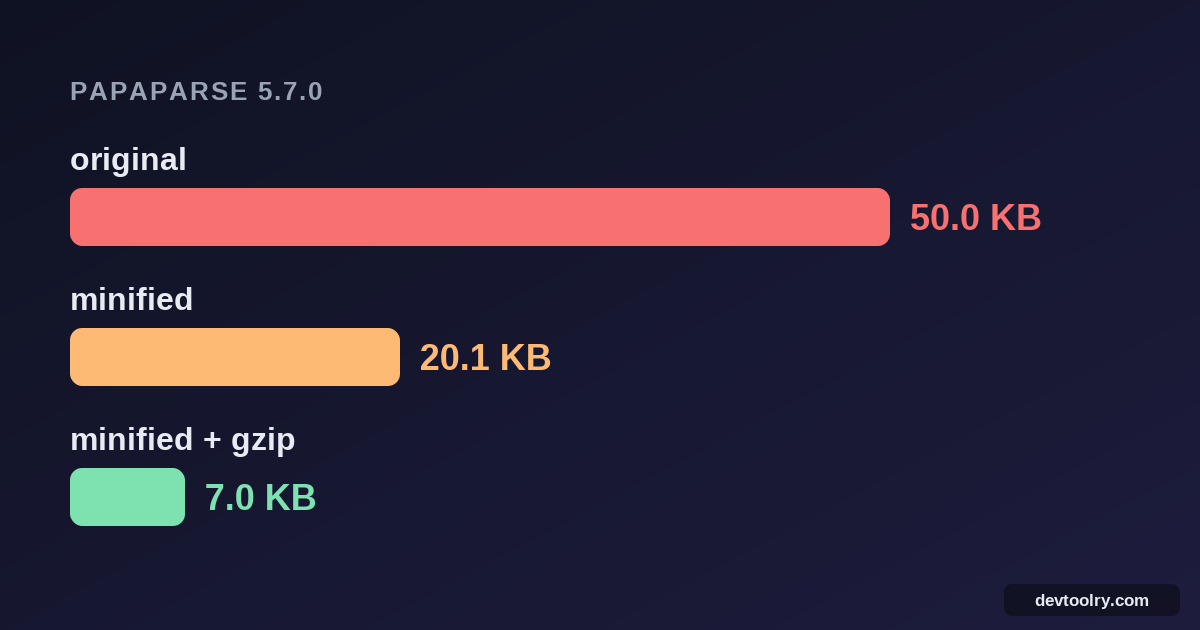
Here's PapaParse 5.7.0, a popular CSV library whose source is written to be readable, measured at three levels of minification, raw and after the two common HTTP compression methods:
| Version | Raw | gzip | Brotli |
|---|---|---|---|
| Original source | 50.0 KB | 13.9 KB | 12.0 KB |
| Whitespace and comments removed | 32.3 KB | 8.7 KB | 7.8 KB |
| Full minification (compress + mangle) | 20.1 KB | 7.0 KB | 6.4 KB |
Two conclusions:
- Compression and minification stack. Gzip alone shrinks the original to 13.9 KB; minification plus gzip gets to 7.0 KB, half of that. Compression removes repetition, but comments and long unique names aren't repetitive, so only a minifier removes them.
- Raw size still matters. The browser has to decompress, parse and compile the full 50 KB or 20 KB. On low-end phones, JavaScript parse and compile time is a real part of page load. Smaller raw code means less work after the download, too.
What minification can break
Minifiers are very reliable, but they make assumptions. Here's where those assumptions fail:
Code that depends on names. function.name, class names used for dependency injection or logging, and frameworks that read argument names (old AngularJS) break when names are mangled. Configure the minifier to keep those names (keep_fnames, keep_classnames in Terser) or avoid relying on them.
eval and with. Code inside eval('subtotal * 2') refers to a variable by name in a string, which the minifier can't see. Terser stops mangling in scopes that use eval, which is one more reason not to use it.
Missing semicolons in concatenated files. Joining two files where the first doesn't end with a semicolon and the second starts with ( creates a function call across files. Bundlers handle this; ad-hoc concatenation scripts don't.
Overly aggressive compression options. Options like unsafe in Terser assume things about built-in objects (for example, that nobody has modified Array.prototype). Leave them off unless you know your code.
If a bug appears only in the minified build, minify with compress off and then mangle off to find which step causes it.
Debugging minified code: source maps
Minified code is unreadable in a stack trace: TypeError at t (app.min.js:1:4211). A source map is a separate file that maps every position in the minified output back to the original file, line and name. Browser dev tools and error trackers use it to show the original code.
Generate source maps in your build (terser --source-map, or your bundler's sourcemap option). You can keep them private: upload them to your error tracker instead of serving them publicly, if you don't want to publish your original source.
And when you need to read minified code without a map (a third-party script, a production bundle), run it through the JavaScript Formatter to restore indentation and line breaks. The mangled names stay short, but the structure becomes readable.
Do you need to minify by hand?
Usually not. Vite, webpack, esbuild, Next.js and similar tools minify production builds automatically. Online minifiers are useful when you:
- Ship a standalone script or snippet without a build step (an embed, a bookmarklet, a WordPress footer).
- Want to see what your bundler is doing to a specific piece of code.
- Need to check how much a dependency would cost after minification before adding it.
- Minify JSON payloads or config. For data formats, the JSON Minifier removes whitespace without changing values.
Formatting is the opposite operation, and just as automatable. Our guide to code formatting with Prettier covers the readable side, and Prettier for PHP shows the same setup for PHP code.
Summary
Minifiers remove comments and whitespace, shorten local names (mangling) and rewrite code into shorter equivalents, including deleting dead code. On a real library, full minification cut 50 KB to 20 KB, and minification plus gzip halved the gzip-only size, so minification is still worth it with compression. Keep names that your code reads at runtime, use source maps for debugging, and let your build tool minify production code automatically.

Written by
Avinash Kori
Founder of Devtoolry
Avinash is a full-stack web developer from Surat, India, with eight years of experience in PHP, Laravel and Angular. He built Devtoolry so developers can solve everyday problems quickly with free tools that run entirely in the browser, and writes practical guides on the formats, encodings and techniques behind them.
Connect on LinkedInTry it yourself
The free tools used in this article. They run in your browser, so nothing you paste is uploaded.
JavaScript Minifier
Minify and mangle JavaScript online with Terser for smaller bundles. Supports modern ES syntax, with compress and mangle options and the size saved.
CSS Minifier
Minify CSS online: strip comments, whitespace and redundant semicolons to shrink your stylesheet, and see the bytes saved. Runs in your browser.
HTML Minifier
Minify HTML online: remove comments and collapse whitespace while keeping pre, textarea, script and style blocks intact. See the size saved instantly.