How QR Codes Work: Error Correction, Size and Scanning Best Practices
What the squares in a QR code mean, how error correction levels work, why long URLs make dense codes, and how big to print a QR code so every phone can scan it.
 By Avinash KoriPublished 6 min read
On this page
QR codes went from a curiosity to infrastructure: restaurant menus, payments, boarding passes, Wi-Fi passwords, event tickets and product packaging all depend on them. Making one takes seconds. Making one that scans reliably from a poster across a room, after being printed on glossy paper and partly covered by a logo, takes a little understanding of how they work.
This guide explains the structure of a QR code, what error correction really does, how the content affects the size, and practical rules for codes that always scan. The examples use the QR Code Generator, which lets you change every setting discussed here.
The anatomy of a QR code
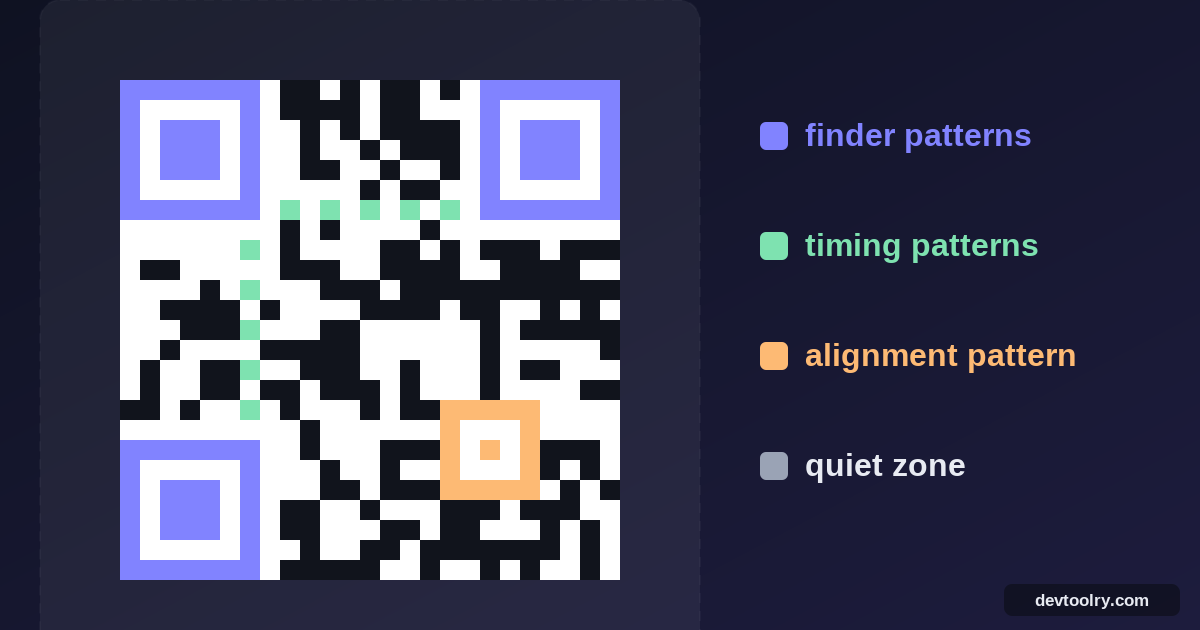
A QR code is a grid of square modules, each black or white. The smallest code (version 1) is 21 × 21 modules; each version adds 4 modules per side, up to version 40 at 177 × 177. Several parts have fixed jobs:
- Finder patterns: the three large squares in the corners. They let a scanner find the code, from any angle, and work out its orientation. The missing fourth corner tells it which way is up.
- Timing patterns: lines of alternating modules between the finders, which tell the scanner the size of one module.
- Alignment patterns: smaller squares (from version 2 up) that help correct for perspective when the code is photographed at an angle or printed on a curved surface.
- Format information: next to the finders, it records the error correction level and the mask pattern, stored twice for safety.
- The quiet zone: the empty margin around the code, which should be at least 4 modules wide. Scanners need it to separate the code from its surroundings.
- Data and error correction: everything else, the actual content.
How content becomes modules
The encoder picks the most compact mode for the content: numeric (digits only, about 3.3 bits per character), alphanumeric (digits, upper-case letters and a few symbols, 5.5 bits per character), or byte mode (any text as UTF-8, 8 bits per byte). A 20-digit number fits in the smallest version-1 code at levels L, M and Q, while 20 characters of mixed-case text need more space.
The data is then split into blocks, error correction codes are added, and the bits are placed in a zigzag pattern across the grid. Finally the encoder applies one of eight mask patterns (XOR-ing the data with a regular pattern) and keeps the one that avoids large blank areas or shapes that look like finder patterns. That's why QR codes look so uniformly speckled.
Error correction: L, M, Q and H
QR codes use Reed–Solomon error correction, the same family of codes used on CDs and in deep-space communication. Extra data is added so that a damaged or dirty code can still be decoded. You choose how much:
| Level | Recovers up to | Use for |
|---|---|---|
| L (Low) | about 7% of the code | Screens and clean, controlled printing |
| M (Medium) | about 15% | The usual default; most printed codes |
| Q (Quartile) | about 25% | Industrial use, outdoor signs, rough surfaces |
| H (High) | about 30% | Codes with a logo in the middle, or that may get damaged |
Higher levels need more modules for the same content. For the 21-character URL https://devtoolry.com, levels L and M produce a version-2 code (25 × 25 modules) and Q and H a version-3 code (29 × 29). For a 104-character URL with tracking parameters, the difference is bigger: version 5 (37 × 37) at L, but version 10 (57 × 57) at H.
Logos. A logo in the middle works only because error correction rebuilds the covered modules. Use level H, keep the logo small (well under the 30% limit; aim for about 20% of the area), never cover the finder patterns, and test with several phones. A logo uses up the damage tolerance, so the code is less robust against everything else.
Shorter content makes better codes
The amount of content decides the version, and the version decides how dense the code is. For a fixed printed size, a denser code has smaller modules, which are harder to scan from a distance or with an older camera.
Compare the two URLs above at level M: version 2 (25 modules across) versus version 6 (41 modules across). Printed at 3 cm wide, the first code's modules are about 1.2 mm, the second's about 0.7 mm.
Ways to keep codes small:
- Remove tracking parameters you don't need, or use a short redirect URL on your own domain (
example.com/menu) that you can also change later without reprinting. - Use upper case for URLs where possible. Domains and many paths are case-insensitive, and an all-caps URL can use the denser alphanumeric mode. Check that your paths really are case-insensitive first.
- Avoid long query strings with encoded characters; every
%20is three characters. Our guide to URL encoding explains why they appear.
How big should a printed QR code be?
A practical rule of thumb: the code's width should be at least one tenth of the scanning distance. A code scanned from 30 cm (a menu on a table) needs to be at least 3 cm wide; a poster read from 3 metres needs 30 cm. Increase that for dense codes, low light or older phones.
And:
- Never print smaller than about 2 × 2 cm, even for short content.
- Keep the quiet zone. Designers often crop it to fit a layout, and scanning failures follow.
- Use dark modules on a light background. Inverted codes (light on dark) aren't supported by every scanner.
- Keep contrast high. Dark blue or dark grey on white works; pastel colours, gradients through the code or a busy photo behind it don't.
- Prefer vector output for print. An SVG stays sharp at any size. A small PNG scaled up gets blurry edges, which confuses scanners. The generator exports both.
- Avoid glossy laminates and curved surfaces where reflections hide modules, or print larger to compensate.
Other things QR codes can hold
Phones recognise several standard formats besides URLs:
WIFI:T:WPA;S:Office Guest;P:correct horse battery;;
mailto:[email protected]?subject=Order%20help
tel:+441234567890
BEGIN:VCARD ... END:VCARD
A Wi-Fi code like the first line lets guests join a network without typing the password (note that anyone who can photograph it can read the password). Contact cards (vCard) and calendar events (iCalendar) work too, but they make large, dense codes; a URL to a contact page is often more robust.
Security: QR codes are just links
A QR code is an unreadable link, and attackers know it. Fake parking-meter and restaurant stickers that send people to phishing payment pages are common enough to have a name: quishing. When you publish codes:
- Use your own, recognisable domain, so people can check the URL their phone shows before opening it.
- Use HTTPS.
- In public places, check periodically that no one has stuck a different code over yours.
When you scan codes, read the URL preview before tapping it, and be suspicious of codes that ask for payment or a login.
A checklist before you print
- Shorten the content; prefer a short URL on your domain.
- Choose level M for normal use, Q for harsh environments, H only with a logo.
- Size the code at one tenth of the scanning distance or more, never below 2 cm.
- Keep a quiet zone of at least 4 modules.
- Use dark-on-light colours with strong contrast.
- Export SVG for print.
- Test the printed proof with at least two different phones, at the real distance and lighting.
Shared pages look better when their link previews are set up properly, too. See HTML meta tags for SEO and social sharing.
Summary
A QR code is a grid of modules with finder patterns for location, timing patterns for scale, a quiet zone for separation and Reed–Solomon error correction for robustness. More content and higher error correction mean more, smaller modules. Keep content short, use level M (or H with a logo), print at least a tenth of the scanning distance wide with a 4-module margin and strong contrast, and always test the printed result.

Written by
Avinash Kori
Founder of Devtoolry
Avinash is a full-stack web developer from Surat, India, with eight years of experience in PHP, Laravel and Angular. He built Devtoolry so developers can solve everyday problems quickly with free tools that run entirely in the browser, and writes practical guides on the formats, encodings and techniques behind them.
Connect on LinkedInTry it yourself
The free tools used in this article. They run in your browser, so nothing you paste is uploaded.
QR Code Generator
Create free QR codes online for websites and text, with custom size, colours and error correction. Live preview, and download as PNG or SVG.
URL Encode / Decode
URL encode or decode text online: percent-encode query string values and full URLs, or turn %20-style escapes back into readable text.