Binary, Octal, Decimal and Hex: Number Bases for Programmers
How number bases work, converting binary, octal, decimal and hex by hand and in code, where each one appears, and the parseInt and precision traps to avoid.
 By Avinash KoriPublished 5 min read
On this page
Programmers see numbers in four bases all the time: decimal for people, binary for bits and flags, hexadecimal for colours, memory addresses and hashes, and octal for Unix file permissions. They're all the same idea with a different number of digits, and once that idea clicks, converting between them becomes mechanical.
This guide explains positional notation, shows how to convert by hand and in code, and covers the traps in JavaScript's parseInt and in very large numbers.
One idea: positional notation
In decimal, each position is worth ten times the one to its right. 472 means 4 × 100 + 7 × 10 + 2 × 1. Any base works the same way, using powers of that base:
| Base | Name | Digits | Place values (right to left) |
|---|---|---|---|
| 2 | Binary | 0–1 | 1, 2, 4, 8, 16, 32 … |
| 8 | Octal | 0–7 | 1, 8, 64, 512 … |
| 10 | Decimal | 0–9 | 1, 10, 100, 1000 … |
| 16 | Hexadecimal | 0–9, A–F | 1, 16, 256, 4096 … |
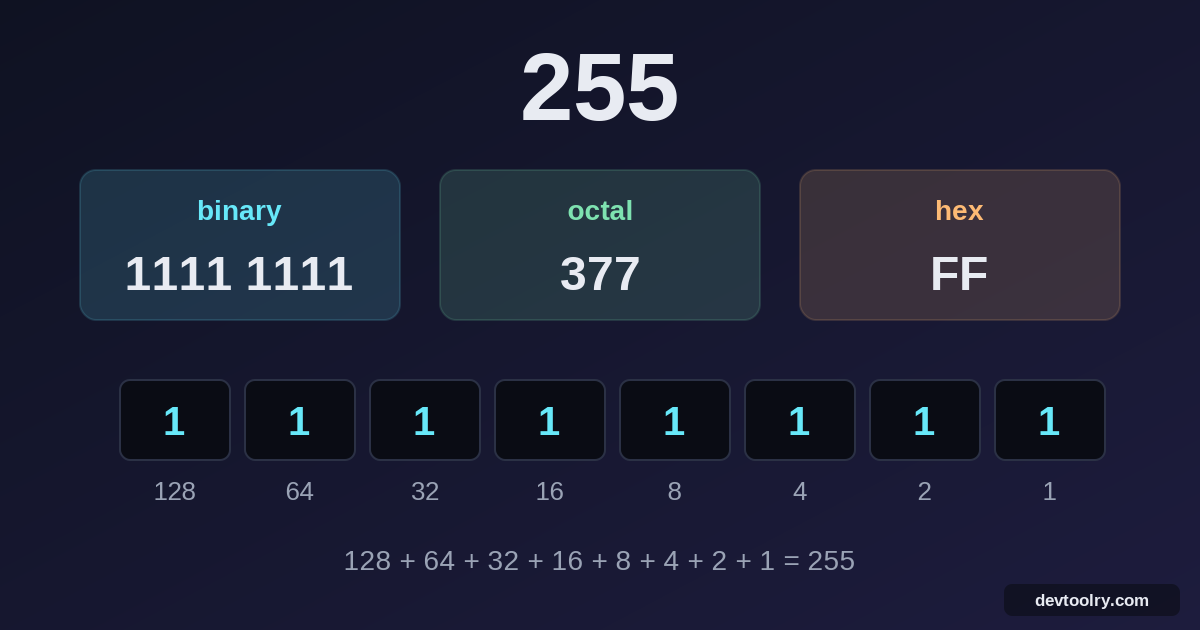
So binary 1011 is 1×8 + 0×4 + 1×2 + 1×1 = 11, and hex FF is 15×16 + 15×1 = 255. In hex, A to F stand for 10 to 15.
Converting by hand
From any base to decimal: multiply each digit by its place value and add. Binary 110010 is 32 + 16 + 2 = 50.
From decimal to any base: divide repeatedly by the base and read the remainders from bottom to top. For 50 in binary:
50 ÷ 2 = 25 remainder 0
25 ÷ 2 = 12 remainder 1
12 ÷ 2 =  6 remainder 0
 6 ÷ 2 =  3 remainder 0
 3 ÷ 2 =  1 remainder 1
 1 ÷ 2 =  0 remainder 1
                       → read upwards: 110010
Between binary and hex (or octal), no arithmetic is needed. Each hex digit is exactly 4 bits, and each octal digit 3 bits, so you just group:
493 in binary:          111101101

groups of 4 (hex):   1 1110 1101
                     1    E    D   → 0x1ED

groups of 3 (octal): 111 101 101
                       7   5   5   → 0o755
That's the reason hex is everywhere in computing: it's a compact, readable way to write bytes. One byte (8 bits) is always exactly two hex digits, 00 to FF. The Number Base Converter shows a number in all these bases at once, plus any base from 2 to 36.
Where each base shows up
Binary: flags and bit masks. Several on/off settings packed into one integer:
const READ = 0b100, WRITE = 0b010, EXEC = 0b001;
const perms = READ | EXEC;        // 0b101 = 5
const canWrite = (perms & WRITE) !== 0; // false
| (OR) sets bits, & (AND) tests them, ^ (XOR) toggles them. 0b0110 & 0b0011 is 0b0010; | gives 0b0111; ^ gives 0b0101.
Octal: Unix permissions. chmod 755 script.sh is three octal digits, one each for owner, group and others, and each digit is the read (4), write (2) and execute (1) bits added together. 7 = rwx, 5 = r-x, so 755 is rwxr-xr-x. Octal survives here because 3 bits per digit fit the three permission bits perfectly.
Hexadecimal: colours, bytes and hashes. The CSS colour #5B5BF0 is three bytes: red 5B (91), green 5B (91), blue F0 (240). The Color Converter translates it to rgb(91, 91, 240) and HSL. Hashes are written in hex too: a SHA-256 digest is 32 bytes, so 64 hex characters, as our hash function comparison shows. So are UUIDs, memory addresses and Unicode code points (U+1F680).
Base 36 and base 64: short IDs. Base 36 uses 0–9 and a–z, so 1234 becomes ya. It's handy for short, case-insensitive IDs. Base64 is related but different: it encodes bytes, not a single number, as explained in Base64 encoding explained.
Converting in code
JavaScript
(255).toString(2);    // "11111111"
(255).toString(16);   // "ff"
(493).toString(8);    // "755"
parseInt('ff', 16);   // 255
parseInt('101', 2);   // 5
0b1010, 0o755, 0xff;  // 10, 493, 255 — literals in source code
(255).toString(2).padStart(16, '0'); // "0000000011111111"
Python
bin(255), oct(493), hex(255)   # ('0b11111111', '0o755', '0xff')
int('ff', 16)                  # 255
int('0b101', 0)                # 5 — base 0 reads the prefix
f'{255:08b}'                   # '11111111' padded to 8 digits
Shell: printf '%x\n' 255 prints ff, and echo $((16#ff)) prints 255 in Bash.
Traps with parseInt
parseInt is more forgiving than you might want:
parseInt('12px');  // 12 — stops at the first invalid character
Number('12px');    // NaN — rejects the whole string
parseInt('1e3');   // 1 — "e" is not a decimal digit
Number('1e3');     // 1000
parseInt('0x1A');  // 26 — the 0x prefix is recognised without a radix
Always pass the radix (parseInt(value, 10)), and use Number() when the whole string must be a number. And never pass parseInt directly to map:
['1', '7', '11'].map(parseInt); // [1, NaN, 3]map calls the function with (value, index), so the index becomes the radix: parseInt('7', 1) is NaN (base 1 doesn't exist) and parseInt('11', 2) is 3. Write .map((s) => parseInt(s, 10)) or .map(Number).
Negative numbers: two's complement
Computers store signed integers in two's complement: the highest bit has a negative place value. In 8 bits, 11111011 is −128 + 64 + 32 + 16 + 8 + 2 + 1 = −5. To negate a number, invert all bits and add one.
JavaScript's toString(2) writes negative numbers with a minus sign (-101), which hides that representation. To see the actual 32-bit pattern, convert to an unsigned value first:
(-5 >>> 0).toString(2);   // "11111111111111111111111111111011"
(-1 >>> 0).toString(16);  // "ffffffff"
(-5 & 0xff).toString(2);  // "11111011" — the low 8 bits
That's why 0xFFFFFFFF often means −1 in C code and debugging output.
Very large numbers and fractions
JavaScript numbers are 64-bit floating point, exact only up to 2⁵³ (9,007,199,254,740,992). Beyond that, conversions silently lose precision: 2**53 + 1 evaluates to 2**53. For large integers, such as 64-bit IDs, hashes as numbers, or cryptography, use BigInt:
BigInt('0xffffffffffffffffff').toString(); // "4722366482869645213695"
9007199254740993n.toString(16);            // "20000000000001"
The Number Base Converter uses BigInt internally, so very large values convert exactly.
Fractions have their own surprise: most decimal fractions have no finite binary representation, just as 1/3 has none in decimal. 0.1 in binary is 0.000110011001100… repeating forever, so it's stored rounded, and 0.1 + 0.2 is 0.30000000000000004. Store money in integer cents (or use a decimal library), and compare floats with a tolerance rather than ===.
Summary
Every base is positional notation with a different number of digits. Convert to decimal by summing digit × place value, from decimal by repeated division, and between binary, octal and hex by grouping bits in threes or fours. Binary is for bit flags, octal for Unix permissions, hex for bytes, colours and hashes. In code, always pass a radix to parseInt, use >>> 0 to see two's-complement bits, and switch to BigInt past 2⁵³.

Written by
Avinash Kori
Founder of Devtoolry
Avinash is a full-stack web developer from Surat, India, with eight years of experience in PHP, Laravel and Angular. He built Devtoolry so developers can solve everyday problems quickly with free tools that run entirely in the browser, and writes practical guides on the formats, encodings and techniques behind them.
Connect on LinkedInTry it yourself
The free tools used in this article. They run in your browser, so nothing you paste is uploaded.
Number Base Converter
Convert numbers online between binary, octal, decimal, hexadecimal and any base from 2 to 36, with BigInt precision for very large values.
Color Converter
Convert colours online between HEX, RGB, HSL and CSS formats with a live preview. Pick a colour or paste a HEX, RGB or HSL value to get every format.