TypeScript Strict Mode Explained: Every Flag and the Bugs It Catches
What "strict": true turns on, the real compiler error for each flag, extra checks worth enabling, and a step-by-step plan for migrating an existing codebase.
 By Avinash KoriPublished 5 min read
On this page
A TypeScript project without "strict": true gives you autocomplete and a feeling of safety, but lets most of the bugs that types are supposed to catch straight through. The program below compiles without a single error in TypeScript's default mode, and contains seven bugs:
function total(items) {
  return items.reduce((sum, item) => sum + item.price, 0);
}

interface User { name: string; email?: string }
function domain(user: User) {
  return user.email.split('@')[1];
}

declare const users: User[];
const first = users.find((u) => u.name === 'Ada');
console.log(first.name);

class Counter {
  count: number;
  label: string;
  constructor() { this.count = 0; }
}

try { JSON.parse('{'); } catch (err) { console.log(err.message); }
With "strict": true, the compiler flags every one of them. This guide goes through the flags that strict enables, shows the real error each produces (from TypeScript 5.9), and explains how to adopt strict mode in an existing codebase.
What "strict": true enables
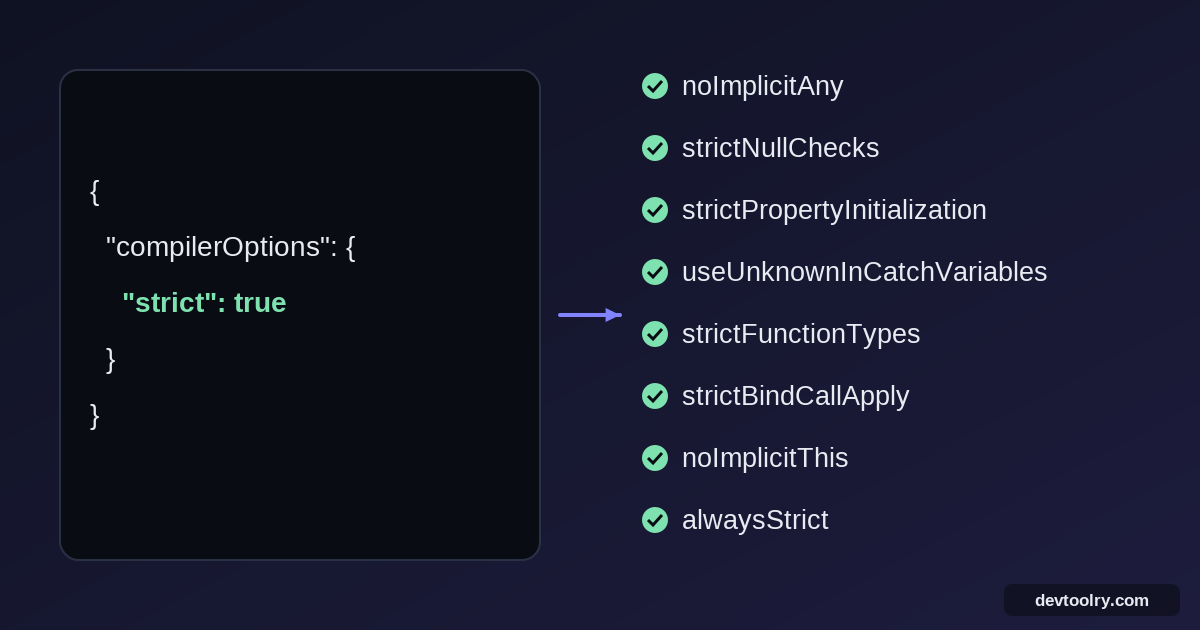
strict is a shorthand that switches on a family of checks. New checks are added to the family over time, which is why the TypeScript team recommends it rather than listing flags individually:
| Flag | Catches |
|---|---|
noImplicitAny | Values whose type silently becomes any |
strictNullChecks | Using a value that might be null or undefined |
strictPropertyInitialization | Class properties that are never assigned |
useUnknownInCatchVariables | Treating caught errors as any |
strictFunctionTypes | Unsafe function assignments |
strictBindCallApply | Wrong arguments to bind, call and apply |
noImplicitThis | this with an unknown type |
alwaysStrict | Emits "use strict" and parses in strict mode |
strictBuiltinIteratorReturn | Treating built-in iterator return values as any |
You can paste any example below into the TypeScript Compiler, which type-checks in strict mode before running your code.
noImplicitAny: no silent any
function total(items) { … }
// error TS7006: Parameter 'items' implicitly has an 'any' type.
Without this flag, an unannotated parameter is any, and any switches type checking off for everything it touches: items.reduce, item.price, the return value. A typo like item.prcie would compile. Annotate the parameter and the whole function is checked:
function total(items: { price: number }[]): number {
  return items.reduce((sum, item) => sum + item.price, 0);
}
strictNullChecks: the most valuable flag
Without strictNullChecks, null and undefined are allowed everywhere, and the compiler never warns you about them. With it, they're separate types you must handle:
return user.email.split('@')[1];
// error TS18048: 'user.email' is possibly 'undefined'.

const first = users.find((u) => u.name === 'Ada');
console.log(first.name);
// error TS18048: 'first' is possibly 'undefined'.
email is optional, and find returns undefined when nothing matches. Both errors are real runtime crashes waiting to happen ("Cannot read properties of undefined"). The fixes make the missing case explicit:
function domain(user: User): string | undefined {
  return user.email?.split('@')[1];
}

const first = users.find((u) => u.name === 'Ada');
if (first) console.log(first.name);
TypeScript narrows the type after a check: inside the if, first is a User, not User | undefined. Optional chaining (?.) and nullish coalescing (??) make most of these fixes one-liners. This flag is also what makes types generated from API data trustworthy, as our guide to generating TypeScript types from JSON shows.
strictPropertyInitialization
class Counter {
  count: number;
  label: string;
  constructor() { this.count = 0; }
}
// error TS2564: Property 'label' has no initializer and is not definitely assigned in the constructor.
The class promises that label is a string, but it's actually undefined until someone sets it. Initialise it (label = ''), assign it in the constructor, or declare it honestly as label?: string. If a framework assigns it later (some dependency-injection and ORM libraries do), use the definite-assignment assertion label!: string and add a comment saying who sets it.
useUnknownInCatchVariables
try { JSON.parse('{'); } catch (err) { console.log(err.message); }
// error TS18046: 'err' is of type 'unknown'.
JavaScript can throw anything: an Error, a string, undefined. Typing caught values as unknown forces you to check before using them:
catch (err) {
  const message = err instanceof Error ? err.message : String(err);
  console.log(message);
}
strictFunctionTypes
This one catches a subtle bug in callbacks:
type Handler = (event: MouseEvent | KeyboardEvent) => void;
const onKey = (event: KeyboardEvent) => console.log(event.key);
const handler: Handler = onKey;
// error TS2322: Type '(event: KeyboardEvent) => void' is not assignable to type 'Handler'.
//   Types of parameters 'event' and 'event' are incompatible.
//     Type 'MouseEvent | KeyboardEvent' is not assignable to type 'KeyboardEvent'.
//       Type 'MouseEvent' is missing the following properties from type 'KeyboardEvent': charCode, code, isComposing, key, and 8 more.
Handler may be called with a MouseEvent, and onKey would then read event.key from a mouse event, getting undefined. Without the flag, TypeScript checks function parameters in both directions ("bivariantly") and allows it. With it, parameters must accept at least everything the caller might pass.
noImplicitThis and strictBindCallApply
function legacy() { return this; }
// error TS2683: 'this' implicitly has type 'any' because it does not have a type annotation.
Declare this explicitly (function legacy(this: Window)), or better, use a method or an arrow function. strictBindCallApply makes fn.call(obj, a, b) check a and b against fn's parameters, which it otherwise doesn't.
Checks worth adding beyond strict
Some useful checks aren't part of strict, usually because they're noisier. Consider these for new projects:
noUncheckedIndexedAccess treats every index lookup as possibly missing:
const scores: Record<string, number> = { ada: 10 };
const s: number = scores['grace'];
// error TS2322: Type 'number | undefined' is not assignable to type 'number'.

const arr = [1, 2, 3];
const x: number = arr[10];
// error TS2322: Type 'number | undefined' is not assignable to type 'number'.
Both lines compile under plain strict, and both values are undefined at runtime. The flag adds some friction to array loops, but catches real out-of-bounds bugs.
exactOptionalPropertyTypes distinguishes "missing" from "explicitly undefined" for optional properties. noImplicitOverride requires the override keyword on overridden methods, so renaming a base method can't silently orphan an override. noFallthroughCasesInSwitch catches a forgotten break.
A solid starting tsconfig.json for a new project:
{
  "compilerOptions": {
    "strict": true,
    "noUncheckedIndexedAccess": true,
    "noImplicitOverride": true,
    "noFallthroughCasesInSwitch": true,
    "target": "es2022",
    "module": "esnext",
    "moduleResolution": "bundler",
    "skipLibCheck": true
  }
}
Migrating an existing codebase
Turning on strict in a large project can produce thousands of errors. Don't let that stop you; do it in stages:
- Enable flags one at a time, in order of value and ease:
noImplicitAnyfirst (fixes are mostly annotations), thenstrictNullChecks(the big one), then the rest. Set"strict": trueat the end. - Fix by directory, starting with leaf modules that others depend on: utilities, API clients, data models. Fixing them improves the types everywhere they're used.
- Stop the bleeding. Make CI fail on new errors while old ones are being fixed. Tools like
typescript-strict-pluginlet you mark files as strict one by one, so new and converted files stay strict. - Prefer real fixes over escape hatches.
!(non-null assertion),ascasts and// @ts-expect-errorsilence the compiler without making the code safer. Each one should have a comment explaining why it's safe. - Validate at the boundaries. Strict types are only as true as the data entering your program. Validate API responses and user input at runtime (with a schema library such as Zod) instead of casting them.
Keep formatting changes out of these commits; reviewers should see only type fixes. If you need consistent formatting first, our guide to setting up Prettier covers it, and the TypeScript Formatter is handy for one-off files.
Summary
"strict": true enables the checks that make TypeScript worth using: no silent any, explicit null and undefined handling, initialised class properties, unknown in catch, and sound function types. Add noUncheckedIndexedAccess for index safety in new projects, migrate older code flag by flag and directory by directory, and avoid escape hatches that turn errors off without fixing them.

Written by
Avinash Kori
Founder of Devtoolry
Avinash is a full-stack web developer from Surat, India, with eight years of experience in PHP, Laravel and Angular. He built Devtoolry so developers can solve everyday problems quickly with free tools that run entirely in the browser, and writes practical guides on the formats, encodings and techniques behind them.
Connect on LinkedInTry it yourself
The free tools used in this article. They run in your browser, so nothing you paste is uploaded.
TypeScript Compiler
Compile and run TypeScript online. Your code is type-checked with the official compiler in strict mode, then runs in a sandboxed worker in your browser.
JSON to TypeScript
Generate TypeScript interfaces from JSON online, including nested objects and arrays. Paste an API response and copy ready-to-use types into your code.
TypeScript Formatter
Format and beautify TypeScript and TSX online with Prettier, including types, generics and decorators. Choose indentation, quotes and semicolons.